











A common challenge for any application scaling globally: delivering content quickly and reliably is a critical requirement. Meantime, factors like high latency, server overload, and inefficient content delivery typically negatively impact user experience and infrastructure costs. To address this, organizations often rely on Content Delivery Networks.
In this guide, we’ll explore Google Cloud CDN from both operational and financial perspectives: covering how it works, its core capabilities, common use cases, pricing mechanics, typical cost drivers, practical strategies for optimizing Cloud CDN deployments, and more. So, let’s dive in.
Key Highlights
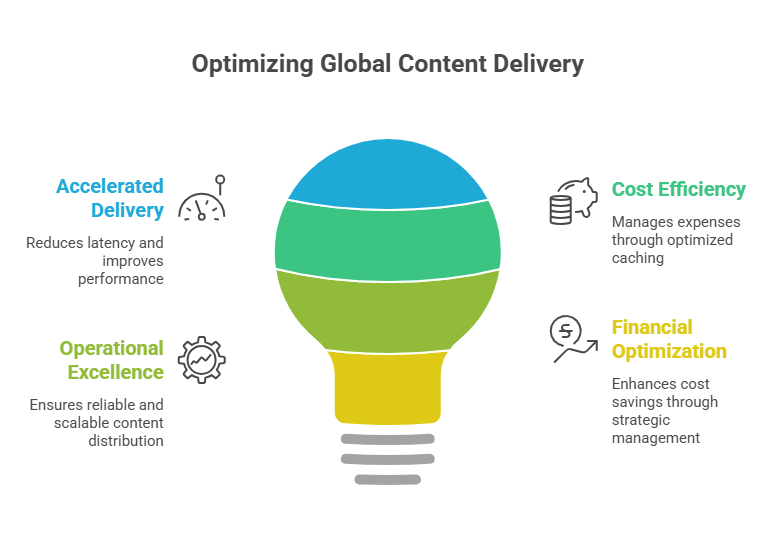
> Google Cloud CDN accelerates global content delivery. It caches static and dynamic content across Google’s global edge network, thus reducing latency and improving application performance.
> Network egress and cache efficiency drive costs. In particular, traffic volume, geographic distribution, and cache hit ratio significantly influence total CDN spending.
> Financial optimization strengthens cost efficiency. Platforms like Spendbase help organizations reduce cloud infrastructure spending through vendor discounts, credits (up to $200,000 of Google Cloud Platform usage), and FinOps guidance.
See how much you can save on your stack
Pick your team’s tools!
Click to select one or more tools.


What’s your company size?
Just click to select.
What’s your business email?
We'll send you calculations right away
The email is flying to your inbox!
Beyond discounts, you may qualify for up to $100K in AWS credits.

What Is Google Cloud CDN
Shortly put, Google Cloud CDN is a service that caches content at the edge to improve speed and reduce backend load.
In its essence, Google Cloud CDN is a global content delivery network that (unlike traditional content delivery) caches application content at Google’s edge locations to reduce latency and accelerate delivery to end users.
| Traditional Content Delivery | Google Cloud CDN |
| Requests served from origin servers | Content cached at edge locations |
| Higher latency for global users | Reduced latency via global edge network |
| Origin servers handle all traffic | Cached requests offloaded from origin |
| Manual scaling required | Edge network handles traffic spikes |
| Infrastructure bottlenecks possible | Distributed content delivery |
Instead of serving every request from origin infrastructure, GCP Cloud CDN stores cached content at Google’s global edge network. This way, when users request content, it is served from the nearest edge location whenever possible, with cache misses forwarded through the HTTP(S) load balancer to the origin (see this flow illustrated below).
From our perspective, GCP Cloud CDN is defined by the following:
> Deep native integration
Google Cloud CDN is tightly integrated with core GCP services. This allows you to enable caching directly within your existing infrastructure without introducing additional layers or third-party tools.
> Global edge network
Another vital benefit, content is distributed and cached across Google’s global edge locations, which ensures low-latency delivery by serving users from the nearest possible point.
> Powered by Google’s private backbone
Traffic between edge locations and origin infrastructure travels over Google’s private network. As a result, there’s more consistent performance and reduced reliance on the public internet.
> Automatic scalability
What stands out (from our perspective) is that rhe platform automatically scales to handle traffic spikes. This way, it eliminates the need for manual capacity planning or infrastructure adjustments.
> Reduced backend load and costs
Beyond all the above-mentioned benefits, GCP Cloud CDN minimizes repeated origin requests – by caching frequently requested content at the edge. This means significant reductions in backend load, bandwidth usage, overall infrastructure costs, you name it.
Besides, Google Cloud CDN stands out not just as a content delivery layer, but as a fully integrated extension of Google Cloud infrastructure (integrated directly with numerous other solutions: HTTP(S) Load Balancing, Cloud Storage, Compute Engine, Google Kubernetes Engine, Cloud Run, etc).
Key Capabilities of Google Cloud CDN
Global Content Acceleration
This aspect of GCP Cloud CDN is a game-changer for many organizations: just imagine your content doesn’t live in just one place anymore and is already closer to your users before they even ask for it. Here’s how exactly it makes a difference.
In a traditional scenario, every request would travel across multiple networks to reach a centralized origin server. With GCP Cloud CDN, in turn, user requests are routed to the nearest edge node, where the content is already available. This is where it delivers real results:
- Shortens round-trip time;
- Avoids congested long-haul routes;
- Delivers responses much faster (especially for users far from the origin).
In the table below, you can see realistic, real-world performance estimates – based on our observations and real-life testing.
Practical Impact of GCP Cloud CDN’s Global Content Acceleration | ||
| Metric | Without CDN (Origin-Based) | With Cloud CDN (Edge-Based) |
| Average latency (global) | 150–400 ms | 20–80 ms |
| Time to First Byte (TTFB) | High variability | Consistent, low |
| Page load time | Slower for distant users | Faster globally |
| Origin request rate | 100% of traffic | 10–40% (depending on cache hit ratio) |
From our perspective, this matters most for cases of global SaaS platforms (due to fast dashboards support workflows and retention), high-traffic marketing sites (since speed impacts conversions and bounce rates), geographically distributed applications (consistent low latency across regions), and more.
Dynamic Content Acceleration
Here’s another big benefit: even when responses cannot be cached, Cloud CDN optimizes how requests travel between users and origin infrastructure. From our experience, this makes a noticeable difference in applications where real-time interactions, frequent API calls, or personalized content are critical to the user experience.
Key optimizations in this domain include:
- TCP optimization – reduces handshake overhead, enabling faster connection setup;
- Connection reuse – keeps sessions open across requests, lowering latency per request;
- Smart routing – leverages optimized Google backbone paths to reduce network congestion;
- Anycast routing – directs users to the nearest edge location, minimizing round-trip time.
Large-Scale Traffic Handling
GCP Cloud CDN acts as a distributed load distribution and buffering layer, which becomes especially critical during unpredictable or sudden traffic spikes. To illustrate this, see a detailed comparison in the table below.
| Traffic Behavior Comparison | ||
| Without CDN | With GCP Cloud CDN | |
| Traffic spike (e.g. x10) | High risk of origin overload | Majority of traffic absorbed at edge |
| Scaling requirement | Manual or reactive auto-scaling | Minimal origin scaling needed |
| Failure risk | High under sudden load | Significantly reduced |
| Response degradation | Likely (timeouts, errors) | Stable and consistent performance |
Delving in, here’s what’s happening under the hood:
> Only cache misses and dynamic requests reach the origin;
> Traffic is geographically distributed instead of being centralized;
> Repeated requests (e.g., popular pages, assets) are served directly from edge caches.
Thanks to this, in real-world architectures, GCP Cloud CDN allows systems to handle significant traffic spikes (from our experience, 10x or more) without proportionally scaling backend infrastructure. See how this would look in a real-life scenario below – based on our hands-on observations.
Traffic Behavior Comparison: Real-Life Example | ||
| Without CDN | With GCP Cloud CDN | |
| Origin CPU usage | 80–100% spikes | 35–50% stable |
| Infrastructure cost | High (overprovisioning) | Optimized |
| Error rate under peak | Noticeable | Near zero |
| Time to recover from spike | Slow (minutes+) | Immediate |
Security Integration
Cloud CDN plays a critical role in strengthening application security by acting as a protective layer at the edge – filtering, inspecting, and controlling traffic before it ever reaches your origin infrastructure.
Most importantly, Cloud CDN integrates with Google Cloud’s security services, including:
- Google Cloud Armor (DDoS protection)
- SSL/TLS encryption
- Identity-aware access controls
- Bot mitigation
So, here’s how it works in practice. When a request is made to your application, GCP Cloud CDN intercepts it at the nearest edge location. Before forwarding anything to the origin:
> Traffic is evaluated against Cloud Armor security policies (e.g., IP reputation, geo-blocking, WAF rules, etc.);
> Suspicious or malicious requests are blocked instantly at the edge (never reaching your backend);
> Legitimate traffic is securely processed and cached where possible with minimized origin exposure;
> Encrypted connections are handled at the edge, which reduces compute overhead on your infrastructure.
Media and Video Delivery
From our observations, GCP Cloud CDN is particularly effective for bandwidth-intensive workloads where the same large assets (videos, images, downloads) are requested repeatedly by users across different regions. By caching these assets at edge locations, it minimizes long-distance data transfer and significantly reduces pressure on origin infrastructure.
The table below illustrates this impact – from improved media delivery to accelerated asset delivery and beyond. For more details, see the best practices for media workloads.
| GCP Cloud CDN for Media and Video Delivery: Performance & Cost Impact | ||
| Without CDN | With GCP Cloud CDN | |
| Video start time | Higher | Reduced |
| Buffering frequency | More frequent | Significantly lower |
| Origin bandwidth usage | 100% | Reduced by 60–90% |
| Asset delivery speed | Slower | Faster (edge-cached) |
Top Use Cases for Google Cloud CDN
Overall, Google Cloud CDN has proven to be the most effective for workloads where performance and scalability matter. In real-life scenarios, it plays a key role in handling global traffic quickly and reducing origin load. To examine it in detail, let’s review several cases below.
✅ Case #1: Global Web Applications
Assessment Highlights | |
| Low-latency delivery | Content served from nearest edge location |
| Scalability | Absorbs traffic spikes without origin hit |
| Performance | Reduced TTFB and faster page rendering |
| Infrastructure impact | Offloads static content from origin |
| Key consideration | Cache policy optimization |
From what we’ve seen in production environments, this is the most common and high-impact use case for Google Cloud CDN. Here’s why: for applications with users across multiple regions, performance drops without edge delivery as distance from the origin increases. This puts more strain on infrastructure – an area where GCP Cloud CDN makes a difference.
Our key observations from this use case testing were the following:
> The most noticeable improvement (from our testing across globally distributed user scenarios) came from Time to First Byte reduction. This was driven by Google Cloud CDN serving content from edge locations closer to users.
> In some cases, TTFB dropped by 40–70% (depending on the distance from the origin).
> Versioned static assets allowed content to be cached for longer periods without the risk of serving outdated data, as new versions automatically triggered fresh delivery.
> Another proven benefit was selective bypass for dynamic endpoints, which ensured that frequently changing or user-specific data was always fetched from the origin – thus preventing incorrect or stale responses.
> On the consideration side, overly conservative caching led to unnecessary origin requests.
> What we’ve also seen: when content is cached for long durations without proper invalidation or versioning, users may receive outdated data, especially for frequently updated content.
✅ Case #2: Media Streaming Platforms
Another case we reviewed is media-heavy applications (like video streaming and content-rich platforms – news websites, large e-learning portals, etc.). Because they generate high volumes of repeated requests for the same assets, they are potentially ideal for edge caching. Let’s review how it worked out in practice.
Assessment Highlights | |
| Large media delivery | Efficient edge distribution of heavy files |
| Performance | High throughput from edge nodes |
| Reliability | Multi-edge redundancy |
| Scalability | Handles concurrent high-volume delivery |
| Key consideration | Storage and egress costs |
Our key findings for this case included:
> Cache hit ratio directly influenced cost efficiency. Specifically, low hit rates significantly increased egress costs;
> Cold cache scenarios (new content releases) created temporary origin pressure spikes;
> Pre-warming content (for expected high-traffic releases) allowed for significantly reducing initial latency spikes;
> Segment-based delivery (e.g., video chunking) helped us improve overall caching efficiency.
Our verdict is clear: media-heavy applications prove to be highly suitable use case for Cloud CDN. Their traffic patterns are naturally cacheable, with large volumes of repeated requests that can be efficiently served from edge locations. In our testing, this translated into stable performance under load, reduced pressure on origin infrastructure, and consistent delivery even during traffic spikes.
✅ Case #3: API Acceleration
Another case we reviewed is API-driven applications, particularly those serving global users with latency-sensitive endpoints. Because APIs often power core product functionality, even small delays can impact user experience – hence, having a big potential for edge optimization.
Assessment Highlights | |
| API latency | Reduced response time via edge caching |
| Integration | Works with load balancers and backends |
| Performance | Improved response times globally |
| Security | Supports auth layers and filtering |
| Key consideration | Cacheability of responses |
Here’s what stood out for us in this scenario:
> Out of all mentioned cases, API acceleration proved to be the most nuanced use case – benefits varied significantly depending on endpoint design and cacheability;
> Caching worked well for GET endpoints with predictable responses and public or semi-static data (e.g., configs, catalogs);
> Note that even small misconfigurations can lead to inconsistencies when it comes to areas like personalized responses, frequently changing data, authenticated requests, you name it;
> Based on results from testing, latency improvements of 30–60% were observed for cacheable endpoints;
> We also observed the backend load was significantly reduced, especially during peak API usage;
> Misconfigured caching introduced risks of serving stale or inconsistent data;
> During this use case testing, short TTL caching and validation strategies (ETags, cache-control headers, etc.) were key to balancing performance and data accuracy.
Free virtual cards for non-EU residents
Open in 1 working day, issue 100 virtual cards, and get up to 1.25% cashback.
Get a free account
When Google Cloud CDN May Not Be the Best Fit: Must-Consider Scenarios
From our experience, it’s important to note that while Google Cloud CDN has proven itself effective, there are cases where it may not be the best fit. See them below.
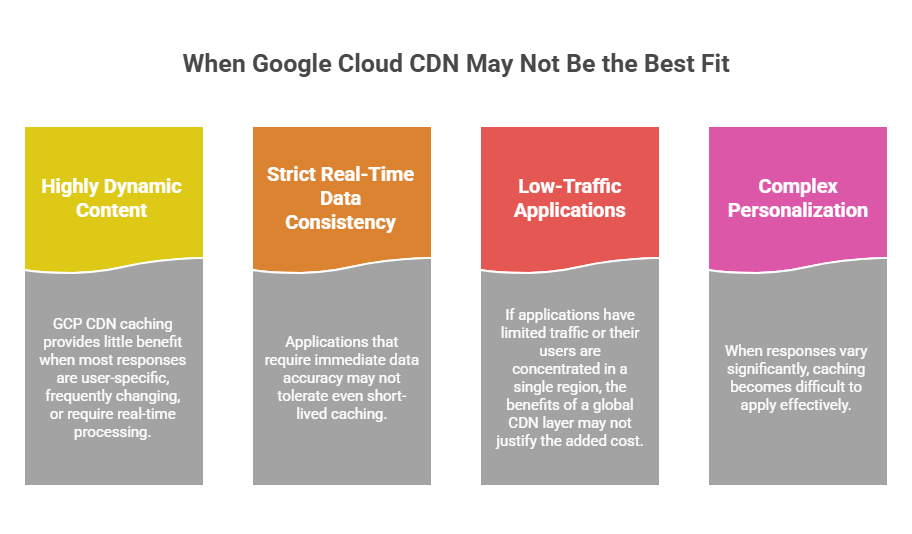
❌ Highly dynamic or non-cacheable content
Based on our observations, GCP CDN caching provides little benefit when most responses are user-specific, frequently changing, or require real-time processing. In such cases, requests are consistently forwarded to the origin, which adds complexity without meaningful performance gains.
In scenarios like this, direct backend optimization or API-focused architectures can be more effective.
❌ Strict real-time data consistency requirements
Besides, applications that require immediate data accuracy (for example, financial transactions, live dashboards, real-time state updates, etc.) may not tolerate even short-lived caching. Without carefully designed cache invalidation or bypass strategies, there is a risk of serving outdated data.
This way, it’s often preferable to rely on direct origin responses or controlled caching mechanisms at the application level.
❌ Low-traffic or regionally concentrated applications
If applications have limited traffic or their users are concentrated in a single region, the benefits of a global CDN layer may not justify the added cost and configuration overhead. From what we’ve seen, performance improvements in such cases are often minimal, too.
Due to this, a simpler architecture with optimized backend services can be more efficient and easier to manage.
❌ Complex personalization and authentication flows
When responses vary significantly (based on either user identity, session data, or any other factors), caching becomes difficult to apply effectively. Thus, misconfigured caching in these scenarios can lead to data leakage or incorrect responses.
In these cases, it’s better for teams to rely on backend-driven optimization strategies, not edge caching.
How It Works: Cloud CDN Architecture Overview
A Cloud CDN deployment consists of several coordinated components, with each component playing a specific role in the delivery pipeline. Explore them below.
1. Global Edge Network
Google Cloud CDN operates on top of Google’s globally distributed edge infrastructure, made up of Points of Presence (PoPs) located close to end users.
In practice, this layer is responsible for:
- Serving cached content with minimal network hops;
- Absorbing large volumes of traffic at scale;
- Providing redundancy across multiple geographic locations.
As a result, you get faster response times, improved availability, and reduced dependency on centralized infrastructure.
2. HTTP(S) Load Balancer Integration
Cloud CDN is tightly integrated with Google Cloud’s global HTTP(S) Load Balancer, which acts as the central entry point for all incoming requests.
Every request first passes through the load balancer, which performs the following actions:
- Determining the closest or most appropriate edge location;
- Handling SSL/TLS termination to offload encryption overhead;
- Routing requests to backend services in case of cache miss;
- Enforcing caching rules and policies.
3. Cache Storage at the Edge
Once a request reaches the edge, GCP Cloud CDN evaluates whether the requested content is already stored in cache. Depending on this, the following happens:
- If the content is cached (cache hit), it is served immediately from the edge – resulting in the lowest possible latency;
- If the content is not cached (cache miss), the request is forwarded to the origin (e.g., Compute Engine, Cloud Storage, or other backends). The response is then returned to the user and optionally stored at the edge for future requests.
4. Cache Invalidation and Refresh
Here’s another highly useful aspect of GCP Cloud CDN: since cached content can become outdated, it provides robust mechanisms to control when and how content is refreshed. In particular:
- Path-based invalidation allows you to remove specific files or URL patterns (e.g., /images/*) from the cache without affecting the entire distribution
- Full cache invalidation enables clearing all cached content, typically used during major updates or releases
- On-demand invalidation via API supports automated cache management as part of CI/CD pipelines
- Cache expiration (TTL-based refresh) ensures content is automatically refreshed after a defined time without manual intervention
- Versioned assets strategy allows updates without invalidation by serving new content under unique URLs (e.g., app.v2.js)
- Revalidation mechanisms (e.g., ETag, Last-Modified) enable the CDN to check with the origin whether cached content is still valid before serving it
5. Cache Control and Policies
Caching behavior in Cloud CDN is primarily governed by HTTP headers and configurable CDN policies – together, they define how content is stored and reused. See the key control areas in the table below.
| GCP Cloud CDN: Key Cache Control Areas and Their Impact | |||
| Control Area | What It Defines | Mechanisms / Controls | Extra Notes |
Cache duration (TTL) | How long content is cached | – Cache-Control – s-maxage – default/max TTL | Higher TTL improves hit rate and reduces origin load, but increases staleness risk |
| Cache eligibility | Which responses are cacheable | – HTTP methods – Status codes – Public / private headers | Misconfig reduces caching or may expose sensitive data |
| Cache key configuration | How cache entries are identified | – Headers – Cookies – Query parameters | Too many variations fragment cache and lower hit rate |
| Cache bypass rules | When requests skip cache | – no-store – Auth headers – Path rules | Ensures correctness, but raises latency and origin traffic |
| Revalidation strategy | How freshness is validated | – ETag – Last-Modified – Conditional requests | Reduces data transfer while keeping content up to date |
GCP Cloud CDN Pricing Overview
Google Cloud CDN pricing is usage-based. In the meantime, there’s a common misconception that costs are vastly driven by how much traffic you have. In contrast, based on real-world deployments, it’s more about how efficiently traffic is served from cache vs. origin. Let’s review how
At a high level, you are paying for four main components:
- Cache egress traffic (edge → users) – costs increase with total data delivered to users and vary by geographic region; this is typically the dominant portion of the bill;
- Cache fill traffic (origin → CDN) – expenses rise with lower cache hit ratios, as more data must be fetched from the origin (often at higher egress rates);
- HTTP(S) Load Balancer usage – pricing scales with the number of requests (which means architectures with many small asset requests can significantly increase costs);
- Cache invalidation operations – costs grow with the number and frequency of invalidation requests; excessive invalidations can also indirectly increase costs by reducing cache efficiency.
| GCP Cloud CDN Pricing Breakdown | ||
| Pricing Component | Behavior | Typical Cost |
| Cache egress | Data served from edge | $0.02–$0.20 per GB |
| Cache fill | Data retrieved from origin | $0.01–$0.04 per GB |
| HTTP(S) load balancer | Requests processed (cache lookup + delivery) | $0.0075 per 10K requests |
| Cache invalidation | API-based invalidations | First 1000 free |
To better understand how Cloud CDN costs accumulate in practice, consider a typical mid-scale production workload – for example, a media platform, SaaS product, or content-heavy web application serving a global audience.
This example (as illustrated in the table below) assumes these aspects:
- A well-optimized CDN setup with a high cache hit ratio (approx. 80–90%);
- Traffic distributed across multiple regions (North America, Europe, APAC);
- A mix of static assets (images, JS, CSS) and moderate media delivery;
- Minimal cache invalidation due to versioned deployments.
| GCP Cloud CDN Pricing: Monthly Cost Scenario Example | ||
| Pricing Area | Scenario | Estimated Cost |
| Edge traffic | 12 TB global traffic | $900 |
| Cache fill traffic | 2 TB | $180 |
| Load balancer requests | 120 million requests | $75 |
| Cache invalidation | Minimal usage | $5 |
| Total | $1,160 / month | |
What Drives GCP Cloud CDN Costs
With the pricing components outlined above, it is equally important to understand how Cloud CDN costs typically scale in real-world deployments. In practice:
- Traffic volume is the primary cost driver, as most charges come from data delivered from edge locations to end users;
- Geographic distribution directly impacts pricing, since delivering content to users in higher-cost regions (e.g., APAC, South America) increases per-GB egress rates;
- Cache hit ratio plays a critical role, as low cache efficiency leads to more origin fetches (cache fill), increasing both egress costs and backend load;
- Request frequency contributes to overall spend through HTTP(S) load balancer charges, especially in high-traffic, API-heavy applications;
- Cache invalidation frequency can introduce additional costs when content is frequently purged instead of versioned, increasing API usage and reducing cache efficiency;
- Content type and cacheability influence cost behavior, as dynamic or personalized content reduces caching effectiveness and drives more origin traffic;
- Traffic patterns (spikes vs steady load) can impact both cost predictability and cache performance, especially during cold cache scenarios.
In most cases, improving cache efficiency has the most significant impact on reducing total Cloud CDN costs. See more strategies and best practices below.
Typical Cost Escalation Scenarios of GCP Cloud CDN | ||
| Cost Driver | Impact | Mitigation Strategy |
| Low cache hit ratio | More origin requests | → Set proper Cache-Control (s-maxage, public) → Use versioned assets (e.g., app.v2.js) → Clean cache keys (avoid extra query params) → Enable negative caching (404/500) |
| Large media delivery | High bandwidth costs | →Use adaptive bitrate streaming (HLS/DASH) → Compress video (H.264/H.265) → Enable Brotli/Gzip for supported assets → Offload media to optimized storage (Cloud Storage + CDN) |
| Frequent cache invalidations | Increased operations | → Replace invalidations with asset versioning → Batch invalidation requests → Avoid wildcard (/*) invalidations → Automate deployment pipelines with cache-aware strategies |
| Global traffic spikes | Egress cost increases | → Pre-warm cache for critical assets → Use multi-region origins strategically → Enable autoscaling on origin infrastructure → Cache aggressively for static/global assets |
| Poor asset optimization | Higher traffic volume | → Minify JS/CSS/HTML → Convert images to WebP/AVIF → Lazy-load non-critical assets → Remove unused code (tree shaking) |
Cloud CDN Cost Optimization Best Practices
Cost efficiency with Cloud CDN requires both technical tuning and operational discipline. To optimize CDN spending, consider these quick-win strategies:
- Improve cache hit ratio – analyze cache performance metrics, identify frequently missed objects, adjust cache-control headers, eliminate unnecessary cache key variations, and ensure static assets are consistently cached across regions;
- Compress static assets – enable gzip or Brotli compression, reduce payload sizes for HTML, CSS, and JavaScript, and minimize bandwidth usage while improving load times;
- Use long cache TTLs – configure longer expiration times for static and versioned assets, reduce repeated origin fetches, and stabilize cache efficiency across high-traffic workloads;
- Optimize image sizes – resize and compress images before delivery, adopt modern formats (e.g., WebP), and reduce unnecessary data transfer for media-heavy applications.
| Quick Wins for GCP Cloud CDN Cost Optimization | |||
| Strategy | Effort | Savings | Impact Speed |
| Stop idle notebooks | Low | High | Immediate |
| Use Spot training instances | Low | High | Fast |
| Switch to serverless inference | Low | Medium | Immediate |
| Right-size training clusters | Low | Medium | Fast |
Meantime, for more in-depth optimization, consider the following action steps:
- Cache key optimization – refine cache keys by removing unnecessary headers, cookies, or query parameters, standardize request patterns, and ensure similar requests map to the same cached object to maximize cache reuse;
- Origin load reduction – identify high-frequency origin calls, cache semi-static or repeatable responses, offload traffic from backend services, and reduce compute and egress costs at the source;
- Regional traffic optimization – analyze user distribution and traffic patterns, align origin placement with high-demand regions, minimize cross-region data transfer, and balance performance with cost efficiency;
- Edge caching policies – implement advanced caching rules for dynamic or semi-static content, define TTLs based on content type, and leverage conditional caching (e.g., headers, status codes) to improve cache effectiveness without compromising data freshness.
| Advanced Optimization Strategies for GCP Cloud CDN | |||
| Strategy | Effort | Savings | Impact Speed |
| Cache key optimization | Medium | High | Medium |
| Origin load reduction | Medium | High | Medium |
| Regional traffic optimization | Medium | Medium | Medium |
| Edge caching policies | Medium | High | Medium |
To learn more about best practices for cost optimization in Google Cloud, check the official documentation.
Getting Started With Google Cloud CDN
Setting up Cloud CDN requires careful architectural planning, as it operates tightly coupled with Google Cloud Load Balancing and backend services. Most important to understand, GCP Cloud CDN sits at the edge layer and depends on properly configured origins and caching policies to deliver both performance and cost efficiency.
For more guidance and details on setup and customization, check out the official GCP Cloud documentation.
Step 1. Configure Load Balancing
First, you must define backend services, including:
- Cloud Storage buckets (for static content delivery);
- Compute Engine instances (for custom application backends);
- GKE/Kubernetes services via Ingress.
Remember: when configuring this layer, it is important to select the appropriate backend type based on whether the workload is static or dynamic, ensure that backend services are securely accessible, and configure health checks to maintain high availability and failover readiness.
Step 2. Enable CDN Caching
Once the load balancer is in place, Cloud CDN must be enabled on the selected backend services. This is where caching behavior is defined at a high level.
At this stage, you need to configure:
- Cacheable content, specifying which responses should be stored at the edge;
- Cache duration (TTL), defining how long content remains cached;
- Cache keys, in particular – how cached objects are uniquely identified.
Plus, note that this step directly impacts cache efficiency. Therefore, poor configuration can lead to low cache hit rates (meaning, more requests reach the origin). However, if you set well-defined caching rules, GCP Cloud CDN can serve the majority of traffic from edge locations and significantly improve performance (+ reduce backend load).
Step 3: Configure Cache Control
Next, set HTTP headers to control caching behavior. In particular:
- Cache-Control (e.g., public, max-age, s-maxage) – this one defines whether content is cacheable and for how long, with s-maxage specifically targeting CDN behavior;
- ETag and Last-Modified – enabling conditional requests, allowing the CDN to validate cached content with the origin without fully re-downloading it;
- no-store or private – to prevent caching for sensitive, user-specific, or dynamic data
This step is particularly important. When configured correctly, they maximize cache usage and reduce origin load. Misconfigure it – and you’ll either limit caching benefits or lead to stale content.
Step 4: Monitor Performance
After deployment, GCP Cloud CDN needs to be continuously monitored – to keep track it delivers the expected performance and cost benefits.
Use Google Cloud Monitoring to track key metrics:
- Cache hit ratio (primary indicator of efficiency);
- Latency and Time to First Byte (TTFB);
- Backend request rates and error rates;
- Traffic distribution across regions.
Step-by-Step GCP Cloud CDN Setup & Optimization Checklist |
| 1. Define delivery and traffic requirements |
| ✅ Identify content types (static, dynamic, media, APIs) ✅ Estimate traffic volume and peak patterns ✅ Analyze geographic user distribution ✅ Define latency and performance expectations |
| 2. Configure origin infrastructure |
| ✅ Set up backend services (Cloud Storage, Compute Engine, or GKE) ✅ Place origin resources in optimal regions ✅ Enable secure access (IAM, private backends if needed) ✅ Validate origin response headers (Cache-Control, ETag, etc.) |
| 3. Enable Cloud CDN |
| ✅ Configure HTTP(S) Load Balancer ✅ Enable Cloud CDN on backend services ✅ Verify CDN edge caching is active ✅ Test content delivery via edge locations |
| 4. Define caching strategy |
| ✅ Configure Cache-Control headers properly ✅ Set TTLs for static vs dynamic content ✅ Avoid caching sensitive or user-specific data ✅ Use versioned assets to minimize invalidations ✅ Define cache modes (cache all, cache static, custom rules) |
| 5. Optimize cache keys |
| ✅ Remove unnecessary query parameters ✅ Normalize headers and cookies ✅ Ensure identical requests map to the same cache object ✅ Test cache hit ratio improvements |
| 6. Implement performance optimizations |
| ✅ Enable gzip/Brotli compression ✅ Optimize image sizes and formats (e.g., WebP) ✅ Reduce payload sizes for static assets ✅ Minimize redirects and unnecessary requests |
| 7. Strengthen security at the edge |
| ✅ Integrate with Google Cloud Armor ✅ Configure WAF rules and IP filtering ✅ Enable SSL/TLS termination at edge ✅ Apply rate limiting and bot protection |
| 8. Monitor and analyze performance |
| ✅ Track cache hit/miss ratio ✅ Monitor latency (TTFB, p50, p95, p99) ✅ Analyze traffic distribution by region ✅ Review load balancer request metrics ✅ Enable logging and export to Cloud Logging / BigQuery |
| 9. Control and optimize costs |
| ✅ Monitor cache egress vs cache fill traffic ✅ Identify high-cost regions and traffic patterns ✅ Reduce origin egress through better caching ✅ Avoid excessive cache invalidations ✅ Review cost reports and set budgets/alerts |
| 10. Implement advanced optimization |
| ✅ Apply edge caching for semi-dynamic content ✅ Pre-warm cache for high-traffic releases ✅ Align origin placement with user geography ✅ Use signed URLs / authentication where needed ✅ Continuously refine caching policies based on usage |

We can unlock discounts on 10,000+ tools you already use.
How Spendbase Helps Reduce GCP Infrastructure Costs
In practice, managing cloud costs isn’t just about using less, it’s about building smarter. With the support of Spendbase, startups can do exactly that – gain the tools and guidance to optimize costs from the start and avoid expensive mistakes later.
To optimize costs and gain a free cloud runway, Spendbase helps companies unlock up to $200,000 in Google Cloud credits. And it doesn’t stop there: up to $100,00 in AWS credits, SaaS spend reduction by 39%, up to 1.25% cashback from all your business expenses – these and many more cost-saving opportunities can help you not only lower expenses, but also reinvest savings into scalable growth.


Get discounts on your team’s favorite apps
Find deals for 10%, 30%, or even 70% off in our discount marketplace.
Check Discounts



