










GCP Committed Use Discounts (Cuds): How to Commit and Save

Cloud costs feel harmless at first. Then your production API, worker queue, database, and analytics jobs keep running every hour, and the monthly bill stops looking flexible.
That is where Committed Use Discounts (CUDs) enter the picture. Google Cloud rewards predictable usage with lower pricing, but only when your commitment matches the part of your workload that truly stays steady.
If you are a CTO, CFO, or founder, you do not need billing jargon. You need a practical way to judge whether a one-year or three-year commitment will cut spend, where a committed use discount does not apply, how GCP CUDs compare with a sustained use discount, and how to avoid paying for unused commitment.
What Google Cloud Committed Use Discounts are, and how they work in plain English
A Google Cloud committed use discount is a pricing deal. You promise a minimum level of use, or a minimum amount of spend, for one or three years. In return, Google Cloud lowers the price on eligible usage.
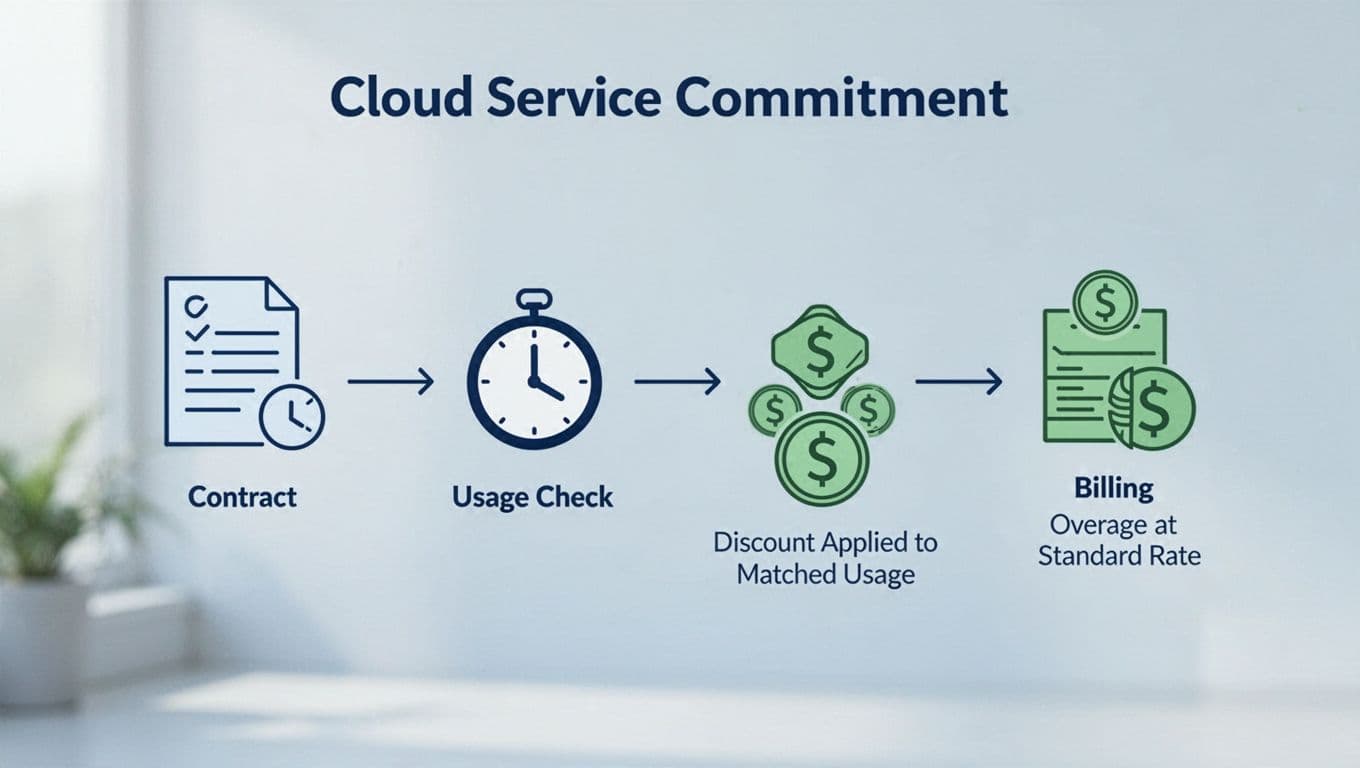
Each hour, Google checks what you used. If your usage matches the commitment, the discounted pricing applies. If you use more than the committed amount, the extra usage is billed at the regular on-demand price. If you use less, you still pay for the commitment you bought.
The basic idea behind a CUD commitment
Your commitment is not a usage cap. It is a billing promise.
A CUD is a floor in your bill, not a ceiling on your usage.
That matters for finance planning. If you buy a $10 per hour spend-based cud, Google expects that spend whether your teams use all of it or not. If you buy compute engine resource-based cuds for a fixed amount of vCPU and memory, the same logic applies. Your bill reflects the commitment first, then any overage.
Google’s Committed use discounts documentation is useful if you want the formal rules behind gcp commitments and eligible compute engine resources.
Where CUD discounts do not apply
CUDs do not cover every google cloud service. The discount applies only to eligible usage, under the exact service, SKU, region, machine type, or commitment model tied to that purchase.
So if your commitment covers compute engine instances in one region, usage in another region can stay at on-demand rate. If you commit to one service, a different cloud service does not inherit the savings. This is why mixed gcp environments need careful review, especially when you run compute engine, google kubernetes engine, cloud run, and managed data services side by side.
See how much you can save on your stack
Pick your team’s tools!
Click to select one or more tools.


What’s your company size?
Just click to select.
What’s your business email?
We'll send you calculations right away
The email is flying to your inbox!
Beyond discounts, you may qualify for up to $100K in AWS credits.

How Google calculates CUD savings, with a simple example you can reuse
The math is simpler than it looks. You compare your steady baseline against the discounted rate and then test how much of that baseline is truly stable.
A quick 2026 snapshot helps frame the upside:
| Workload type | 1-year pricing cut | 3-year pricing cut |
|---|---|---|
| General-purpose compute engine VMs | 28% | 46% |
| GKE and Cloud Run | 28% | 46% |
| Cloud Run functions | 17% | 17% |
| Memory-optimized VMs | n/a | up to 63% |
As of April 2026, these figures align with current public guidance and recent reporting on google cloud pricing. The deepest discount is still tied to long, stable use.
A simple diagram shows the hourly matching flow:
Resource-based calculation, spend-based calculation, and what changes on your bill
Resource-based cuds measure fixed resources, such as vCPU, memory, or a specific compute engine machine family in a region. Spend-based cuds measure committed spend per hour across a covered service.
For example, compute engine resource-based commitments fit stable infrastructure shapes. Spend-based committed use discounts fit services where usage shifts, but overall spend stays predictable. Google explains the setup in its spend-based CUD guide.
There was also a billing change between July 2025 and February 2026. Spend-based cuds now show as direct discounted prices on invoices, instead of separate credits. If you compare old and new bills, the math can look different even when total savings are the same.
Example CUD discount calculation for a steady workload
Assume your team runs a steady compute engine workload every hour of the month. On-demand pricing for that baseline comes to $10 per hour, or about $7,300 per month.
If you buy a one-year commitment that covers the full $10 per hour baseline, and the discount rate is 28%, your covered usage drops to $7.20 per hour. That turns into about $5,256 per month. Your monthly savings are about $2,044.
Now change the real-world picture. If actual eligible usage rises to $12 per hour, the first $10 gets the discounted pricing and the extra $2 is billed at the on-demand price. If your usage falls to $8 per hour, you still pay for the full $10 commitment.

That is why conservative sizing matters more than chasing the biggest headline discount.
CUD vs. sustained use discounts, plus the CUD types you can choose from
A sustained use discount is automatic. If eligible compute engine usage runs long enough during a billing month, Google lowers the price without any contract. Recent guidance still points to up to 30% savings for qualifying usage once instances run past roughly 25% of the month.
CUDs are different. You buy them on purpose, and you get deeper pricing in exchange for commitment.
Here is the fast comparison:
| Factor | CUDs | Sustained use discount |
|---|---|---|
| Commitment required | Yes | No |
| Savings depth | Usually higher | Usually lower |
| Flexibility | Lower | Higher |
| Best fit | Stable baseline | Uncertain or spiky use |
| Risk | Underuse waste | Minimal |
Committed Use Discounts vs. Sustained Use Discounts
If your workloads swing with product launches, trials, or seasonal demand, a sustained use discount may be safer. If your core platform runs day and night, a gcp committed use discount usually wins on pricing.
Both can matter in the same environment. A founder might use cuds for always-on production and let automatic gcp sustained use discounts cover variable dev or test workloads. That split keeps risk down while still reducing compute spend.
You can also use the CUD analysis report in Cloud Billing to see whether your purchased commitment is paying off.
Spend-based, resource-based, and flexible CUDs, which services they cover
In practice, you care about three buckets:
- Resource-based cuds for stable compute engine resources, machine family choices, and regional workloads.
- Spend-based cuds for service-level spend across eligible products.
- Flexible cuds, including compute flexible commitments, when your compute usage moves across eligible shapes more often.
Common coverage can include compute engine, google kubernetes engine, cloud run, google cloud vmware engine, and some BigQuery commitment models. BigQuery has its own flavor of spend-based cud and slot-related commitments, which this BigQuery CUD guide explains well. Still, service rules change, so you should confirm the exact SKU and region before purchasing committed use contracts.
How to choose the right CUD, estimate savings, and avoid expensive mistakes
The right commitment starts with your baseline, not your ambition. Review 30 to 90 days of usage. Then mark the part that stays on every hour, even on a quiet weekend.

Spend-based vs. resource-based CUDs, which is right for you
Resource-based committed use discounts fit you best when your compute engine machine type, region, and amount of compute engine resources stay stable. They can deliver strong pricing, but they are less forgiving.
Spend-based cuds work better when you know the service will stay busy, but the exact mix may shift. That is common with cloud run or google kubernetes engine fleets that scale differently over time.
A simple rule works well:
- Pick resource-based cuds for fixed, mature workloads.
- Pick spend-based cuds or flexible cuds for changing compute patterns.
- Skip a long commitment during migrations, large re-platforming work, or major product uncertainty.
What happens if you use fewer resources than you committed to
You still pay. That is the downside, and it is the reason many teams overspend on cuds.
A real-world case makes this clear. One Series A SaaS team had a stable API layer but an unstable data pipeline. They committed only the API baseline, about 70% of total compute costs. The result was lower pricing without locking in the pipeline, which changed every sprint. Had they committed the full forecast, half of that commitment would have sat idle during a redesign.
There is one helpful update on the way. Starting June 16, 2026, google cloud plans to make sharing the default for many resource-based cuds across projects in the same cloud billing account. That can improve discount sharing and reduce waste.
Real-world pricing math, startup credits, and when outside help pays off
Commitment sizing is one part of the savings plan. Credits can cut the bill before you even buy a cud.
If you are early-stage, you may qualify for up to $25K in free Google Cloud credits for startups. Spendbase also notes a larger path for Seed to Series A companies, up to $200K, depending on fit and program eligibility.
Those credits should not replace good pricing discipline. They buy time. You still need to right-size your commitment, track eligible usage, and avoid locking in spend that product demand will not support.
Free virtual cards for non-EU residents
Open in 1 working day, issue 100 virtual cards, and get up to 1.25% cashback.
Get a free account
FinOps best practices for getting CUD savings without losing flexibility
Your billing structure shapes your savings. Spend-based cuds apply to eligible usage in projects paid by the same cloud billing account. Resource-based cuds have had stricter sharing behavior, but the June 2026 default sharing change should help more teams use one commitment across multiple projects.
That means org design matters. If your workloads are split across several billing accounts, you may leave savings on the table.
How CUDs apply across projects and billing accounts
You should map commitments to the billing account that actually pays for the steady workloads. A fragmented setup can hide eligible usage and weaken coverage. A clean google cloud console view, paired with billing exports and monthly reviews, gives you a clearer signal on what to commit to.
Best practices, common risks, and what changed in 2025 and 2026
Keep this playbook short and strict:
- Analyze baseline usage first.
- Start with a smaller one-year commitment.
- Review coverage monthly.
- Align each commitment with your product roadmap.
- Avoid long commitments for uncertain workloads.
The main recent changes are practical. Spend-based cuds now appear as direct pricing reductions on newer bills, which changed how savings look in reports. Also, resource-based cuds are moving toward broader default sharing in June 2026. Those two updates make cuds easier to read and, in some cases, easier to use well.

We can unlock discounts on 10,000+ tools you already use.
Final thoughts
CUDs cut costs when your usage is steady. They create waste when your commitment is too big, too narrow, or tied to the wrong workload.
The safest path is simple: compare cuds with a sustained use discount, commit only to your stable baseline, and review the result every month. Before you buy a one-year or three-year commitment, look back at the last few months of eligible usage and treat that history as your guardrail.


Get discounts on your team’s favorite apps
Find deals for 10%, 30%, or even 70% off in our discount marketplace.
Check Discounts



