










GCP Services Inventory: A Clear Map of Google Cloud Assets

If you lead product, finance, or engineering, the size of GCP Services can feel like opening a warehouse with no aisle map. You know Google Cloud Platform can run apps, store data, train models, and secure workloads, yet the catalog is broad enough to slow decisions.
A services inventory fixes that. In practice, it is your working view of what exists, what each service does, what it costs, and how much operational weight it puts on your team.
That matters in 2026 because cloud choices now shape speed, margin, and risk. The sections below give you a usable map, not a sales brochure, so you can compare core services, pricing snapshots, service models, management levels, and the trends that matter next.
What Google Cloud Platform is, and what a GCP services inventory helps you see
Google Cloud Platform is Google’s public cloud. You use it to run compute, databases, analytics, AI features, networking, security, and developer tools on Google’s global cloud infrastructure.
If you want the full catalog, Google’s own products and services page and products at a glance in Google Cloud documentation show how wide the platform supports modern workloads.
A GCP resource inventory gives you something more practical. It helps you map which google cloud service fits each workload, which cloud assets you already own, and where gaps or waste sit in your cloud environment. For a CTO, that means architecture clarity. For a CFO, it means cost visibility. For a founder, it means fewer wrong turns.
How Cloud Asset Inventory gives you visibility across your cloud resources
Cloud Asset Inventory is a free inventory service that lets you list, search, and track google cloud resources across projects, folders, and organizations. In plain terms, it gives you visibility and control over cloud assets, including google cloud asset metadata, IAM policy changes, and asset relationships.
You get up to 35 days of history, so you can trace a timestamped change instead of guessing. You can export asset metadata to BigQuery or Cloud Storage, wire Pub/Sub alerts for changes, and review resources across multiple teams from one place.
That makes audit work, compliance across projects, and debug work far easier.
A simple example helps. If your monthly bill jumps, you can use google cloud asset inventory to find idle VMs, old disks, or public cloud storage buckets that no one meant to expose. If a policy breaks an API or blocks a workflow, you can trace IAM and organization policy changes without hunting through each project by hand.
See how much you can save on your stack
Pick your team’s tools!
Click to select one or more tools.


What’s your company size?
Just click to select.
What’s your business email?
We'll send you calculations right away
The email is flying to your inbox!
Beyond discounts, you may qualify for up to $100K in AWS credits.

The main GCP services you can use today, with a pricing snapshot table
The best way to read the many google cloud services listed is by category. You usually choose one service from each bucket, then connect them into a working stack.
Here is a compact inventory of the service groups most teams compare first.
| Category | Key services | Best fit |
|---|---|---|
| Compute | Compute Engine, App Engine, Cloud Run, GKE, Batch | VMs, app hosting, containers, background jobs |
| Storage | Cloud Storage, Persistent Disk, Filestore | Object data, block storage, shared file systems |
| Databases | Cloud SQL, Spanner, AlloyDB, Firestore | Transactional apps, global scale, postgres-heavy workloads |
| Analytics | BigQuery, Dataflow, Pub/Sub, Looker | Bigquery data, pipelines, dashboards, time series analysis |
| AI and ML | Vertex AI, Vertex AI Search, AI APIs | Model training, search, chat, inference |
| Networking | Virtual Private Cloud, load balancing, Cloud CDN, Service Directory | Traffic routing, private networking, service discovery |
| Security | IAM, Security Command Center, Cloud KMS, reCAPTCHA Enterprise, Web Risk API, Access Context Manager | Identity, posture, keys, fraud control, google security |
| Developer and management | Cloud Build, Artifact Registry, Cloud Scheduler, Workflows, VM Manager, Cloud Monitoring | CI/CD, docker images, automation, scheduling, operations |
Core service groups, from compute and storage to AI, security, and networking
For app delivery, you usually start with Compute Engine, App Engine, Cloud Run, or GKE. Compute Engine gives you a virtual machine with full OS control.
App Engine is simpler for web apps. Cloud Run works well for stateless API services and event-driven jobs. GKE is the container choice when you need Kubernetes. Batch helps with scheduled or large-scale jobs.
For data, Cloud Storage handles object files, backups, and logs. Persistent Disk backs VMs. Filestore gives shared file storage.
Then your database choice depends on the workload: Cloud SQL for common relational apps, Spanner for globally distributed sql at scale, and AlloyDB for high-performance PostgreSQL use cases.
If your product depends on data across events, BigQuery is often the center of gravity. Many teams pair it with Dataflow, Pub/Sub, and Looker. You can see how Google keeps adding new services in the Google Cloud release notes, which is useful when your stack depends on a specific service lifecycle or new AI features.
What the pricing table should help you compare before you choose
Price tables are not there to pick the cheapest row. They help you compare billing model, free tier, scale pattern, and hidden cost drivers such as egress, idle capacity, disk growth, or over-scanned queries.
Cheap hourly pricing can still become an expensive month when idle resources, network egress, and bad sizing pile up.
This quick snapshot uses US-oriented 2026 figures and approximations. Final cost changes by region, usage patterns, and discounts.
| Service | 2026 pricing snapshot | Free tier or discount note | What to watch |
|---|---|---|---|
| Compute Engine e2-micro | About $0.0084 per hour in us-central1 | 720 hours per month free in select regions | Disks and egress are extra |
| Compute Engine e2-standard-2 | About $0.067 per hour | Sustained use and committed use discounts apply | Idle VMs burn cash fast |
| Cloud Storage Standard | About $0.020 per GB-month | New customers can use trial credits | Operations and retrieval can add up |
| BigQuery on-demand | About $6.25 per TiB scanned | Flat-rate style options can help steady workloads | Poor query design raises cost |
| GKE management | $0.10 per hour per cluster, plus VM costs | Savings depend on node rightsizing | Control plane fee is only part of the bill |
| Cloud Run | Usage-based, tiny per-second CPU and memory charges | Strong free tier for low traffic apps | Cold starts, request spikes, and bad limits affect spend |
Savings options matter as much as list price. Spot-style choices on VMs, sustained use discounts, and committed use discounts can cut spend hard. So can cleanup automation, right-sizing, and better export data for FinOps review.
How GCP service models and management levels change your daily work
Each service model changes what your team has to patch, scale, monitor, and secure. That is where many teams misread GCP services. They compare features, but ignore operational drag.
Where infrastructure, platform, and serverless each fit best
Use Compute Engine when you need deep control over the OS, custom agents, or an unusual development environment. It fits legacy apps, custom Apache stacks, and some on-premises migrations. You keep flexibility, yet you also own more ops.
GKE sits in the middle. It works when your team already uses containers, docker images, and a deployment pipeline that needs strong scheduling and synchronization across services.
You get portability and control, but you still manage cluster design, policies, and more moving parts.
App Engine and Cloud Run reduce admin load. App Engine is good for simple app hosting.
Cloud Run is often the faster choice for websites, APIs, and event-driven workflow jobs because it scales to zero and charges by usage. Managed data services do the same for databases. You trade some control for less day-to-day admin.
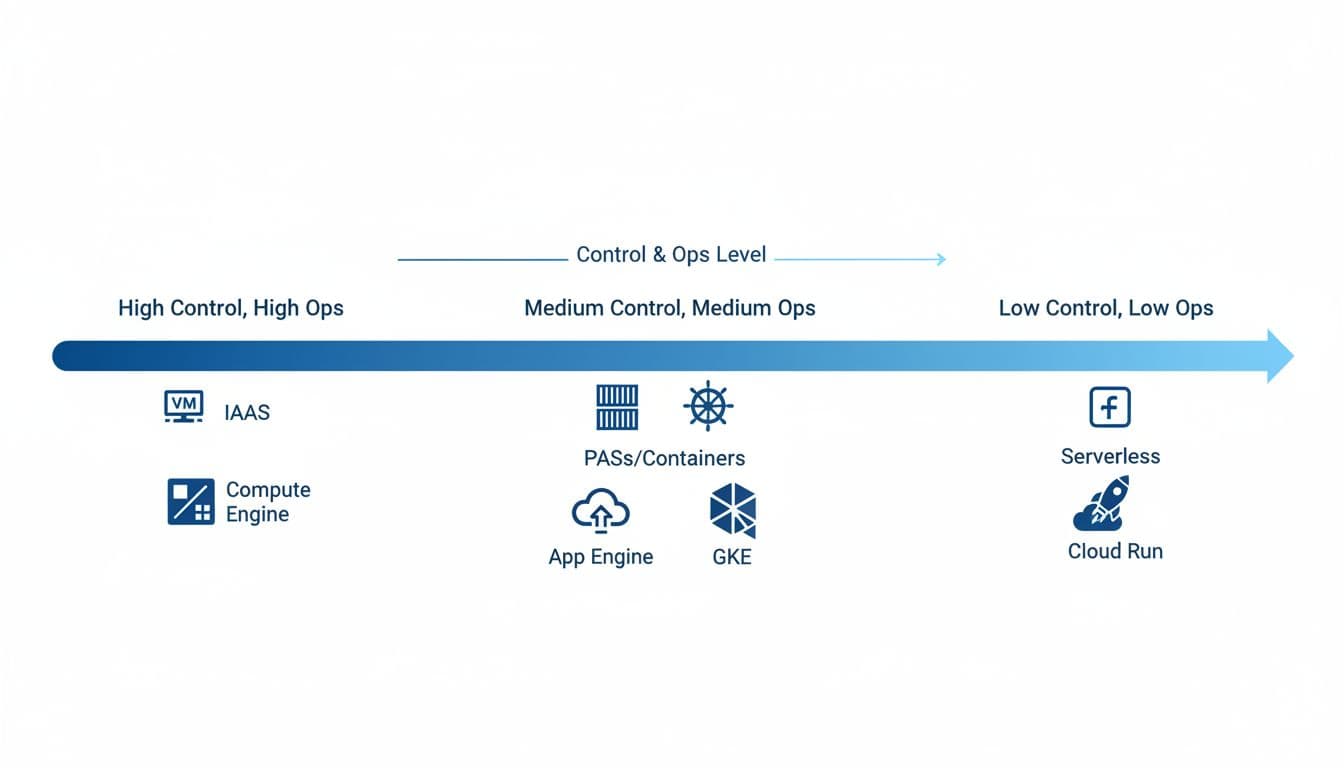
The tradeoff between control, speed, and operational overhead
More control usually means more patching, more VM monitoring, more IAM setup, and more compliance work. Less control usually means faster delivery and simpler scaling.
A short pros and cons view helps:
- Compute-heavy IaaS gives you control and custom tuning, but you manage more risk and overhead.
- PaaS and managed databases speed up delivery, but they can limit low-level choices.
- Serverless cuts idle waste and ops time, but request-based billing needs careful guardrails.
If you need a daily rule, use the least-managed option that still gives you the control your workload needs.
How to choose the right GCP service for your team, budget, and growth stage
A good inventory becomes a decision guide once you match service choices to workload, team size, budget pressure, and compliance needs.
Match each workload to the service that fits it best
A SaaS startup with one product team often does well with Cloud Run, Cloud SQL, Cloud Storage, and Cloud Scheduler. That stack is scalable, easy to operate, and cheap when traffic is uneven. If the product later needs more service isolation, you can move parts to GKE.
A data-heavy team often lands on Pub/Sub, Dataflow, BigQuery, and Looker. That is common when you track customer experience, product usage, or event data across multiple sources.
One retail analytics team, for example, might export clickstream metadata into BigQuery each day, then build finance and product dashboards without running its own warehouse servers. The 2026 Google Cloud community view for data engineers mirrors that pattern.
For an on-prem move, Compute Engine plus managed sql is often the calmest first step. You keep familiar virtual machine patterns while reducing database admin work.
Use startup credits and cost controls before your cloud bill grows too fast
If you are early-stage, credits buy time for MVP builds, testing, AI workloads, analytics spikes, and migration windows. Spendbase highlights up to $25K in Google Cloud credits for software startups, and up to $200K for Seed to Series A startups, which can soften your first serious cloud bill.
You should still build guardrails early. Set budget alerts. Clean up idle vms. Review network egress. Use autoscaling where it fits. Export billing data for regular checks. Tie cost reviews to Cloud Asset Inventory so you can connect spend to actual cloud resource ownership, not guesswork.

We can unlock discounts on 10,000+ tools you already use.
Why businesses choose GCP, and what cloud management trends matter in 2026
You usually pick google cloud because of data strength, strong AI tooling, fast global networking, and mature Kubernetes options. As of 2025, market estimates put GCP near 10% of global cloud share, with many teams using it either for major workloads or as part of a multi-cloud setup.
The business reasons GCP often wins for modern teams
BigQuery is still a major draw because it removes a lot of warehouse plumbing. Vertex AI helps teams ship AI features without building every layer from scratch.
GKE remains strong for container teams, and managed services reduce admin work when your headcount is tight.
The tradeoff is complexity. Many google cloud resources are powerful, but the catalog is wide. That is why a clear gcp resource inventory matters. It turns many google cloud options into a short list tied to your actual workload.
What to expect next in cloud service management
In 2026, cloud management is moving toward better asset visibility, tighter FinOps, policy-driven security, and more AI help for monitoring and debug work. Public cloud spending is on track to pass $1 trillion, so cost discipline is no longer optional.
You should expect stronger visibility and governance across projects, better automation for cost and policy checks, and more support for hybrid and multi-cloud operations.
Keep an eye on Google Cloud documentation and release updates because service changes now arrive fast, and small pricing or policy shifts can change a plan.
Your best google cloud platform stack is the one that fits your workload, not the one with the longest feature page. Start with a small inventory of must-have services, compare pricing against management overhead, and use credits when they can buy you time.
Then build the basics early: Cloud Asset Inventory for visibility, IAM for control, and cost checks that catch waste before it spreads. That is how you keep GCP useful, affordable, and ready for the next stage of growth.


Get discounts on your team’s favorite apps
Find deals for 10%, 30%, or even 70% off in our discount marketplace.
Check Discounts



