










Google Kubernetes Engine (GKE) Pricing Use Cases and Resource Management That Makes Sense

Choosing the right deployment strategy is crucial for optimizing your Kubernetes cluster. Kubernetes Engine (GKE) is not only a technical call. You are also picking a cost model, an operating style, and a level of control that will shape how your team ships software.
That matters because the biggest GKE costs rarely come from one line item. They come from cluster type, node usage, storage, network traffic, backups, and how well you size each workload.
Google Cloud also gives you a free tier, and early-stage teams may cut spend further with free Google Cloud credits for startups.
If you want a clear way to judge price, performance, and day-to-day effort, the numbers below will help.
What Google Kubernetes Engine is, and why teams use it, vs best practices
Kubernetes is an open-source container orchestration system. It helps you run containerized applications, scale them, restart failed services, and manage deployment across many machines. Google Kubernetes Engine is Google Cloud’s managed kubernetes service for doing that work with less manual setup.
For a CTO, that means faster deployment and less cluster management pain, especially when comparing autopilot vs standard options. For a CFO, it means you can separate fixed platform costs from usage-driven costs. For a founder, it means your product can grow without rebuilding the whole stack every six months.
Teams get the most value from GKE when they run multi-service SaaS apps, APIs, data-heavy systems, AI workloads, or internal platforms with several environments.
Why teams choose GKE over running Kubernetes by hand
If you run Kubernetes yourself, you own the control plane, upgrades, patching, and much of the day-to-day operations. In GKE, Google manages key control plane parts for you. That cuts maintenance and lowers the chance that a small ops gap turns into downtime, showcasing best practices in Kubernetes management.
The benefits are practical:
- You spend less time on cluster operations.
- You get built-in security options and tight integration with Google Cloud services, enhancing the features of Google Kubernetes Engine.
- You can scale containerized applications without stitching together every piece on your own.
The tradeoff is simple. GKE gives you speed and managed convenience, but you still need to make smart choices about resources and cost.
How GKE works in simple terms
Your team builds a container image, pushes it to a registry, and creates a deployment. GKE then places that workload onto nodes inside a cluster. Pods are the smallest running units, and node pools are groups of nodes with shared settings.
In plain English, Google manages the brain, and you manage what runs on the muscles.
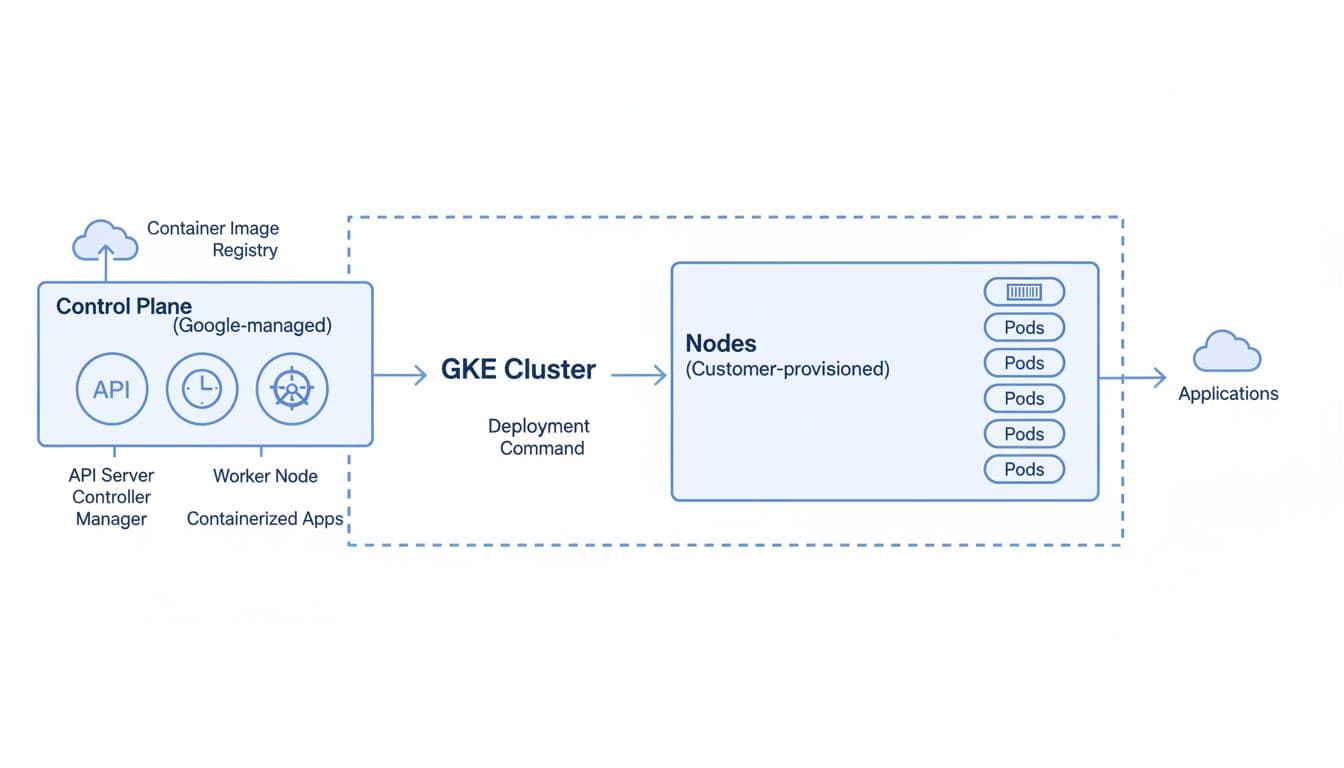
That split is why a managed kubernetes platform feels easier to run. You keep control over workloads, policies, and node pools, while Google handles the control plane that coordinates scheduling and orchestration in an automated cluster.
See how much you can save on your stack
Pick your team’s tools!
Click to select one or more tools.


What’s your company size?
Just click to select.
What’s your business email?
We'll send you calculations right away
The email is flying to your inbox!
Beyond discounts, you may qualify for up to $100K in AWS credits.

How GKE pricing really adds up in 2026
In April 2026, GKE pricing starts with one simple number: the cluster management fee is $0.10 per hour per cluster, billed by the second after the free tier runs out, can impact your overall GCP costs.
Google Cloud also gives you $74.40 in free credits each month per billing account for one eligible zonal Standard cluster or one Autopilot cluster.
You can confirm the current numbers on Google Kubernetes Engine pricing reflects the features of Google Kubernetes Engine and its benefits for businesses..
What you get in the free tier, and when costs start
That $74.40 monthly credit can fully cover one small eligible cluster’s management fee for the month. If you stay within that limit, the control plane cost may be effectively free. If you run extra clusters, use unsupported topologies, or go beyond the monthly credit, the $0.10 hourly fee begins.
Backup spend needs attention too. Google changed GKE Backup pricing on March 2, 2026. The management charge moved from per-pod billing to $9 per namespace per month, and storage is now $0.045 per GB per month. Cross-region backup traffic can also add network egress cost, which is a critical factor in Kubernetes management.
For small dev or test environments, the free tier can keep a zonal cluster cheap. For teams with many namespaces and long backup retention, backup can grow faster than expected.
This table shows the core difference between Standard and Autopilot.
| Mode | How you pay | Ops effort | Best fit | Main tradeoff |
|---|---|---|---|---|
| Standard | Cluster fee, plus nodes, storage, network, and other resources | Higher | Teams that want control over node types, GPUs, and tuning | More flexibility, more ops work |
| Autopilot | Cluster fee, plus pod-based billing for requested CPU, memory, and ephemeral storage | Lower costs can be achieved through effective Kubernetes management. | Lean teams, fast-moving apps, many general-purpose services | Easier operations, less low-level control |
The short version is clear. Autopilot buys time, while Standard buys flexibility.
Autopilot vs Standard mode pricing
In Standard mode, you pay more like traditional infrastructure. You pick the node shape, the underlying Compute Engine instances, disks, and policies. If your nodes sit half-empty, you still pay for them.
In Autopilot, Google manages the node layer and bills more by requested workload resources. That often works well when you want a managed service and don’t want to tune every node pool in a Kubernetes cluster.
There are pros and cons on both sides:
- Standard is better when you need special hardware, custom node pools, or fine control over placement.
- Autopilot is better when you want simpler cluster management and cleaner cost mapping to each workload.
- Standard can be cheaper for dense, predictable usage.
- Autopilot can be cheaper when idle capacity would otherwise pile up.
The management fee is easy to notice. The hidden waste is what hurts.
| Cost component | What drives it |
|---|---|
| Cluster management | Number of clusters and hours running |
| Nodes and compute | Machine type, uptime, idle capacity, GPUs |
| Storage | Persistent disks, snapshots, backup storage growth |
| Networking considerations are essential for maintaining cloud security in your Kubernetes cluster. | Egress, cross-region traffic, load balancing |
| Backup for GKE | Namespace count, retained data size, restore needs |
The cluster management fee is only the cover charge. Most of your bill comes from resource choices inside the cluster.
Oversized nodes, forgotten dev clusters, overprovisioned requests, storage sprawl, and cross-region traffic can quietly raise spend. If finance wants accurate showback, GKE cost allocation helps you map spend by namespace and cluster.
Resource management that keeps containers fast without wasting money
A GKE cluster can feel healthy while still wasting money. That usually starts with bad requests, loose limits, and weak autoscaling rules.

Requests, limits, and why they matter for every workload
Requests tell Kubernetes what a pod needs to get scheduled. Limits cap how much it can consume in the context of cloud security. Quotas put guardrails around a namespace. Autoscaling changes capacity when demand moves, providing an efficient response to varying use cases.
Use this as a quick reference:
| Setting | What it does | Cost impact | Performance impact |
|---|---|---|---|
| Requests | Reserves minimum CPU and memory | Too high wastes money | Too low causes contention |
| Limits | Caps max usage | Too high can hide bad sizing | Too low can throttle or kill pods |
| Quotas | Caps team or namespace usage | Prevents runaway spend | Reduces noisy-neighbor risk |
| Autoscaling | Adds or removes pods or nodes | Cuts idle capacity | Helps match demand |
A good rule of thumb is to set CPU requests near real sustained usage, and review memory more carefully because memory pressure is less forgiving. Google also offers guidance to right-size workloads at scale, which is useful when you have many services.
How scaling helps you save money during busy and quiet hours
Horizontal Pod Autoscaling adds replicas when traffic rises. Cluster autoscaling adds nodes when pods cannot fit. Vertical Pod Autoscaling adjusts requests over time.
This matters most when demand changes by hour, season, or product cycle. SaaS platforms with weekday peaks, data jobs that run overnight, and AI inference apps with bursty traffic all benefit from autoscaling. Teams often cut 20% to 40% by rightsizing and scaling well. Fault-tolerant jobs can save much more when Spot capacity fits.
How to cut GKE costs without slowing your team down with use cases
Cost control works best when finance and engineering look at the same facts. If the bill climbs, start with waste before you redesign the platform.
The easiest ways to find waste in your clusters
Use this short review with your engineering lead:
- Check for idle nodes and clusters that run after office hours.
- Look for oversized requests on low-traffic services.
- Remove orphaned disks, old snapshots, and test namespaces.
- Review replica counts in dev and staging.
- Turn on GKE recommendations and insights to flag idle clusters and overprovisioned workloads.
If you are early-stage, credits can matter more than micro-optimizing a small bill. This guide on how to get $350K free Google Cloud credits can help you judge what startup support fits your stage. Spendbase also helps teams trim broader software and cloud spend.
When GKE Backup, Spot capacity, and commitments make sense
Backup is worth the money when the data is hard to rebuild or compliance is strict. Spot capacity works best for batch jobs, CI, non-production systems, and fault-tolerant services. Commitments fit steady-state workloads with predictable demand.
A real example helps. PlayPlay cut total cloud spend by about 40% on GKE after automating Spot usage for suitable workloads. That kind of result is common when you separate critical services from interruptible jobs instead of treating every node the same.
You can also frame the decision by workload type:
- A steady SaaS API with strict uptime often fits Standard with committed use discounts.
- An internal tool with mixed traffic often fits a GKE Autopilot cluster.
- A backup-heavy environment needs tighter namespace planning and retention rules, or backup costs will swell.
Free virtual cards for non-EU residents
Open in 1 working day, issue 100 virtual cards, and get up to 1.25% cashback.
Get a free account
Where GKE fits in your Google Cloud (gcp) stack and in real life
GKE works best when your app needs more control than Cloud Run and more automation than raw Compute Engine VMs. If you run many services, custom networking, mixed workloads, or shared platform tooling, Google Kubernetes Engine is usually the better middle ground.
SaaS teams use it for APIs and web apps with many services. AI teams use it for inference where they need scalable GPU or CPU pools, demonstrating the versatility of GCP. Platform teams use multiple clusters for dev, staging, and production, then automate deployment through Artifact Registry and Cloud Build. Cloud Monitoring and Logging help you watch health, while the Google Cloud ecosystem keeps billing, policy, and security in one place.
Version support matters too. If you stay behind on supported Kubernetes versions, upgrades get harder, risk rises, and surprise project work lands on your team later, complicating your pipeline. Keeping the cluster current is part security posture, part cost control.

We can unlock discounts on 10,000+ tools you already use.
Conclusion
The cheapest GKE cluster is not always the best one. The best choice is the one that matches your workload, your team’s operating capacity, and the kind of control you need.
When you set sane requests and limits, use autoscaling well, and review costs on a schedule, Google Kubernetes Engine stays efficient without slowing growth.
Take one pass through your current cluster setup this week. Check for idle capacity, loose backup settings, and startup credits you may be leaving on the table.


Get discounts on your team’s favorite apps
Find deals for 10%, 30%, or even 70% off in our discount marketplace.
Check Discounts



