










What Is Cloudflare Used for, and When Does It Make Sense?

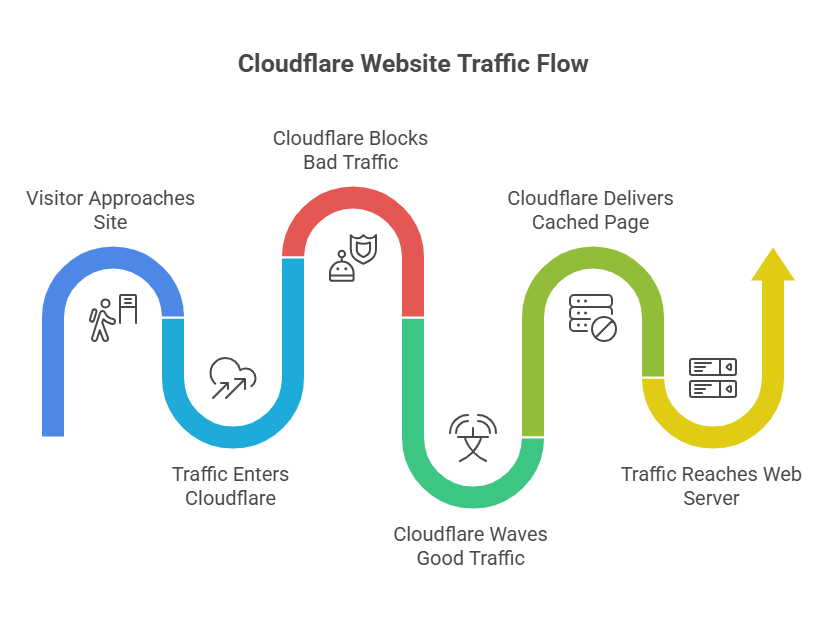
Picture your site as a storefront. A visitor walks up, but before they reach your web server, they pass through Cloudflare. That layer can wave good traffic through, block bad traffic, and hand over a cached copy of the page faster than your origin could.
In plain English, Cloudflare is used to make websites and apps faster, safer, and more reliable. It wraps several jobs into one platform, including a CDN, DNS, reverse proxy, WAF, DDoS defense, SSL, and developer tools.
If you’re weighing cost, risk, and complexity, you need more than a product blurb. You need to know what Cloudflare actually does, how it works, what features matter, what the free plan gives you, where it falls short, and when an alternative may fit better.
What Cloudflare is, in simple terms
Cloudflare was founded in 2009, and it’s now one of the biggest internet infrastructure companies on the web. At its core, Cloudflare acts like a smart layer between your visitors and your server.
That matters because your server shouldn’t have to greet every request alone. Cloudflare filters harmful traffic, speeds up content distribution, and keeps your site reachable when traffic spikes.
Cloudflare is not only a CDN. It also runs DNS service, SSL handling, app security, bot filtering, and developer services like Cloudflare Workers and Cloudflare Pages.
The main job Cloudflare does for your website or app
Most teams use Cloudflare for three jobs: speed, security, and uptime.
For speed, Cloudflare can serve images, scripts, and other static files from a location near your user. That cuts latency and helps pages feel snappier.
For security, Cloudflare hides your origin IP address behind its reverse proxy. Bad actors hit Cloudflare first, not your web server directly.
For uptime, Cloudflare helps absorb traffic floods and route around trouble. If your origin gets stressed, cached content can still keep parts of your site online.
Why Cloudflare is more than a content delivery network
A basic content delivery network mostly handles content distribution. Cloudflare also provides the control plane around that traffic.
You can manage DNS, add SSL, turn on a web application firewall, challenge malicious bots, and secure internal apps with Cloudflare Zero Trust. If you’re building modern products, you can also deploy serverless code instantly across the globe with Cloudflare Workers and host front ends on Cloudflare Pages.
That broad stack is what makes Cloudflare different. For some teams, one vendor can replace several point tools.
See how much you can save on your stack
Pick your team’s tools!
Click to select one or more tools.


What’s your company size?
Just click to select.
What’s your business email?
We'll send you calculations right away
The email is flying to your inbox!
Beyond discounts, you may qualify for up to $100K in AWS credits.

How Cloudflare works behind the scenes
When you use Cloudflare, traffic is routed through Cloudflare’s global network before it reaches your origin. That sounds technical, but the path is simple.
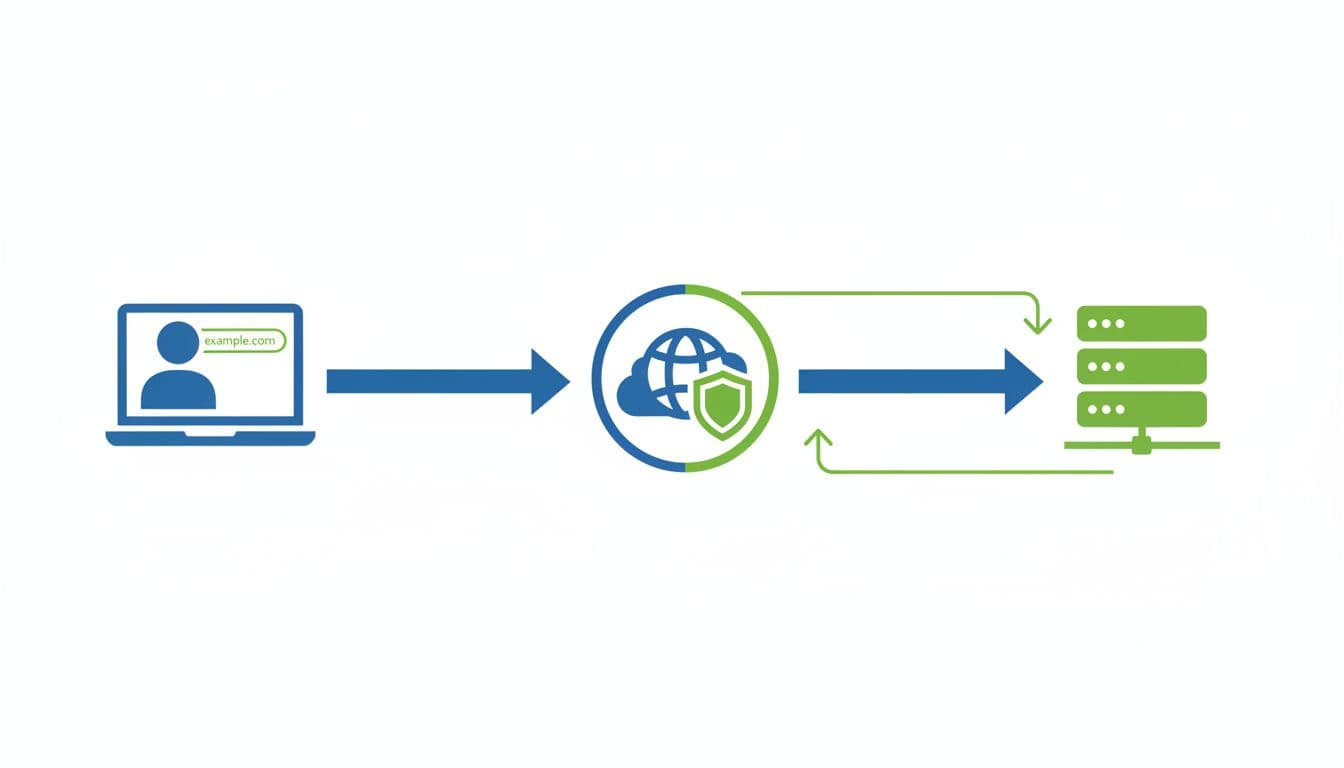
Here’s the basic request flow:
What happens when someone opens your site
First, a visitor types your domain name into a browser. Your DNS points that domain to Cloudflare, not straight to your hosting provider.
Next, the request goes to the nearest Cloudflare edge location. Cloudflare’s global network spans hundreds of cities and data centers, so the request usually lands nearby.
Then Cloudflare checks a few things fast. Is there a cached copy? Is the SSL connection valid? Does the request look normal? If the file is already in cache, Cloudflare sends it back to the user right away. If not, Cloudflare fetches it from your origin server, stores it when allowed, and returns the response.
That’s why Cloudflare powers internet requests for millions of websites while reducing strain on the origin.
How Cloudflare protects your origin server from DDoS attacks
A DDoS attack tries to flood your site until the server slows down or falls over. Cloudflare helps by inspecting traffic at the edge, spotting odd spikes, and blocking or challenging bad traffic before it reaches your origin.
The scale here matters. According to the 2026 Cloudflare Threat Report, Cloudflare blocks over 230 billion threats daily. In 2025, it mitigated 47.1 million DDoS attacks and stopped a record 31.4 Tbps attack. Many attacks lasted under 10 minutes, which means human reaction time alone isn’t enough.
If a DDoS attack peaks and ends in minutes, automated edge defense matters more than manual response.
Cloudflare server logic creates fingerprints for suspicious patterns, such as sudden floods from compromised devices or repeated requests from malicious bots. Legit traffic still flows back to the user, while attack traffic gets dropped, rate-limited, or challenged.
The Cloudflare features that matter most
If you’re choosing tools for security and performance, this quick view helps.
| Feature | What it does | Who benefits most |
|---|---|---|
| CDN and cache | Stores files closer to users and reduces origin load | Content-heavy sites, ecommerce, SaaS |
| DNS | Resolves your domain name quickly and reliably | Any public website or app |
| WAF and bot tools | Blocks harmful requests and fake traffic | Login pages, APIs, checkout flows |
| SSL | Encrypts traffic between users and Cloudflare | Every site handling user data |
| Workers and Pages | Lets you deploy code and sites at the edge | Product teams shipping fast |
| Zero Trust | Controls access to internal apps | Remote teams and growing companies |
CDN, caching, and faster page loads
This is the part most people notice first. Cloudflare’s content delivery network stores copies of common files closer to your users, so pages load faster and your server does less work.
You can also set cache rules to decide what Cloudflare should store and for how long. For a growing app, that can cut bandwidth bills and improve response time at the same time. If you want the nuts and bolts, Cloudflare publishes cache feature details by plan.
DNS, SSL, WAF, and bot protection
Think of DNS as the phonebook of the internet. It turns your domain name into an IP address so browsers know where to go. Cloudflare’s DNS service is popular because it’s fast and tightly linked to the rest of the platform.
SSL encrypts traffic, which protects logins, forms, and payments in transit. Then Cloudflare WAF steps in as a filter. It looks for known bad patterns, including attacks like SQL injection and cross-site scripting.
Bot protection adds another layer. Instead of letting scrapers, credential stuffers, and malicious bots hammer your app, Cloudflare can score, rate-limit, or challenge them. That security scope keeps expanding, as shown in Cloudflare’s recent client-side security update.
Workers, Pages, and Zero Trust tools
This is where Cloudflare also starts to look like a developer platform, not only a security layer.
Cloudflare Workers lets you run serverless code close to users. That can help you personalize responses, reshape API traffic, or deploy lightweight logic without managing more servers. Cloudflare Pages hosts modern sites and supports quick deploy cycles, which founders and CTOs often like because teams can ship faster with less ops overhead.
For internal tools, Cloudflare Zero Trust gives you app-level access control. Instead of opening the whole network, you can grant the right people the right access.
Why businesses use Cloudflare, and where it can fall short
The attraction is clear. You get a unified platform for security and performance, plus a strong free and paid entry path.
Real-world examples help. Shopify uses Cloudflare to secure and personalize shopping at scale. Fullscript reported much faster deployments and lower daily costs. Stack Overflow used Cloudflare services to protect traffic and support new product work. One New York City government agency used Cloudflare to block 500 million malicious requests during a password attack.
The biggest advantages of using Cloudflare
- You can improve speed without rewriting your whole stack.
- You can hide the origin server and reduce direct attack exposure.
- You can simplify operations by combining CDN, DNS, WAF, SSL, and bot controls.
- You can start on free and move up only when your needs change.
The downsides and trade-offs to keep in mind
Cloudflare isn’t magic. Advanced rules can take time to tune. False positives can block real users. A broad platform also creates partial lock-in, because the more services you adopt, the harder it gets to swap pieces later.
There’s also dependency risk. If you proxy traffic via Cloudflare and a misconfiguration or outage happens, your site can feel it even when your origin is healthy.
This trade-off table keeps the picture honest:
| Pros | Cons |
|---|---|
| Strong speed gains from cache and edge delivery | Advanced setup can get complex |
| Good security coverage in one place | False positives need tuning |
| Generous free protection for small sites | Higher tiers jump in price |
| Lower load on your web server | Some lock-in over time |
| Broad global network and uptime tools | Cloudflare outage risk exists |
Free virtual cards for non-EU residents
Open in 1 working day, issue 100 virtual cards, and get up to 1.25% cashback.
Get a free account
Cloudflare pricing, free features, and ways to cut the cost
Cloudflare offers Free, Pro, Business, and Enterprise plans. In 2026, Pro commonly starts around $20 per month per domain, while Business sits around $200 per month. Enterprise is custom. Paid developer and access products can add separate charges depending on usage and seats.
What you get on the free plan
For many small teams, the free plan is the reason to use Cloudflare in the first place. You get CDN, SSL, DNS, analytics, and standard unlimited DDoS protection. You also get basic WAF coverage and entry-level access to Workers and Pages.
That’s often enough for a personal site, a startup landing page, a side project, or an early SaaS app that needs free protection before traffic climbs.
When a paid plan makes sense, plus Spendbase savings
Paid plans make sense when you need stronger WAF controls, more rules, better bot management, deeper analytics, or support and SLA commitments.
This quick comparison is a useful starting point:
| Plan | Typical starting price | Best fit |
|---|---|---|
| Free | $0 | Personal sites, MVPs, small startups |
| Pro | About $20 per domain monthly | Growing sites and revenue pages |
| Business | About $200 per domain monthly | Ecommerce, APIs, higher-risk apps |
| Enterprise | Custom quote | Large brands, compliance-heavy teams |
If you’re comparing contracts, it helps to check outside pricing options too. You can review the Up to 25% off Cloudflare discount for a quick cost benchmark.
Censorship concerns, well-known users, and Cloudflare alternatives
Because Cloudflare sits in front of traffic, people sometimes pull it into censorship debates. Cloudflare is usually infrastructure, not the host, but its decisions on abuse handling, access controls, and service limits can still affect who gets reached and when. That role cuts both ways. Cloudflare helps keep sites online during attacks, and programs like Project Galileo support at-risk public-interest groups, yet policy disputes around intermediaries still matter.
Cloudflare is also widely used. Public 2026 web-usage datasets estimate more than 24 million active websites run on Cloudflare, and thousands of the top 10,000 sites do too. You’ll see it across SaaS, media, ecommerce, and developer platforms.
If you want alternatives, compare what layer you need replaced. Akamai shines in large enterprise delivery. Fastly appeals to teams that want more developer control at the edge. Imperva leans hard into application security. AWS CloudFront with Shield and WAF fits teams already deep in AWS. Bunny.net is simpler and often cheaper for straightforward delivery needs.
A recent Cloudflare alternatives comparison gives a useful side-by-side view.

We can unlock discounts on 10,000+ tools you already use.
Conclusion
Cloudflare is used for one simple goal with many moving parts: making your site faster, safer, and harder to knock offline.
If you want CDN, DNS, WAF, DDoS defense, SSL, and edge tools in one place, Cloudflare is often a strong fit. If your pricing model, stack, or compliance needs point elsewhere, compare the alternatives first, because the best choice is the one that matches how you build and what you can afford to run.


Get discounts on your team’s favorite apps
Find deals for 10%, 30%, or even 70% off in our discount marketplace.
Check Discounts



