











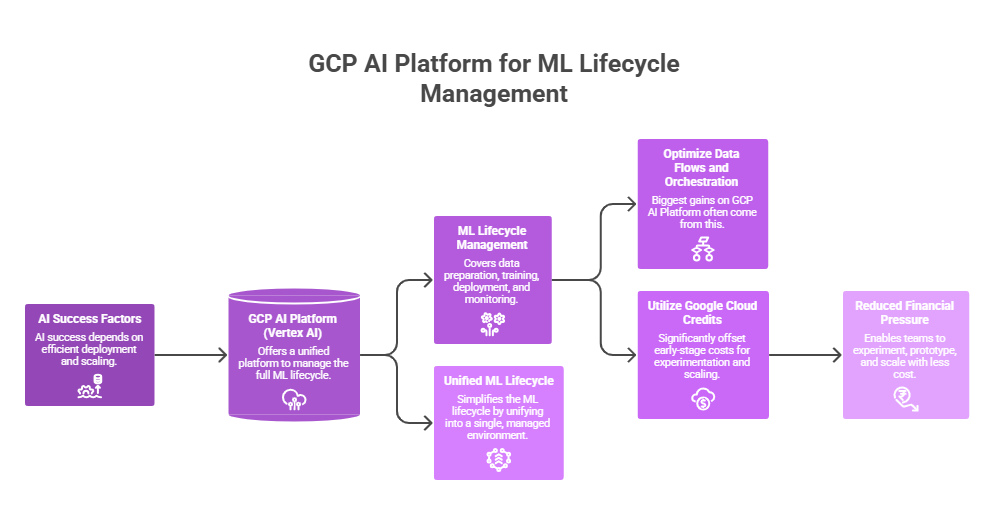
Nowadays, AI success depends on efficient deployment and scaling – and GCP AI Platform (Vertex AI) offers a unified platform to manage the full ML lifecycle.
In this guide, we’ll do a deep dive into the GCP AI Platform functionality – covering its mechanics, value areas, inefficiency drivers, optimization strategies, and more.
Key Takeaways
> Google Cloud AI Platform simplifies the ML lifecycle – by unifying data preparation, training, deployment, and monitoring into a single, managed environment.
> The biggest gains on Google Cloud AI Platform often come from optimizing data flows and orchestration.
> Google Cloud credits can significantly offset early-stage costs – enabling teams to experiment, prototype, and scale on Google Cloud AI Platform with reduced financial pressure.
See how much you can save on your stack
Pick your team’s tools!
Click to select one or more tools.


What’s your company size?
Just click to select.
What’s your business email?
We'll send you calculations right away
The email is flying to your inbox!
Beyond discounts, you may qualify for up to $100K in AWS credits.

What Is GCP AI Platform
GCP AI Platform (now part of Vertex AI) is a fully managed machine learning platform that enables teams to: build, train, deploy models, and monitor performance – all within a unified environment.
Unlike traditional approaches with fragmented tooling, GCP AI Platform unifies data processing, experimentation, deployment, and monitoring into a single standardized ML lifecycle.
| Traditional ML Workflow | GCP AI Platform Model |
| Separate tools for training and deployment | Unified platform |
| Manual setup and management | Fully managed infrastructure |
| Custom-built pipelines | Built-in pipeline orchestration |
| Ad hoc model deployment | Standardized deployment endpoints |
| High operational overhead | Reduced operational burden |
Functionally, this translates into:
- End-to-end pipeline orchestration;
- Native integration with data services;
- Centralized feature and metadata management;
- Scalable training infrastructure;
- Flexible deployment options;
- Built-in monitoring and feedback loops.
The key impact is not just operational efficiency – it’s alignment across data, models, and infrastructure. Teams move from managing disconnected components to managing a unified system of pipelines.
Core GCP AI Platform Components
Vertex AI Training
Using CPUs, GPUs, or TPUs, Vertex AI Training provides a fully managed production-grade environment for executing machine learning training workloads at scale.
In doing so, it abstracts infrastructure management and gives practitioners fine-grained control over how training jobs are configured and executed. In particular, it allows teams to:
- Submit containerized or prebuilt training jobs without provisioning clusters;
- Dynamically choose between CPUs, GPUs, and TPUs based on workload characteristics;
- Full compatibility with TensorFlow, PyTorch, scikit-learn, and custom containers;
- Native support for multi-worker and multi-node training strategies;
- Automated search (grid/random/Bayesian) to optimize model performance.
Vertex AI Pipelines
Vertex AI Pipelines enables you to automate and orchestrate end-to-end machine learning workflows in a reliable and repeatable way. It connects all stages of the ML lifecycle (data preparation, training, evaluation, deployment, etc.) into a structured pipeline.
Check out the table below, highlighting functional components of Vertex AI.
Vertex AI Training: Functional Components | |
| Component | Functionality |
Pipeline Definition | Defines workflow steps, dependencies, and execution logic using SDK or YAML |
| Components (Tasks) | Encapsulated steps with inputs/outputs, reusable across pipelines |
| Execution Engine | Orchestrates task execution, handles dependencies and parallelism |
| Metadata Tracking | Captures artifacts, metrics, lineage, and logs |
| Scheduling & Triggers | Supports cron jobs, event-based triggers, and manual runs |
| Version Control | Tracks versions of pipelines, components, and artifacts |
| Parameterization | Allows dynamic inputs (e.g., hyperparameters, dataset paths) |
| Caching | Reuses outputs of unchanged steps to avoid recomputation |
| Artifact Management | Stores and manages intermediate outputs (models, datasets) |
| Security & Access Control | Manages permissions and roles for pipeline execution |
Vertex AI Endpoints
Vertex AI Endpoints is responsible for deploying and serving trained machine learning models so they can generate predictions in real-world applications.
To better understand the functionality, explore a breakdown of core and advanced capabilities – covering both essential deployment features and more advanced production-level controls:
- The core capabilities (real-time predictions, batch predictions, model deployment, etc.) focus on enabling you to quickly deploy models and serve predictions at scale;
- Advanced capabilities provide the tools needed for reliability, monitoring, controlled rollouts, and long-term maintenance in real-world environments – see them below.
Vertex AI Endpoints Functionality Highlights | |
Core Capabilities | Advanced Capabilities |
| Real-time predictions | Model versioning |
| Batch predictions | Canary deployments |
| Model deployment | Monitoring & logging |
| Auto-scaling | Prediction drift detection |
| Traffic splitting | Security & access control |
Feature Store
Vertex AI Feature Store acts as a centralized repository where features are defined, versioned, and reused, ensuring that the same data transformations applied during model training are also used during prediction.
Feature Store decouples feature computation from model development, which allows teams to standardize feature definitions and reuse high-quality features across multiple models and use cases.
In practice, this means:
- Reduced data leakage and inconsistency risks;
- Faster experimentation through reusable feature pipelines;
- Improved collaboration between data scientists and engineers;
- Stronger production reliability via consistent feature access.
Here’s our perspective on efficient usage: before diving into adopting a feature store, note that requires upfront investment in defining, governing, and maintaining high-quality features. However, this pays off as systems scale, reducing duplication, inconsistencies, and long-term technical debt.
Model Registry
Vertex AI Model Registry is a centralized component for managing machine learning models across their entire lifecycle (thus, improving reproducibility, governance, and collaboration).
Functionally, it enables teams to version, organize, and control model releases, supporting safe deployment practices (f.e., rollback, promotion between environments, etc.).
In particular:
- Version tracking (manage model versions with clear lineage);
- Metadata management (store parameters, metrics, artifacts, etc.);
- Deployment tracking (monitor staging and production states);
- Model comparison (evaluate performance across versions).
How GCP AI Platform Works
GCP AI Platform works as a managed pipeline that takes a machine learning project from raw data all the way to live predictions.
At a high level, it works like this:
– Step 1: Data ingestion and preparation
Data is collected from sources such as BigQuery or Cloud Storage, then cleaned, transformed, and prepared for training. This step defines the quality and usability of the model inputs.
– Step 2: Model training
Models are trained using managed compute resources (CPU/GPU/TPU). The platform handles infrastructure provisioning, scaling, and execution, allowing teams to focus on model logic rather than setup.
– Step 3: Model registration
Once trained, models are stored and versioned in a registry. This enables reproducibility, comparison between versions, and controlled promotion to production.
– Step 4: Model deployment
Trained models are deployed to managed endpoints. The platform standardizes deployment, making it easier to expose models as APIs for real-time or batch inference.
– Step 5: Prediction serving
Predictions are generated either in real time (via API endpoints) or in batch jobs for large datasets. The system scales automatically based on demand.
– Step 6: Monitoring and feedback loop
Model performance, latency, and resource usage are continuously monitored using tools like Cloud Monitoring. This enables detection of drift, performance issues, and triggers for retraining.
Key Architectural Layers (GCP AI / Vertex AI) | ||
| Layer | Description | Key Functionality |
| Data Pipelines | Handles data flow from source to model-ready format | → Data ingestion → Transformation → Feature engineering |
| Training Infrastructure | Provides compute resources for model training | → Managed CPUs/GPUs/TPUs → Distributed training → Hyperparameter tuning |
| Model Registry | Centralized storage for trained models | → Versioning → Lifecycle management → Model tracking |
| Deployment Endpoints | Serves models for inference | → Real-time predictions → Batch predictions → Auto-scaling APIs |
| Monitoring Systems | Tracks model and system performance | → Logging & metrics → Drift detection → Alerting |
Free virtual cards for non-EU residents
Open in 1 working day, issue 100 virtual cards, and get up to 1.25% cashback.
Get a free account
Key Capabilities of GCP AI Platform
End-to-End ML Lifecycle Management
The platform supports distributed training across CPUs, GPUs, and TPUs, enabling teams to scale from small experiments to large production workloads.
However, note that resource selection directly impacts cost. Inefficient training loops and unnecessary use of high-performance hardware (e.g., GPUs/TPUs) can significantly increase spend without proportional benefits.
Scalable Training Infrastructure
Google Cloud AI Platform provides a scalable training environment that supports everything – from small experiments to large-scale, production workloads. Instead of managing infrastructure manually, teams can rely on fully managed resources that adapt to workload demands.
From what we’ve observed, this allows teams to focus on model development, benefit from flexible, high-performance compute options, and achieve consistent execution.
| GCP AI Platform: Compute Options Overview | |||
| Resource Type | Best For | Key Advantage | Cost Consideration |
| CPUs | Preprocessing, classical ML | Low cost, widely available | Slower for deep learning workloads |
| GPUs | Deep learning, parallel computation | High performance for neural networks | Expensive if underutilized |
| TPUs | Large-scale TensorFlow training | Extremely fast for specific workloads | High cost, limited flexibility |
Managed Model Deployment
Google Cloud AI Platform enables models to be deployed as scalable, production-ready endpoints. From a functional standpoint, it also provides the following:
> Versioned deployments
Deploy multiple model versions and control traffic splitting for A/B testing or gradual rollouts.
> Flexible deployment types
Support for both online (real-time) and batch prediction workloads depending on use case.
> Integrated monitoring
Track latency, error rates, and prediction performance directly within the platform.
> Secure endpoint management
Control access via IAM, authentication, and network configurations.
> Seamless CI/CD integration
Automate deployment pipelines and updates as part of broader MLOps workflows.
> Autoscaling policies
Configure min/max nodes and scaling behavior to balance performance and cost.
Experiment Tracking & Versioning
Within Google Cloud AI Platform, experiment tracking and versioning provide a structured way to capture and analyze the full lifecycle of model development. In particular, you can track:
- Model versions – allowing you to trace changes over time, compare iterations, and safely roll back to a previous version if performance degrades.
- Training parameters , which make it possible to reproduce experiments and understand what influenced model behavior.
- Performance metrics for objective comparison between experiments and helping identify the best-performing model for production.
GCP AI Experiment Tracking & Versioning: What You Can Track | |
| Component | What is Captured |
| Model Versions | Model artifacts, version IDs |
| Training Parameters | Hyperparameters, feature sets, dataset versions |
| Performance Metrics | Accuracy, loss, precision/recall, latency |
| Data Lineage | Source datasets and transformations |
| Experiment Metadata | Timestamps, authors, environment configs |
From our experience, this significantly improves reproducibility – however, at the same time, it only works when teams treat it as a strict enforced practice (not a passive feature). Reproducibility depends on consistently logging every relevant variable – from dataset versions and feature transformations to hyperparameters and environment configurations. If even one of these is missing or inconsistently recorded, the ability to reliably reproduce results breaks down.
Integration with Google Services
Google Cloud AI Platform integrates natively with the Google Cloud ecosystem (BigQuery, Cloud Storage, Dataflow, etc.), enabling seamless data-to-model workflows without complex setup. This, in turn, reduces engineering overhead and accelerates development. See a table with core integrations below.
Integration with GCP Ecosystem | ||
| Service | Role | What It Enables |
| BigQuery | Data analytics & querying | Enables fast analysis, feature engineering, and large-scale dataset processing |
| Dataflow | Data processing (ETL/streaming) | Supports batch and real-time pipelines for preparing ML data |
| Cloud Storage | Dataset and artifact storage | Provides scalable storage for datasets, models, and checkpoints |
| Cloud Monitoring | Observability & metrics | Tracks training jobs, endpoints, and infrastructure performance |
| Vertex AI Pipelines | Pipeline orchestration | Automates end-to-end ML workflows and reproducible pipelines |
| Cloud Functions | Event-driven automation | Triggers ML workflows (e.g., retraining on new data) |
| Pub/Sub | Event streaming | Enables real-time data ingestion and pipeline triggering |
| Artifact Registry | Model & container storage | Stores ML models, containers, and dependencies securely |
| Looker | Visualization & insights | Enables analysis of model outputs and business impact |
Top Use Cases for GCP AI Platform
✅ Case #1: Model Training & Experimentation
As one of the core use cases for Google Cloud AI Platform, model training and experimentation involves iterative cycles of training models, tuning hyperparameters, testing different datasets, comparing results to improve accuracy and performance, etc.
Here’s what defines this use case:
- Frequent training runs with varying parameters;
- Use of high-performance compute (especially GPUs/TPUs);
- Temporary resources that should be short-lived;
- Large volumes of intermediate artifacts (models, logs, checkpoints).
Let’s see how AWS EBS performs in this scenario.
GCP AI Platform for Application & Database Storage: Assessment Highlights | |
Primary value | Scalable model training |
Performance drivers | Compute selection, dataset size |
Operational impact | Accelerates experimentation |
Critical dependencies | Efficient pipelines, hyperparameter tuning |
Overall, we found out that model training and experimentation benefit greatly from managed infrastructure. However, without proper control, they can quickly become the largest and least predictable cost driver in the ML lifecycle.
In particular, our testing shows:
- Idle or forgotten training jobs are one of the most common cost leaks, especially when experiments are not properly tracked or terminated;
- Training duration is often longer than necessary (in most cases, due to lack of early stopping, inefficient code, or redundant runs);
- Duplicate experiments (slightly modified runs with similar configurations) significantly increase compute usage without proportional value;
- Artifacts can accumulate quickly (for example, unused models, checkpoints, logs, etc.).
✅ Case #2: Real-Time Inference
Real-time inference is a key production use case for Google Cloud AI Platform, where trained models are deployed and exposed via APIs to serve predictions instantly. This is critical for applications – recommendation systems, fraud detection, personalization engines, AI-powered user experiences, etc.
In this setup, models are hosted on managed endpoints and must deliver low-latency, high-availability responses under variable traffic conditions. Unlike training, which is batch-oriented, inference is latency-sensitive and user-facing, making performance consistency a top priority.
GCP AI Platform for Application & Database Storage: Assessment Highlights | |
Primary value | Serving predictions via APIs |
Performance drivers | Endpoint scaling, latency |
Operational impact | Enables AI-powered applications |
Critical dependencies | Load balancing, autoscaling |
Several aspects to be considered in this scenario:
- Latency is highly sensitive to model size and complexity, with larger models significantly increasing response time and infrastructure requirements;
- Cold starts can impact performance if scaling policies are too aggressive in scaling down;
- Traffic patterns matter. Bursty or unpredictable workloads require careful scaling strategies to avoid both delays and unnecessary cost.
✅ Case #3: End-to-End ML Pipelines
Automated ML workflows focus on orchestrating the entire ML lifecycle – from data ingestion and preprocessing to training, evaluation, deployment, and monitoring. This use case can be especially relevant for teams that need to scale ML operations, ensure reproducibility, and reduce manual coordination across multiple stages of the workflow. This way, instead of running isolated experiments or deployments, pipelines connect all steps into a continuous, structured process.
GCP AI Platform for Application & Database Storage: Assessment Highlights | |
Primary value | Automated ML workflows |
Performance drivers | Pipeline orchestration |
Operational impact | Reduces manual effort |
Critical dependencies | Workflow design, data consistency |
Our testing revealed the following:
- Pipelines significantly reduce manual coordination, especially in multi-step workflows involving data prep, training, deployment, etc.;
- Poorly designed pipelines (redundant steps, unnecessary recomputation) can increase compute costs without adding value;
- Parallel execution improves speed, but can also increase cost if not carefully controlled;
- Data consistency is critical. Inconsistent inputs across pipeline stages lead to unreliable outputs.
Scenarios Where Google Cloud AI Platform Is Not the Best Fit
❌ Simple ML use cases
For relatively simple models or lightweight workflows, the platform can introduce unnecessary overhead. Its abstractions and managed features are designed for scale, which may slow down development and increase costs compared to using notebooks or minimal infrastructure.
As an alternative, we recommend using lightweight tools (Jupyter Notebook, Google Colab, Scikit-learn, etc.) on a single VM.
❌ Highly custom ML workflows
From our experience, here’s what we’ve often seen: when workflows require non-standard pipelines or deep customization, additional tooling is often needed. While the platform supports orchestration, highly specialized setups may be easier to implement and control in self-managed environments.
In such cases, consider using flexible orchestration with Apache Airflow or container-based setups built on Kubernetes for greater control.
❌ Cost-sensitive experimentation
Frequent experimentation (especially with GPU-based training) can quickly increase costs. Without proper controls (scheduling, quotas, auto-shutdown mechanisms, etc.), short iterative cycles may lead to disproportionately high spending.
A more cost-efficient approach is to rely on preemptible or spot instances from Google Cloud or Amazon Web Services, combined with tools like MLflow to manage spending.
❌ Poor data quality
The platform optimizes model training and deployment, but it does not solve underlying data issues. If datasets are incomplete, inconsistent, or poorly labeled, the resulting models will remain unreliable regardless of the infrastructure used.
To address this, focus on strengthening data validation and preprocessing pipelines using tools (for example, Great Expectations or Apache Spark) before training models.
GCP AI Platform: Suitability Overview | ||
| Suitability | Use Case | Why It Works (or Doesn’t) |
| Highly suitable | Production ML systems | – Managed infrastructure reduces operational overhead – Scales training and inference seamlessly – Integrated lifecycle |
| Highly suitable | Real-time prediction APIs | – Managed endpoints with autoscaling – Low-latency serving – Standardized deployment and versioning |
| Highly suitable | MLOps & pipeline automation | – Built-in orchestration via Vertex AI Pipelines – Reproducible workflows – Reduced manual coordination |
| Highly suitable | Large-scale model training | – Supports GPUs/TPUs – Handles distributed training – Optimized for high-volume datasets |
| Moderate suitability | Batch predictions & offline inference | – Works well for scheduled jobs – Requires cost control for large -scale runs – Performance depends on resource configuration |
| Moderate suitability | Experimentation & prototyping | – Fast to start, but costs can scale quickly – Requires monitoring to avoid idle resources – Overhead may be unnecessary for simple models |
| Limited suitability | Highly custom ML workflows | – May require external tools/custom orchestration – Less flexibility than fully self-managed setups – Integration complexity can increase |
| Limited suitability | Cost-sensitive or small-scale ML | – Managed services can be overkill for simple use cases – Compute costs (especially GPUs) can grow quickly – Simpler tools may be more efficient |
Optimizing GCP AI Platform Costs: Best Practices
From an optimization standpoint, Google Cloud AI Platform requires continuous tuning. While it simplifies infrastructure compared to traditional ML workflows, costs can still grow quickly if resources, training jobs, and endpoints are not actively managed.
Immediate, High-Impact Areas for Improvement for GCP AI Platform | |||
| Strategy | Effort | Savings | Impact Speed |
| Reduce idle training resources | Low | High | Immediate |
| Shut down unused endpoints | Low | High | Immediate |
| Optimize machine types (CPU/GPU) | Low | High | Immediate |
| Limit training job duration | Low | Medium | Short-term |
| Clean up unused models/artifacts | Low | Medium | Short-term |
To achieve quick wins in GCP AI Platform cost optimization, follow these recommendations:
- Stop idle resources – ensure training jobs and endpoints are not left running unnecessarily;
- Right-size compute – select appropriate CPU/GPU configurations based on actual workload needs;
- Remove unused endpoints – delete inactive deployed models that still incur costs;
- Control training duration – avoid excessive training cycles or inefficient iterations;
- Clean up artifacts – regularly remove unused models, datasets, intermediate outputs, etc.
Long-Term Cost Optimization Strategies for GCP AI Platform | |||
| Strategy | Effort | Savings | Impact Speed |
| Implement automated resource scheduling | Medium | High | Ongoing |
| Optimize training pipelines | Medium | High | Medium-term |
| Use preemptible/spot instances where possible | Medium | High | Short-term |
| Standardize model deployment practices | Medium | Medium | Medium-term |
| Introduce cost monitoring & alerting | Low | High | Immediate |
| Optimize data storage and retention | Low | Medium | Ongoing |
| Align compute with workload lifecycle | Medium | High | Medium-term |
| Regularly audit ML resources | Low | High | Ongoing |
Meantime, to maintain long-term efficiency, we recommend these best practices:
- Automate resource scheduling – stop training jobs and endpoints outside of active use windows;
- Optimize pipelines – reduce redundant steps and improve training efficiency;
- Leverage preemptible instances – lower costs for non-critical or batch training workloads;
- Standardize deployments – avoid unnecessary duplication of endpoints and models;
- Introduce cost visibility and alerts – monitor usage trends and detect anomalies early;
- Manage data lifecycle – archive or delete unused datasets and artifacts;
- Align compute with lifecycle – ensure dev/test workloads don’t consume production-level resources;
- Perform regular audits – continuously review models, endpoints, and pipelines for optimization opportunities.

We can unlock discounts on 10,000+ tools you already use.
Leverage Google Cloud Credits for AI Adoption with Spendbase
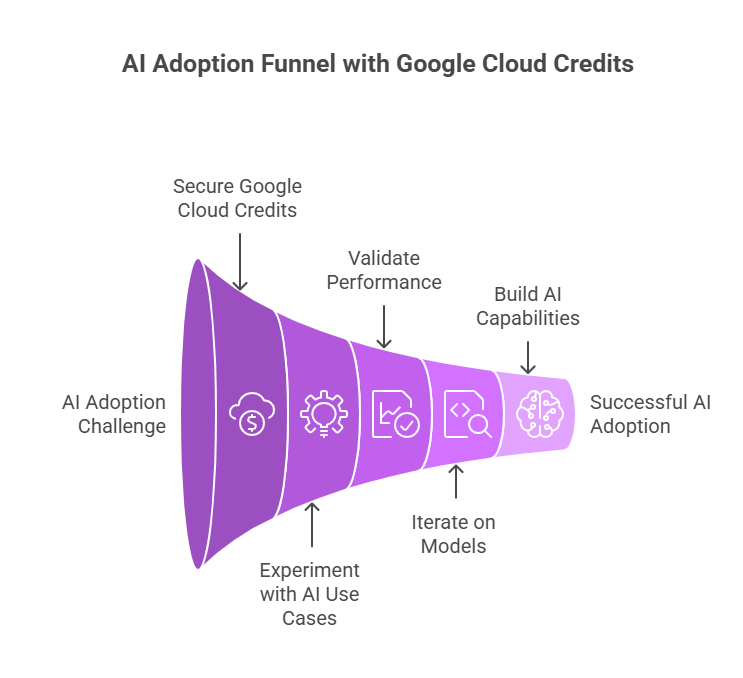
Adopting AI often comes with one major barrier: uncertain costs at the experimentation stage. Before committing to large-scale investments, businesses need space to test, validate, and iterate.
To achieve that, Google Cloud credits, secured with Spendbase, create a rare advantage of the ability to experiment without financial pressure. Businesses can unlock up to $200K (for Seed-Series A startups) and up to $25K Credits (for software startups).
This, in turn, enables businesses to:
- Test multiple AI use cases in parallel;
- Validate real-world performance early;
- Iterate on models without budget constraints;
- Build internal AI capabilities safely.
Besides cloud credits, Spendbase offers a range of additional cost optimization opportunities: SaaS discounts, shadow IT elimination, vendor negotiation services, corporate cards for spend control, and more.


Get discounts on your team’s favorite apps
Find deals for 10%, 30%, or even 70% off in our discount marketplace.
Check Discounts



