











Cost optimization
Google Cloud SQL: Guides, Pricing, Cost Optimization

To address current challenges of scaling applications (traffic spikes, unpredictable workloads, performance bottlenecks, high availability requirements, you name it), organizations increasingly rely on managed database services – and Google Cloud SQL is one of the most widely adopted solutions in this space.
In this guide, we’ll explore Google Cloud SQL through an operational and financial lens: how it works, where it delivers the most value, what drives inefficiencies, and which optimization strategies are essential for long-term efficiency.
Key Takeaways
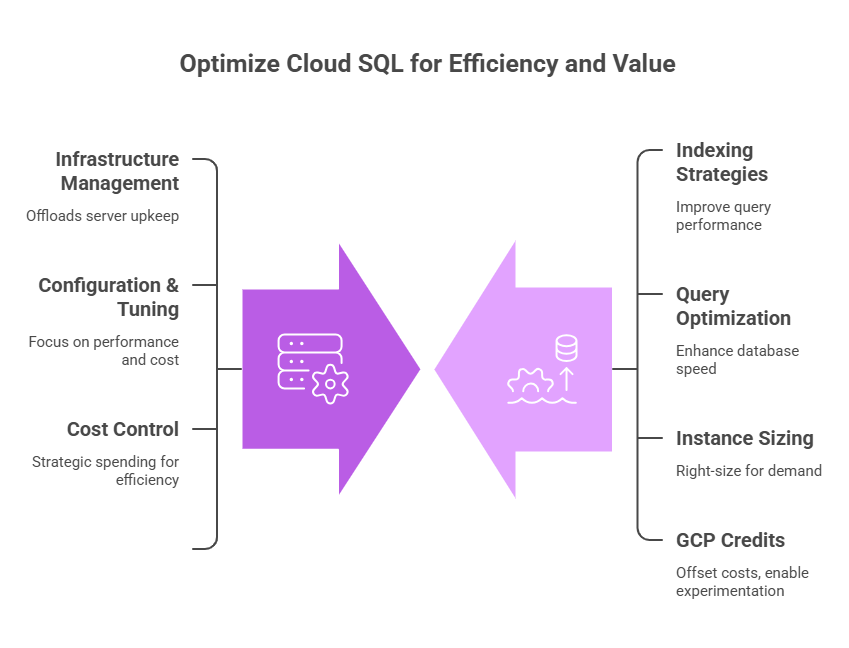
> Google Cloud SQL removes infrastructure management and shifts responsibility toward configuration, performance tuning, and cost control.
> Most Google Cloud SQL inefficiencies originate from workload design: poor indexing, unoptimized queries, overprovisioned instances, etc.
> GCP credits can offset initial costs and give teams the flexibility to experiment, validate architecture decisions, iterate without immediate financial pressure, and more.
See how much you can save on your stack
Pick your team’s tools!
Click to select one or more tools.


What’s your company size?
Just click to select.
What’s your business email?
We'll send you calculations right away
The email is flying to your inbox!
Beyond discounts, you may qualify for up to $100K in AWS credits.

What Is Google Cloud SQL
Google Cloud SQL is a fully managed relational database service designed to remove the burden of infrastructure management – and thus, eliminating the need to provision servers, perform manual backups, or manage patching cycles.
It supports MySQL, PostgreSQL, and SQL Server – this way, teams can run production-grade databases with built-in high availability, automated backups, seamless scaling, and automated maintenance.
Unlike traditional networking-heavy database setups, Google Cloud SQL provides a fully managed model. See the key differences in the table below.
| Traditional Networking vs Google Cloud SQL Model | |
| Traditional Networking | Google Cloud SQL |
| Manual provisioning | Managed instances |
| Infrastructure ownership | Platform-managed infrastructure |
| Manual failover setup | Built-in high availability |
| Custom backup logic | Automated backups |
| High operational burden | Configuration-driven management |
From our perspective, these core capabilities make Google Cloud SQL particularly valuable:
> Fully managed operations, covering automated backups, updates, patching, failover, and more;
> High availability by design, with built-in replication and failover options to support production workloads;
> Seamless GCP integration – including native connectivity with BigQuery, Cloud Monitoring, and Dataflow;
> Built-in security controls (IAM integration, encryption at rest and in transit, automated patching, etc.);
> Easy to scale compute and storage without managing the underlying infrastructure.
Meantime, here’s another important aspect to consider: from what we’ve seen in practice, many teams misinterpret the core value and functionality of Google Cloud SQL, thinking it simplifies databases – when, in reality, it simplifies infrastructure around databases. This means, teams are still responsible for how well it performs within their system: including database design, performance, cost optimization, you name it.
Core Google Cloud SQL Components & Capabilities
Database Engine Behavior
When working with Google Cloud SQL, one of the first (and most impactful) decisions is choosing the database engine. From our experience, this choice is often underestimated early on – but it directly influences performance, scalability, cost efficiency, and other crucial factors.
Each supported engine behaves differently under load, and this choice has long-term implications:
- MySQL – works well for simpler, read-heavy workloads with moderate scalability needs;
- PostgreSQL – supports more advanced querying and extensibility, but may require deeper tuning;
- SQL Server – offers enterprise-grade features (but introduces licensing and operational complexity).
Google Cloud SQL Database Engine Comparison | |||
| MySQL | PostgreSQL | SQL Server | |
| Best for | Simpler, read-heavy workloads | Complex queries, extensibility | Enterprise use cases |
| Performance | Fast for straightforward queries | Strong for complex and analytical queries | Optimized for enterprise workloads |
| Scalability | Moderate | High (with proper tuning) | High (within enterprise environments) |
| Features | Basic, relational | Advanced querying | Rich, enterprise-level |
| Ease of use | Easy | Moderate | More complex setup |
| Cost considerations | Open-source, lower cost | Open-source, cost-efficient | High licensing costs |
| Trade-off | Limited flexibility for complex workloads | Requires tuning | Cost, operational overhead |
Instance Sizing (Compute Layer)
Google Cloud SQL relies on predefined machine types, where CPU and RAM directly determine how queries are processed. This means:
– Performance is directly tied to instance size. You’re not scaling gradually, you’re moving between tiers.
– Scaling requires resizing the instance (and sometimes restarts) – hence, teams tend to overprovision early to avoid disruptions.
– Overprovisioning is common to “stay safe”. Functionally, this leads to paying for capacity that is rarely used but always billed.
To learn more, refer to the official Google Cloud documentation on quotas and limits.
Storage & I/O Performance
Storage in Google Cloud SQL actively defines how the database behaves under load and often becomes the primary limiting factor as systems scale. In particular:
> All reads and writes go through persistent disks;
> Disk performance determines how quickly data can be fetched or written;
> I/O limits (throughput and IOPS) directly impact query execution time.
Due to these aspects, unoptimized storage often becomes a hidden bottleneck. Besides, most importantly, storage-related issues in Google Cloud SQL rarely appear as obvious errors – typically, they show up as gradual slowdowns, inconsistent performance, or unexplained latency spikes (as seen in the table below).
Common Google Cloud SQL Storage Bottlenecks & Their Impact | ||
| Scenario | Impact | Optimization |
| Write-heavy workload | I/O saturation, slower transactions, increased latency | → Batch writes where possible → Optimize indexes → Use appropriate disk type (SSD) → Scale storage throughput |
| Large dataset scans | High disk reads, slow query execution | → Add indexes to avoid full scans → Partition large tables → Limit result sets → Use caching where applicable |
| Index-heavy queries | Excessive lookups, increased I/O pressure, higher latency | → Reduce unnecessary indexes → Optimize query plans → Balance read vs write performance |
| Analytical queries | Large sequential reads, throughput limits, performance drops | → Offload analytics to separate systems → Use read replicas → Pre-aggregate data |
| Under-provisioned storage | Low IOPS, queueing, performance spikes | → Increase disk size or performance tier → Monitor IOPS & throughput metrics → Plan for data growth |
High Availability (HA)
High Availability (HA) in Google Cloud SQL is implemented through regional deployments, where a primary instance is paired with a standby instance in a different zone.
Data is synchronously replicated between the primary and standby, ensuring that both remain in sync at all times. If the primary instance becomes unavailable, Cloud SQL automatically performs a failover, promoting the standby to primary with minimal disruption.
Functionally, it works as following:
- Every write operation is replicated to the standby before being confirmed;
- Failover is triggered by system health checks (no manual intervention required);
- Instances are distributed across zones to protect against localized infrastructure failures;
- Applications reconnect to the new primary instance after failover (requires proper retry logic);
- Planned updates can leverage failover to reduce downtime impact.
Fully Managed Database Operations
Google Cloud SQL automates core database management tasks (backups, updates, failover, replication, etc.). From our experience, this removes much of the operational burden typically associated with maintaining relational databases.
This, in turn, enables several further benefits:
- Reduced operational overhead for engineering teams;
- Improved reliability through automated failover and backups;
- Faster setup and maintenance of production-ready databases.
| Google Cloud SQL’s Managed Operations: Capabilities vs Impact | |||
| Capability | What it does | Performance Impact | Setup & Management |
| Automated backups | Automated backups reduce data loss risk | Medium | Easy |
| Automatic patching & updates | Updates applied automatically, reducing vulnerabilities | Medium | Easy |
| Built-in replication | Data replication improves availability | High | Easy |
| Managed failover | Automatic failover minimizes downtime | High | Easy |
| Instance provisioning | Fast setup with minimal manual effort | Medium | Very easy |
Vertical Scaling Approach
Google Cloud SQL primarily relies on vertical scaling – increasing instance size (CPU, RAM, and storage) to handle higher workloads. This means resources are upgraded by moving to larger predefined instance tiers.
Some must-consider aspects include:
– Compute resources (vCPU and memory) are tied to the selected instance type, so scaling requires switching to a larger configuration;
– Storage can be increased separately from compute, but cannot be easily reduced once allocated;
– Depending on the change, instance resizing can involve restarts or planned maintenance windows;
– There’s no automatic horizontal scaling: unlike distributed systems, Cloud SQL does not natively scale out across multiple nodes for write workloads.
Built-In Security Foundation
Cloud SQL includes a range of built-in security mechanisms to help teams standardize access control, built-in data protection, and reduce exposure to vulnerabilities. Let’s review these mechanisms below.
> IAM integration
Cloud SQL integrates with Identity and Access Management to control who can access database resources. Access can be granted based on roles and permissions, enabling fine-grained control over users, services, and applications.
> Encryption at rest
All data stored in Cloud SQL is automatically encrypted when written to disk. This includes database files, backups, temporary storage, etc.
> Encryption in transit
Data moving between applications and the database is encrypted using secure protocols (e.g., TLS).
> Automated patching
Google automatically applies security patches and updates to the underlying infrastructure and database engine.
High Availability & Failover
Google Cloud SQL supports high availability (HA) configurations through regional deployments, where a primary instance is paired with a standby instance in a different zone.
In this setup, data is synchronously replicated to the standby instance, ensuring consistency and readiness for failover.
Here’s how it works in practice:
- Synchronous replication. Data is continuously replicated to the standby instance to prevent data loss.
- Automatic failover. Failover is triggered without manual intervention, reducing downtime.
- Zonal isolation. Primary and standby instances are placed in different zones to protect against localized failures.
- Managed maintenance. Planned maintenance events are handled with minimal impact, often leveraging failover mechanisms.
However, it’s important to note: high availability improves reliability, but it also increases cost.
Without aligning HA configurations to actual business needs, teams may end up paying for resilience they don’t fully require.
Google Cloud SQL’s High Availability: Capabilities vs Trade-offs | ||
| Capability | Benefit | Trade-off |
| Synchronous replication | No data loss on failover | Increased write latency |
| Automatic failover | Minimal downtime | Requires proper app retry logic |
| Multi-zone deployment | Protection from zonal failures | Higher infrastructure cost |
| Managed failover process | No manual intervention | Limited customization |
| Standby instance | High resilience | Nearly doubles compute cost |
How Google Cloud SQL Works
At its core, Google Cloud SQL runs database engines inside a fully managed environment, as illustrated in the architecture banner below. The flow is straightforward:
- Step 1. Your application connects via a static (or private) IP
- Step 2. Queries are processed within the managed instance (VM)
- Step 3. Data is stored on persistent disks for durability and performance
- Step 4. Built-in services handle logging, monitoring, backups, and replication automatically
- Step 5. A standby instance enables automatic failover without manual intervention
However, beneath this simplicity lies a critical reality: performance is still determined by how the database is used (not how it is hosted). This means that even with Google Cloud SQL handling infrastructure, outcomes still depend on your decisions – like the ones we’ve highlighted in the table below.
| What Determines Performance in Google Cloud SQL | |
Area | What It Affects |
| Query design | CPU usage, latency, overall responsiveness |
| Schema structure | Scalability, data access efficiency, bottlenecks |
| Indexing strategy | Read/write performance, query speed |
| Instance sizing | Cost efficiency, ability to handle load |
| Connection management | Stability, resource utilization |
| Workload patterns | Contention, system behavior under load |
| Data growth | Storage costs, long-term query performance |
Free virtual cards for non-EU residents
Open in 1 working day, issue 100 virtual cards, and get up to 1.25% cashback.
Get a free account
Top Use Cases for Google Cloud SQL
For Google Cloud SQL, suitability is first and foremost defined by the following aspects:
> Relational model fit
If your data is structured (tables, relationships, clear schemas) and queries rely on joins and transactions, it’s a good fit.
> Vertical scaling approach
If you can handle growth by increasing CPU/RAM on a single instance (rather than distributing across many nodes), it aligns well
> Predictable usage patterns
If traffic is relatively stable (no extreme spikes), you’ll get consistent performance and better cost control.
> Query structure
If your queries are repeatable and can be optimized with indexing, performance will scale reliably
> Concurrency levels
If your system operates within moderate parallel usage or can be optimized with pooling, it will perform well.
> Cost sensitivity
If your workload runs consistently (not idle or highly variable), costs will be easier to manage and justify.
Google Cloud SQL: Suitability Overview | ||
| Suitability | Use Case | Why |
| Highly suitable | Web & mobile app backends (OLTP) | – Predictable queries – Strong consistency – Managed reliability |
| Highly suitable | SaaS platforms (multi-tenant, steady load) | – Structured schemas – Repeatable patterns – Stable performance |
| Highly suitable | Internal systems (ERP, CRM) | – Steady usage – Low ops overhead – Built-in HA/backups |
| Highly suitable | Lift-and-shift migrations | – Minimal changes – Familiar engines – Fast setup |
| Moderate suitability | APIs & microservices | – Works at moderate scale – Needs query/connection tuning |
| Moderate suitability | Read-heavy apps | – Read replicas help – Adds cost/complexity |
| Moderate suitability | Medium-scale systems | – Vertical scaling limits growth |
| Moderate suitability | Hybrid workloads | – Analytics can impact OLTP |
| Not suitable | Distributed, horizontal scaling | – Single-node limits – Poor multi-region scaling |
| Not suitable | Highly variable workloads | – Always-on billing – Overprovisioning |
| Not suitable | Analytics / data warehousing | – Not built for large scans – Resource contention |
| Not suitable | Ultra high concurrency | – Connection limits – Contention issues |
| Not suitable | Poor schema/query design | – Inefficiencies scale – Higher cost/performance issues |
When opting for Google Cloud SQL, what matters most is understanding where it naturally fits and where it doesn’t. Based on our hands-on experience and testing, we’ve observed Cloud SQL perform exceptionally well in structured, predictable environments – but also become a constraint when pushed beyond its design boundaries.
Considering that, let’s explore several specific practices.
✅ Case #1: Web & Application Backends
From what we’ve observed, Google Cloud SQL is highly effective for applications that rely on structured, transactional data (user profiles, orders, sessions, configurations, etc.).
For this scenario, we evaluated Cloud SQL as the primary database for a web and mobile application backend handling user interactions, authentication, and transactional operations. Let’s see how Google Cloud SQL performed in this case.
During testing, several important observations emerged:
- Overall, Google Cloud SQL provided stable performance for transactional workloads with consistent query patterns.
- Managed features (like backups and failover) significantly reduced operational complexity.
- Well-indexed queries delivered predictable response times even under moderate load.
- However, inefficient queries quickly increased CPU usage and affected performance.
- To maintain stability under concurrent access, we applied connection management (pooling).
To conclude, Cloud SQL proved highly effective for application backends, particularly when workloads are structured and predictable. However, performance depends heavily on proper query and schema design. Therefore, remember to optimize schema and queries around real workloads, right-size and monitor resources continuously, and scale intentionally.
| Google Cloud SQL for Backends: Assessment Highlights | |
Primary value | Reliable transactional database |
Performance drivers | Query efficiency, indexing |
Operational impact | Reduces infrastructure overhead |
Critical design dependencies | Schema design, connection management |
✅ Case #2: Lift-and-Shift Migrations
The second scenario focused on migrating an existing on-premise relational database to the cloud with minimal architectural changes. In this setup, Cloud SQL was used to replicate the existing database environment while offloading infrastructure management to Google Cloud.
Our testing revealed several key insights:
- Migration to Cloud SQL was relatively straightforward with minimal changes to application logic.
- Managed backups, updates, and failover improved reliability compared to on-prem setups.
- Initial performance closely matched the source system when properly sized.
- On the downside, unoptimized legacy queries carried over inefficiencies into the cloud environment.
- To achieve cost and performance efficiency, we needed to carry out post-migration tuning.
| Google Cloud SQL for Lift-and-Shift Migrations: Assessment Highlights | |
Primary value | Quick migration from on-prem to cloud |
Performance drivers | Compatibility and tuning |
Operational impact | Simplifies infrastructure |
Critical design dependencies | Post-migration optimization |
✅ Case #3: SaaS Platforms
Next, we analyzed Google Cloud SQL as the core database for a SaaS platform with steady traffic patterns and a multi-tenant architecture. In this scenario, Google Cloud SQL was used to handle transactional workloads, tenant data isolation, and consistent performance under predictable demand, to name a few requirements.
From our observations, Google Cloud SQL handled the task particularly well. Doing so, it performed as follows:
- Managed scaling simplified infrastructure planning for growing user bases;
- Consistent schema design enabled stable performance across tenants.
- Built-in backups and high availability significantly improved reliability.
Meantime, we also noticed several considerations. In particular:
> High concurrency required careful connection and query optimization. To handle it, we implemented connection pooling, limited active connections per service, and optimized high-frequency queries to reduce lock contention and CPU spikes.
> Query performance became a bottleneck under load. To address this, we introduced targeted indexing, analyzed execution plans, and refactored heavy queries to eliminate full table scans.
| Google Cloud SQL for SaaS Platforms: Assessment Highlights | |
Primary value | Managed database for scalable SaaS applications |
Performance drivers | Concurrency handling, indexing, workload distribution |
Operational impact | Supports growth without infrastructure overhead |
Critical design dependencies | Tenant design, schema consistency |
Scenarios Where Google Cloud SQL May Not Be the Best Fit
❌ Horizontally scalable workloads
Google Cloud SQL follows a vertically scalable model (where performance improves by increasing resources on a single instance). From our experience, there’s an often-overlooked aspect: while effective initially, this approach becomes limiting for systems that need to scale across multiple nodes or regions.
In such scenarios, two main things happen: 1 – performance gains start to plateau, 2 – high concurrency and large datasets introduce contention and latency.
Therefore, for these cases, distributed databases (for example, Google Cloud Spanner) or other horizontally scalable systems can be a better fit.
❌ Highly variable workloads
Google Cloud SQL relies on provisioned capacity, which means resources are billed continuously regardless of actual usage. For workloads with fluctuating demand, this typically leads to several inefficiencies:
- Instances are typically sized for peak load, but remain underutilized most of the time;
- Resources continue to incur costs even during periods of low or no activity, leading to poor alignment between usage and spending;
- CPU and memory often sit idle during off-peak periods, while scaling adjustments require manual intervention and are not always immediate.
Because of that, serverless or auto-scaling alternatives (AlloyDB for PostgreSQL, Google Cloud Spanner, Firestore, etc.) can align much better with these patterns.
❌ Analytical processing
Google Cloud SQL is designed for transactional workloads – not large-scale analytics. Because of this, analytical queries that scan large datasets and perform aggregations can quickly consume resources and degrade performance.
For this reason, analytics is better handled by platforms like BigQuery (or other platforms that are built for parallel data processing at scale).
❌ Poorly optimized schemas
Another common misconception: Google Cloud SQL does not eliminate the need for proper database design. Schema structure, indexing, and query patterns directly affect performance and cost – and, without optimization, queries process more data than necessary and require higher resource usage. This, in turn, significantly increases costs, too.
As an alternative, a more effective approach is to focus on efficient schema design and query optimization from the start.
Optimizing Google Cloud SQL: Best Practices
From our experience, improving cost efficiency in Google Cloud SQL often starts with a few simple fixes. To reduce unnecessary spend and improve performance, we recommend following these steps:
- Right-size instances – continuously review CPU and memory utilization, downsize overprovisioned instances, avoid sizing for peak load only, align capacity with real usage patterns;
- Optimize queries and indexing – identify slow queries, reduce full table scans, apply indexing where needed, simplify joins and data retrieval logic;
- Clean up unused data – remove obsolete records, archive cold data to cheaper storage, control table growth, avoid paying for unused storage;
- Control high availability usage – enable HA only for critical workloads, review failover requirements, avoid defaulting to high-cost configurations;
- Monitor resource usage continuously – track CPU, disk I/O, query latency, and connection patterns, identify anomalies early, and adjust configurations proactively.
| Immediate, High-Impact Areas for Improvement for Google Cloud SQL | |||
| Strategy | Effort | Savings | Impact Speed |
| Align instance size with workload | Low | High | Immediate |
| Remove stale or unused data | Low | Medium | Short-term |
| Choose the right storage configuration | Low | Medium | Short-term |
| Enable HA selectively (not by default) | Low | High | Short-term |
| Track resource usage (CPU, disk) | Low | High | Short-term |
However, for long-term efficiency, the above-mentioned quick wins won’t be sufficient. First and foremost, it’s important to focus on sustainable architecture, thoughtful schema design, and proactive performance tuning – for example:
- Refining query patterns – standardize query design, eliminate redundant queries, optimize execution plans, reduce unnecessary data processing;
- Improving connection management – analyze connection spikes, implement pooling strategies, prevent excessive open connections, stabilize workload behavior;
- Enhancing storage and I/O efficiency – align storage type with workload needs, reduce read/write amplification, monitor throughput bottlenecks;
- Implementing continuous observability – set up alerts, track performance trends, correlate usage with cost, ensure ongoing optimization;
- Distributing workloads across services – offload analytics and heavy processing to specialized GCP services to reduce database strain.
| Long-Term Efficiency Improvements for Google Cloud SQL | |||
| Strategy | Effort | Savings | Impact Speed |
| Improve query structure and indexing | Medium | High | Short-term |
| Minimize full table scans | Medium | High | Short-term |
| Analyze and optimize connection behavior | Medium | Medium | Ongoing |
| Enhance disk I/O performance | Medium | High | Short-term |
| Implement continuous monitoring practices | Medium | High | Ongoing |
Beyond Google Cloud SQL: Why Database Design Still Matters
One of the most important insights from our experience is that Google Cloud SQL doesn’t solve database design. It removes infrastructure management, but the core responsibility remains unchanged.
From our experience, poor design decisions will surface regardless of the platform – they simply manifest differently (often as performance issues, scaling limitations, steadily increasing costs, or others).
Use the checklist below to quickly assess whether your setup is aligned with best practices, and if there are hidden inefficiencies that may surface as you scale.
Assessing Google Cloud SQL’s Performance & Efficiency: Practical Checklist Give each point a score based on the following criteria: 0 – not addressed, 1 – partially addressed, 2 – well implemented |
Score Interpretation: 0-6 – High risk (likely performance and cost issues), 7-11 – Moderate ( improvements needed to scale efficiently), 12–16 – Strong (well-optimized & scalable setup). |
Google Cloud SQL Pricing Overview
Google Cloud SQL follows a provisioned, consumption-based pricing model, where costs are primarily driven by allocated resources rather than actual usage. While this simplifies planning, it also means that inefficiencies can persist if resources are not actively optimized.
Unlike serverless databases, Cloud SQL instances run continuously, so even idle capacity contributes to cost.
Its main cost drivers include:
- Instance configuration – machine type (vCPU, RAM) and database engine selection;
- Storage usage – provisioned disk size and type (SSD vs HDD);
- High availability (HA) – standby instances in multi-zone setups;
- Backup storage – automated backups and retained snapshots;
- Network traffic – especially cross-zone and outbound data transfer.
See a simplified breakdown below – or check out the official Google Cloud SQL pricing page for more details.
Pricing Breakdown: Google Cloud SQL | ||
| Pricing Component | Behavior | Price Range |
| Instance (vCPU + RAM) | Charged per provisioned instance-hour | $0.03–$0.50+ per hour |
| Storage (SSD/HDD) | Charged per GB provisioned | $0.04–$0.17 per GB-month |
| Backup Storage | Charged for stored backups | $0.08 per GB-month |
| High Availability | Standby instance mirrors primary | 2× instance cost |
| Network Egress | Charged for outbound data transfer | $0.05–$0.19 per GB (varies by destination and region) |
| Aggregate Cost (moderate workload) | Combined compute + storage | $50–$300+ per month |
Breaking Down Cloud SQL Costs: A Real-World Scenario
To illustrate how Google Cloud SQL pricing plays out in practice, let’s look at a mid-sized application with a typical production setup. This scenario depicts a common SaaS or internal business system that runs a transactional database, with standard storage, backups, and monitoring enabled.
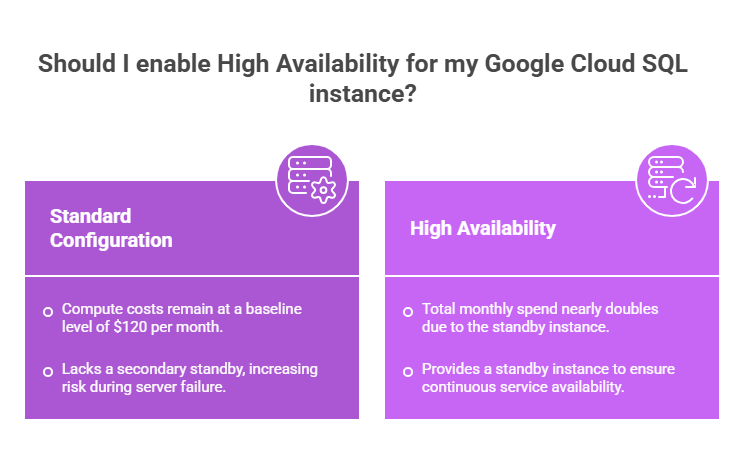
In a setup like this, the following:
- Compute dominates the cost structure, especially when high availability is enabled;
- HA configurations can nearly double total spend;
- Storage and backups start small but scale steadily with data growth;
- Ancillary costs (network, monitoring) are easy to overlook but add up over time.
See more details, along with cost estimates, in the table below.
Estimated Google Cloud SQL Monthly Costs for a Mid-Size Deployment | ||
| Component | Usage | Monthly Cost |
| Compute instance (2 vCPU, 8 GB RAM) | Full-time (730 hrs) | $120 |
| SSD storage | 100 GB | $17 |
| Automated backups | 7-day retention | $5 |
| Network egress | 50 GB | $6 |
| High availability standby | Enabled | $120 |
| Monitoring & logging | Baseline usage | $10 |
| Total (with HA) | $278/month | |
Common Cost Pitfalls in Google Cloud SQL
From our experience, most cost inefficiencies follow predictable patterns: once you spot them, they’re relatively easy to fix. Some of the common ones include:
- Overprovisioned instances. Allocating larger instances than needed leads to continuous underutilization and unnecessary cost.
- Idle or underused databases. Development and staging environments often run continuously without delivering value.
- Inefficient queries. Poor indexing and unoptimized queries increase CPU and I/O usage, driving up costs.
- Uncontrolled storage growth. Data accumulation without lifecycle management increases storage and backup costs.
- Unnecessary high availability. HA is sometimes enabled by default, doubling cost without a clear requirement.
Google Cloud SQL: Capabilities vs Cost Risks | ||
| Capability | Cost Risk & Impact | Optimization |
| Instance scaling (vertical) | Overprovisioning, unused CPU/RAM, unnecessary spend | → Right-size based on usage → Monitor CPU/memory → Start small & scale gradually |
| Always-on instances | Idle resources, continuous billing, low utilization | → Stop/schedule non-prod → Automate shutdowns → Separate environments → Remove unused instances |
| Query execution | Inefficient queries, high CPU usage, increased I/O costs | → Optimize queries → Add indexes → Avoid full scans → Cache frequent queries |
| Storage & backups | Data growth, higher storage costs, increasing backup costs | → Archive old data → Remove unused data → Adjust retention → Use compression |
| High availability (HA) | Duplicate resources, increased infrastructure cost, overprovisioning | → Enable only if needed → Review SLA needs → Use selectively → Reassess regularly |
| Monitoring & logging | Excess logs, higher observability costs, unnecessary data retention | → Tune log levels → Reduce verbosity → Export key metrics only → Clean up logs |
| Connections handling | Too many connections, resource contention, performance degradation | → Use pooling → Optimize access → Set limits/timeouts → Reduce overhead |
Google Cloud SQL Setup & Governance: Step-by-Step Checklist
A structured setup process helps avoid common pitfalls like overprovisioning, poor performance, and unnecessary spending. Use the checklist below to stay on track – and, for more details, check out the Google Cloud documentation article about planning your SQL Server migration to Cloud SQL.
| Google Cloud SQL Setup & Governance Checklist |
| 1. Define workload & expectations |
| ☐ Clarify workload type (transactional, analytical, hybrid) ☐ Estimate traffic patterns and peak demand ☐ Set performance and latency targets ☐ Forecast data growth and storage needs ☐ Define availability and failover requirements |
| 2. Plan database architecture |
| ☐ Select the appropriate engine (PostgreSQL, MySQL, SQL Server) ☐ Design schema with scalability in mind ☐ Plan indexing strategy upfront ☐ Separate environments (prod, staging, dev) ☐ Ensure flexibility for future scaling |
| 3. Configure compute & scaling |
| ☐ Choose instance size based on real usage (not assumptions) ☐ Avoid overprovisioning for rare peak loads ☐ Understand vertical scaling constraints ☐ Define when and how to scale ☐ Validate performance under realistic load |
| 4. Set up storage & backups |
| ☐ Select the right storage option (SSD vs HDD) ☐ Configure backup frequency and retention ☐ Track storage growth over time ☐ Implement data cleanup or archiving policies ☐ Avoid allocating excess storage upfront |
| 5. Optimize performance early |
| ☐ Review and optimize query patterns ☐ Minimize full table scans ☐ Apply indexes where needed ☐ Monitor slow queries and execution plans ☐ Optimize joins and data access logic |
| 6. Enable monitoring & visibility |
| ☐ Activate Cloud Monitoring and logging ☐ Track CPU, memory, disk I/O, and latency ☐ Set up alerts for anomalies ☐ Monitor connection spikes and usage patterns ☐ Regularly review metrics for optimization |
| 7. Apply security & access controls |
| ☐ Configure Identity and Access Management with least privilege ☐ Enable encryption (at rest and in transit) ☐ Restrict network access (private IP, allowlists) ☐ Secure credentials and secrets ☐ Audit access and activity regularly |
| 8. Manage cost proactively |
| ☐ Continuously adjust instance size based on usage ☐ Stop or schedule non-production environments ☐ Reassess high availability requirements ☐ Remove unused data and resources ☐ Monitor costs and optimize continuously |
| 9. Test, validate, improve |
| ☐ Run performance and stress tests ☐ Simulate failover scenarios ☐ Analyze real usage behavior ☐ Identify inefficiencies and optimize ☐ Continuously refine setup as needs evolve |

We can unlock discounts on 10,000+ tools you already use.
How Spendbase Helps Optimize Google Cloud SQL Through GCP Credits
One of the biggest missed opportunities in Cloud SQL optimization is not fully leveraging available GCP credits. Many teams either don’t apply, underutilize them, or use them without a clear cost strategy.
As an official GCP Partner, Spendbase helps you turn credits into a structured cost advantage. With Spendbase guidance from seasoned cost optimization experts, you get:
- Access to GCP credits – up to $25K for startups and up to $200K for Seed–Series A;
- End-to-end application support – eligibility check, documentation, and direct coordination with Google, etc.;
- Extended credit runway – with reduced waste from idle or overprovisioned resources;
- Additional savings opportunities – including CUD audits, SaaS spend optimization, digital banking and spend control, and more.
Beyond GCP, businesses can access additional cloud savings – up to $100,000 in AWS credits or up to $300,000 in total cloud credits across GCP, Azure, and AWS. Get in touch to see if you’re eligible.


Get discounts on your team’s favorite apps
Find deals for 10%, 30%, or even 70% off in our discount marketplace.
Check Discounts



