










What Is AWS Tagging and Why It Matters for Cost Control

AWS Tagging fixes that by adding simple labels to each AWS resource. A tag is a tag key and a tag value, such as environment=production or cost-center=finance. The resource runs the same either way, but the metadata helps you organize, search, secure, automate, and track spend.
That matters fast when your company grows. If you’re a CEO, founder, CTO, or CFO, you need cloud costs you can explain in plain English. You also need fewer blind spots. Here’s how tagging works, why it matters, where teams get real value, and what to do next.
What AWS Tagging is, and what a tag looks like
AWS Tagging means attaching metadata to an AWS resource. You can use tag your resources with a key and an optional value, then sort and manage them later. Think of a shipping label on a box.
The label doesn’t change what’s inside. It tells you what it is, who owns it, and where it belongs.
An EC2 instance might have owner=platform-team. An S3 bucket might have environment=prod. An RDS database could use cost-center=finance. A Lambda function might carry application=checkout. Each tag helps you identify resources faster.
Most AWS services support tags, although support tags can differ by service. AWS also supports up to 50 user-defined tags per resource.
In addition, AWS generated tags exist, often from tools like AWS CloudFormation. For service-specific details, keep the AWS tagging whitepaper close.
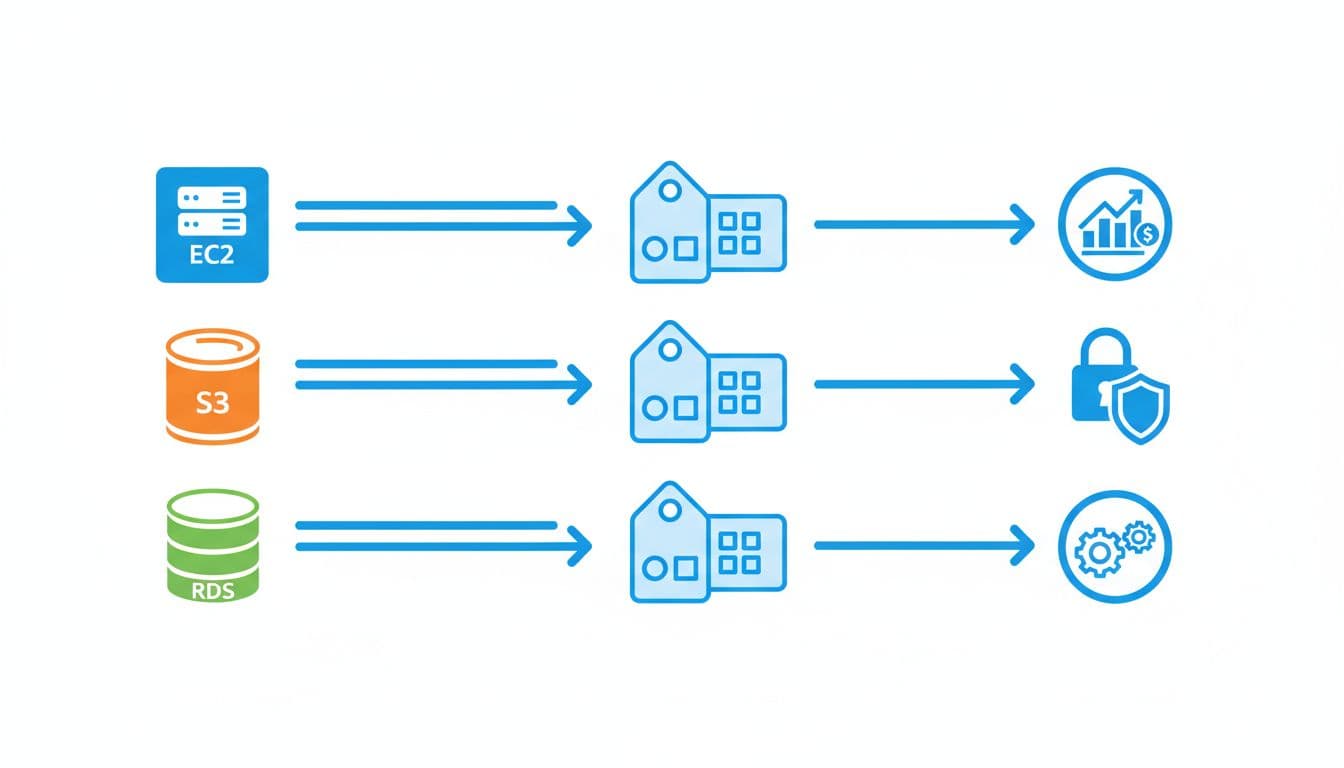
This quick table shows what a tag looks like in practice:
| AWS resource | Tag key | Tag value | Why it helps |
|---|---|---|---|
| EC2 instance | environment | production | Separates prod from dev |
| S3 bucket | owner | data-team | Shows who should manage it |
| RDS database | cost-center | finance | Improves chargebacks and reports |
| Lambda function | application | checkout | Links the resource to a product |
A tag key is the label name. A tag value is the label content. So in app=checkout, app is the tag key and checkout is the tag value.
That sounds small, but it changes how you find resources. owner=platform-team, app=checkout, and environment=dev let you scan an AWS account without guessing. You can filter resources, group them, and attach permission rules to them.
AWS generated tags also help. For example, CloudFormation can apply stack-related tags to resources created together. That gives you a trail back to the deployment source, which is helpful when you inherit an AWS environment you didn’t build.
Common tag examples you can start using today
You don’t need a giant taxonomy on day one. Start with a small set of tags that map to real business needs:
name, for a human-friendly labelenvironment, for dev, staging, or prodowner, for team or personcost-center, for billing and financeapplication, for product or workloadcompliance, for rules like PCI or HIPAAbackup, for retention and recovery needs
Those specific tags help with accountability, cost management, and security from the start.
See how much you can save on your stack
Pick your team’s tools!
Click to select one or more tools.


What’s your company size?
Just click to select.
What’s your business email?
We'll send you calculations right away
The email is flying to your inbox!
Beyond discounts, you may qualify for up to $100K in AWS credits.

How AWS Tagging works, and why it matters when your cloud grows
You can apply tags in the AWS Console, the AWS CLI, SDKs, AWS CloudFormation, and the API. You can also use Tag Editor to assign tags in bulk, which helps when the number of resources climbs across accounts and regions.
The best moment to add a tag is when you create AWS resources. If you wait, your reports start with gaps. Your automation tags miss targets.
Your permission logic can fail. In short, late tagging creates mess you pay for later.
If a resource starts life untagged, your billing, access rules, and cleanup jobs start life wrong.
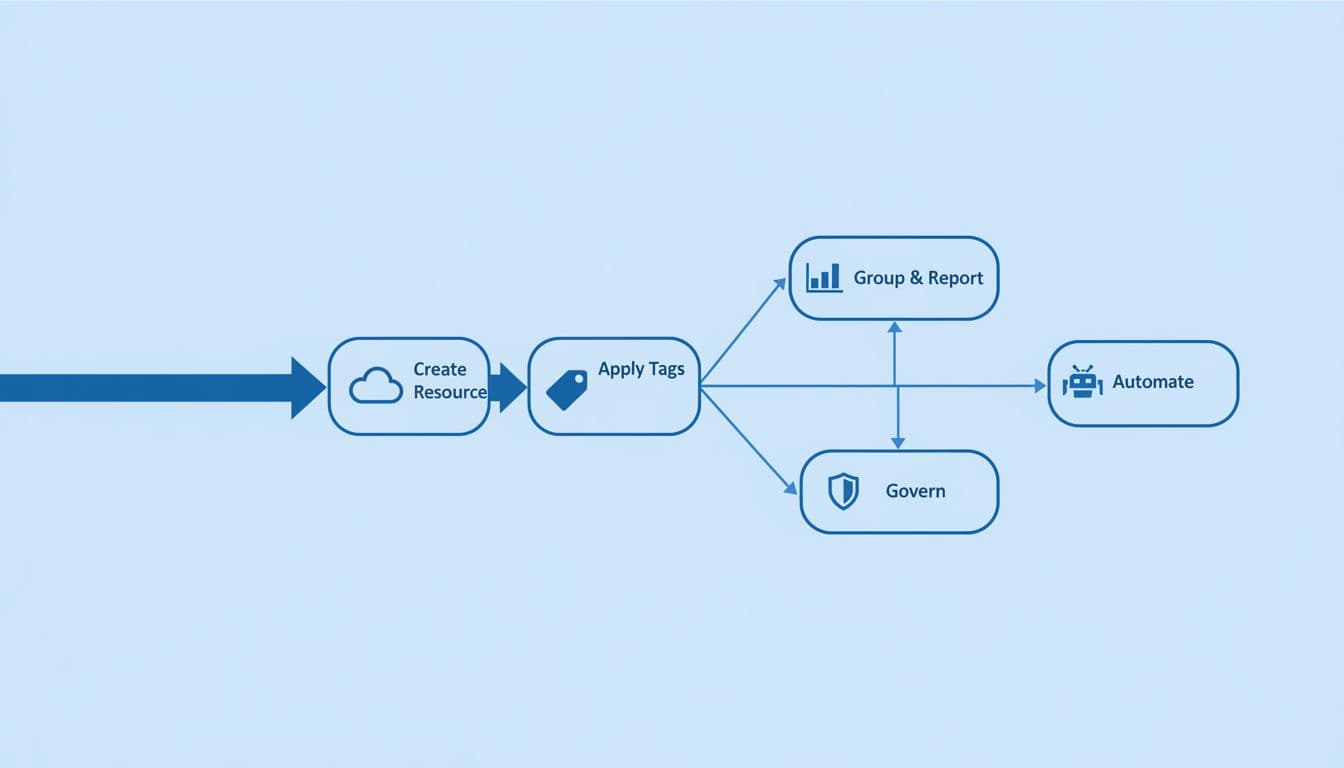
This is the basic flow: create resource, apply tags, then group, report, automate, and govern.
When you use AWS management tools well, tagging resources becomes part of the build, not an afterthought. You can tag an EC2 instance at launch, tag an S3 bucket in an IaC template, or automate the tagging process with EventBridge plus Lambda.
Fresh 2026 changes make this easier. AWS Organizations tag policies now support stronger validation, including wildcard matching and newer IaC checks before deployment.
Since late 2025, teams can also validate required tags in CloudFormation, Terraform, and Pulumi templates before resources created ever reach production. For a broader take, see this 2026 guide to AWS tagging best practices.
Tags allow you to use AWS cost allocation tags to organize spend by team, client, or product. In Cost Explorer, that means a CFO can review a bill by business unit instead of by mysterious service name.
They also shape security. With tag-based permission rules, you can let one team use aws resources using environment=dev while blocking production access.
That cuts risk without hard-coding every single resource ID. The AWS Partner Network guide on better tagging and ROI shows how better labels improve both spend visibility and control.
Just remember one rule: tags are not encrypted. Never place secrets, passwords, or personal data in them.
Real AWS Tagging use cases that save money and reduce chaos
When cloud usage grows, the bill often turns into fog. Tags clear it. A clean tagging strategy helps you separate dev, staging, and production, find orphaned resources, and route work to the right team.
The biggest gains usually show up in cost and cleanup. If you use tag values like environment=non-prod, you can stop test servers at night and on weekends.
Many teams see dev and test spend fall by 60 to 70 percent when those schedules stick. You also get better visibility. Some organizations report 40 to 60 percent clearer cost views once cost allocation tags to organize spend are enforced across accounts.
A useful outside view comes from Hykell’s cloud cost tagging analysis.
Cost allocation, chargebacks, and cleaner cloud bills
Say your CFO opens the monthly report and asks why spend jumped 18 percent. Without tags, you’re reading tea leaves.
With cost-center, project, and environment, you can show the increase came from a new analytics feature in staging, not from production waste.
That same logic supports chargebacks and showbacks. Finance sees cost by client or product. Engineering sees cost by workload. Everyone argues less because the map is clearer.
Here is the trade-off at a glance:
| Pros | Cons |
|---|---|
| Better cost allocation and budgeting | Takes discipline to keep values consistent |
| Easier ownership and accountability | Legacy resources may need cleanup |
| Stronger automation and policy control | Some services support tags differently |
| Faster audits and search | Too many tags can create tag sprawl |
A real-world example helps. In the Adbirt AWS case study: $24K savings, the team focused on AWS cost transparency, found key cost drivers fast, and secured $24,000 in AWS credits.
Automation, cleanup, and policy-based control
Tags can also trigger action. You can stop non-prod EC2 at night, delete old snapshots, apply backup rules, or route alerts to the right owner. This is where automation tags pay off.
At scale, you need policy support. Tag policies in AWS Organizations help govern and assign tags across accounts. AWS Config can flag untagged resources. The Resource Groups Tagging API, also called the resource tagging API, helps you find resources and manage tags across many services. Some teams pair tag policies with service control policies to enforce tagging on AWS before non-compliant resources spread. If you manage 100 or more accounts, this guide to tag policies at scale is a helpful reference.
If you’re also trying to lower AWS costs while cleaning up governance, AWS Discounts Up to $100,000 Credits can give your team room to fix waste without slowing growth.

We can unlock discounts on 10,000+ tools you already use.
How to build an AWS tagging strategy that stays useful over time
A good tagging strategy is small, clear, and enforced. If you start with 40 labels, your set of tags becomes clutter. If you start with 8 to 12 required tags, your tags help instead of getting ignored.
Use lowercase letters with hyphens. Define one allowed format per tag key. Decide who owns each tag. Then review tags periodically, because tags in the long run only work when someone checks them.
This table ties business goals to recommended tags:
| Business goal | Recommended tags |
|---|---|
| Cost control | cost-center, project, environment |
| Ownership | owner, application, managed-by |
| Compliance | compliance, data-classification |
| Automation | backup, schedule, lifecycle |
Most teams should require these tags across important resources in your AWS environment:
nameenvironmentownercost-centerapplicationmanaged-bycompliancebackup
That core set works because it covers identity, billing, operations, and risk. It’s also small enough to enforce tagging without creating tag sprawl.
Keep one source of truth for tag definitions. That might live in a platform handbook or in aws cloudformation guardrails. Either way, everyone should use the same rules.
Also, propagate tags where AWS uses inheritance features, and use tag editor to fix tags in bulk when needed.
Aim for 90 percent or better compliance before turning strict tag policies from reporting mode to enforcement mode. That gives you time to clean old resources across accounts. The best practices for tagging AWS resources are simple: tag at creation, avoid sensitive data, audit often, and keep the tagging strategy tied to business goals.
A tag is small. The habit behind it is not.
You don’t need a giant project to start. Pick a short required tag list, enforce tags at creation, and review a sample of resources this week. Once you label the boxes, your AWS account gets easier to run, easier to secure, and far easier to explain.
If you want to cut waste while tightening control, look at AWS Tagging and cost support together. Teams that need budget relief while they clean up governance can also explore Free AWS Credits Up to $100K.


Get discounts on your team’s favorite apps
Find deals for 10%, 30%, or even 70% off in our discount marketplace.
Check DiscountsAWS Tagging means attaching metadata to an AWS resource. You can use tag your resources with a key and an optional value, then sort and manage them later. Think of a shipping label on a box. The label doesn’t change what’s inside. It tells you what it is, who owns it, and where it belongs.




