










Cost optimization
AWS Grants for Startups: Credits, Rules, FinOps (2026)

AWS grants can feel like free money, until you realize they’re really non-dilutive capital with a deadline. For founders, COOs, and finance leads, AWS credits can fund experimentation, speed up shipping, and cut cash burn, but only if you treat them like a budget line item, not a perk.
The catch is the credit cliff. When promotional credits expire (often in 12 to 24 months), your bill doesn’t taper, it snaps back to cash, and teams that didn’t set FinOps guardrails can get surprised fast.
This post breaks down what you can realistically get, when to apply, what credits can’t pay for, and how to make them last longer with basics like serverless-first choices, Graviton migrations, and cost alerts from day one.

| Program path | Typical credit range | Typical validity | What usually gates access |
|---|---|---|---|
| Activate Founders | $1,000 | 12 months | Early-stage, self-funded, website plus domain email |
| Activate Portfolio | Up to $100,000 | 24 months | Org ID from a VC, accelerator, or approved provider |
| Select AI accelerators | Higher (can reach seven figures) | Program-specific | Strong AI use case, technical review, cohort acceptance |
If you want to sanity-check your upside before you spend time on paperwork, an AWS credits eligibility calculator can help you estimate what fits your stage, then map it to a plan that won’t blow up when the credits run out.
TLDR: AWS Activate gives startups promotional credits to cover eligible AWS usage. Most teams see $1,000 (Founders) up to $100,000 (Portfolio with an Org ID), while select AI accelerators can go higher. Apply when you’re ready to scale, track spend early, tag costs, and plan for the credit cliff always.
What AWS grants and credits really are, and what they are not
AWS startup “grants” usually mean promotional credits that act like a prepaid balance inside your AWS billing account. When you run eligible services, AWS applies credits first, then charges cash after the credit balance is gone or expires. That’s the upside and the constraint.
Before you plan around them, get clear on what you can expect.
| What AWS credits are | What AWS credits are not |
|---|---|
| A prepaid credit balance applied to eligible AWS usage | Cash you can withdraw, transfer, or use outside AWS |
| Non-dilutive runway (no equity given up) for infrastructure | A refund for past invoices, credits generally don’t backdate |
| Time-limited promo value (often 12 to 24 months, some as short as 6) | Permanent discounts that lower your bill forever |
| Great for core services (compute, storage, databases, delivery, many AI services) | A blanket coupon for everything (many third-party Marketplace items and consulting services are commonly excluded) |
The fastest way to waste credits is to treat them like “free cloud.” Treat them like a grant with an end date and a spend plan.
The big promise: non-dilutive runway and faster learning
The practical promise is simple: credits help you learn faster without burning cash. You can run real workloads on AWS (compute, storage, managed databases, content delivery, and many ML tools) while you search for product-market fit, and you can keep your bank balance focused on people and go-to-market.

- Launching a beta without panic: You can ship a customer-facing MVP on EC2 or serverless functions (like AWS Lambda), store assets reliably, and distribute content globally with low latency. If a community post spikes signups overnight, your infra can scale without you scrambling for a purchase order.
- Running load tests before you’re “ready”: Instead of guessing, you can stress test APIs, queues, and databases early. That tends to surface bad assumptions (slow queries, chatty services, oversized instances) while the fix is still cheap.
- Building analytics you’ll actually trust: Early data pipelines and dashboards often feel like a luxury. Credits let you instrument events, store data, and run queries so finance and product can answer basic questions (activation, retention, COGS trends) sooner.
Credits also pair with real operational perks in some startup packages. For example, higher tiers may include support-plan credits and training resources, which is often the difference between “we’ll figure it out” and “we can keep production stable.” Business support can also unlock a broad set of automated checks, including hundreds of cost and security recommendations.
AWS doesn’t offer these programs out of charity. This is a customer acquisition strategy. AWS wants startups to build muscle memory around its stack, then stay as they scale. If you understand that incentive, you can use it to your advantage: apply when your usage is about to ramp, design around services that fit your workload, and build guardrails so the program funds learning instead of waste.
If you want a practical playbook for stretching credits and avoiding common mistakes, the AWS Credits Guide for Startups is a solid reference point.
The credit cliff is what happens when your promotional credits stop covering your usage, usually because they expire, you grow faster than expected, or you kept paying for things that don’t create value. The bill doesn’t gradually rise, it switches from “mostly covered” to “all cash” in the next billing cycle.
It can also show up in less obvious ways. Some packages include support credits that auto-apply to support fees. If those support credits run out before your infrastructure credits, you can start paying support charges out of pocket (often calculated as a percentage of monthly AWS spend, and commonly starting around 10% for the first spend tier). Teams notice this late because the core usage still “looks covered.”

- Costs rising week over week even though headcount and traffic look flat. This often points to mis-sized compute, higher database spend, or a new data/AI workflow that quietly runs nonstop.
- Unused resources hanging around (idle instances, old snapshots, orphaned volumes, dev environments that never sleep). Credits hide these leaks until they’re gone.
- Missing tags and no budgets or alerts. If you can’t slice spend by environment, team, or product area, you can’t stop the bleeding fast.
A simple way to make this feel real is to imagine credits as a gift card for a grocery run. If you don’t track the balance, you’ll still fill the cart the same way. At checkout, the surprise is not the price of one item, it’s the total.
To pressure test your risk, compare your current run-rate to your remaining credits and expiration date, then set alerts for the moment your burn changes.
Guides like nOps’ overview of expiring AWS credits also help you sanity-check the common failure modes.
When you’re ready to put structure around all of it, a tool that centralizes cloud and SaaS visibility, approvals, and savings options can keep the cliff from becoming a fire drill.
Spendbase’s AWS promotional credits program is one practical path if you want help aligning eligibility, timing, and cost controls.
TLDR
AWS “grants” are usually promotional credits, a prepaid balance applied to eligible AWS usage. They speed MVP testing and early scale without dilution. They are not cash, refunds, or permanent discounts. The main danger is the credit cliff when credits expire and support fees continue. Track burn, tag spend, set budgets.
See how much you can save on your stack
Pick your team’s tools!
Click to select one or more tools.


What’s your company size?
Just click to select.
What’s your business email?
We'll send you calculations right away
The email is flying to your inbox!
Beyond discounts, you may qualify for up to $100K in AWS credits.

A simple map of AWS Activate tiers, amounts, and when each makes sense
AWS Activate is easiest to understand as a staircase. Each step matches a different stage of “can we ship” and “can we scale.” If you pick the wrong step, you either leave value on the table or you burn time on an application you cannot pass yet.
Here’s a quick map you can use to match tier, amount, and timing to how your company actually runs today.
| Tier or program | Typical credit amount | Typical validity | Best time to apply | What usually unlocks it |
|---|---|---|---|---|
| Activate Founders | $1,000 | 12 months | When you’re building the MVP and testing real usage | Self-serve eligibility (no provider needed) |
| Activate Portfolio | Up to $100,000 | 24 months | Right after joining a recognized provider network, or after a funding event | Provider Org ID (accelerator, VC, angel network, fintech providers in some cases) |
| AI-first programs and accelerators | Larger packages (sometimes $300,000 to $1,000,000) | Program-specific | When AI compute becomes a real line item in your model | Selective review, technical fit, cohort acceptance |
The practical takeaway: Founders helps you prove you can ship, Portfolio helps you scale with guardrails, and AI programs exist for teams whose GPU bill can eat credits fast.
Founders tier: good for MVPs and proof you can ship
The Founders tier is for the “we’re building” phase. Think of it like a small but useful gift card that lets you run real infrastructure without turning cloud spend into a weekly argument between product and finance.
In simple terms, this tier usually works if you check these boxes:
- Your startup is under 10 years old.
- You have a working website that explains what you do (a real product page, not a “coming soon”).
- You apply with a company-domain email (for example,
name@yourcompany.com). - Your AWS account is in good standing on a paid plan, with a valid payment method attached (AWS still needs a way to bill anything not covered by credits).

- MVP infrastructure: a small API, a simple web app, staging environments.
- Early testing: load tests, QA environments, feature flags, simple CI jobs.
- Light analytics: basic event collection, dashboards, and “is anything breaking?” monitoring.
One detail trips up a surprising number of first-time applicants: email identity. If you submit the application using Gmail, Yahoo, or another personal inbox, it often signals “not a real company yet,” and automated checks can reject the submission.
Gotcha: Keep a personal email for your AWS Builder ID if you want, but use a domain email for the Activate application itself. It reduces avoidable back-and-forth.
If you want a broader rundown of legit credit paths beyond Founders, including how teams stack programs over time, the Spendbase guide on How to Get Free AWS Credits for Startups lays out the options in plain language.
Portfolio tier: how startups reach up to $100,000 with a provider Org ID
Portfolio is where AWS credits start to feel like real runway. The catch is that you do not unlock it solo. You need to be connected to an AWS Activate Provider, which is usually an accelerator, VC, angel network, or other approved partner organization.
The Portfolio application hinges on one thing: a case-sensitive Organization ID (Org ID) issued by that provider. Without it, you are generally not applying for Portfolio, even if your company looks like a perfect fit.
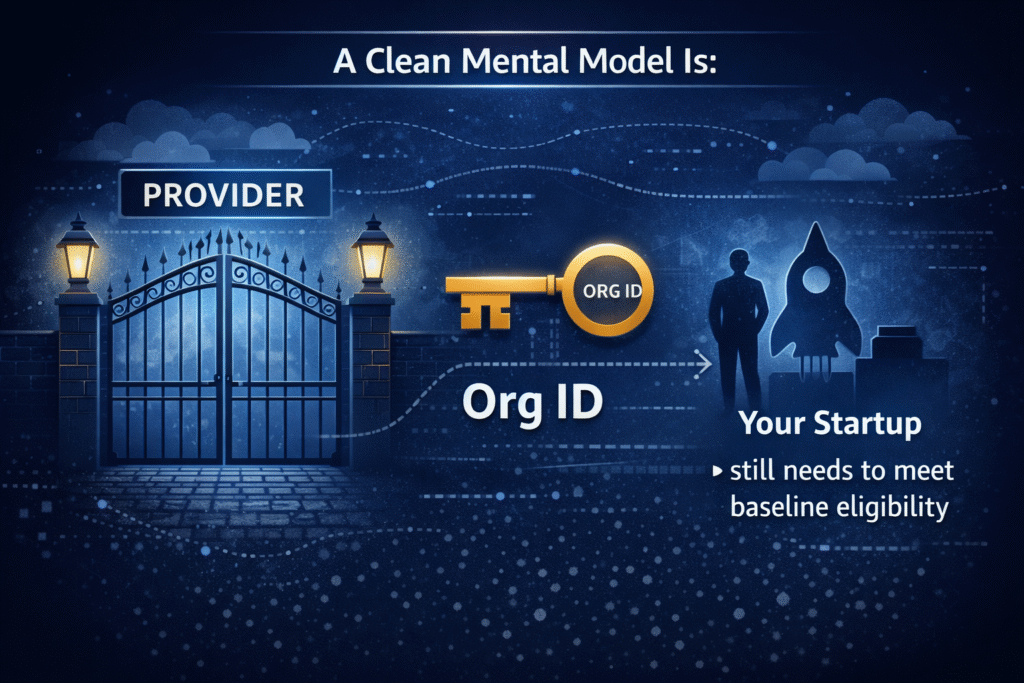
- Provider = the gate
- Org ID = the key
- Your startup = still needs to meet baseline eligibility
In practice, Portfolio makes the most sense when you are moving from “proving it works” to “we need this to run reliably.” That usually lines up with:
- A seed round, or meaningful revenue traction
- A more complex stack (queues, multiple environments, analytics, security tooling)
- Increased production expectations (uptime, response time, incident handling)
There is also a timing rule that matters for finance planning. Many provider-backed paths enforce an eligibility window tied to your most recent funding event. A common policy is applying within about 12 months of your latest round. Miss the window and the company can still be a great business, but the credits may be out of reach.
Another nuance that helps with planning is the “step-up” concept. If you started with a smaller Activate grant and later join a recognized provider network, AWS may top up what you already received, up to the Portfolio maximum. In other words, it can behave less like “start over,” and more like “upgrade your tier.”
A few operational tips that keep things moving:
- Ask your accelerator or VC for the Org ID immediately when you join. Don’t wait until you are ready to apply.
- Treat the application like admin work, not a technical project. You are proving identity, stage, and fit.
- Expect that credits apply to current and future usage, not last month’s bill.
For AWS’s current framing of Portfolio eligibility and the “up to $100,000” positioning, see the official AWS Activate Credits overview.
AI-first and accelerator credits: when standard grants are not enough
Standard Activate credits can go far for a traditional SaaS product. GenAI products are different because the spend curve is steeper. Even a well-run team can burn through credits quickly if you run:
- GPU-heavy training or fine-tuning
- High-concurrency inference (especially with spikes or large context windows)
- Evaluation loops (batch scoring, regression tests, safety checks)
- Data pipelines that move and transform large volumes nonstop
That is why AWS also runs selective programs and accelerators that offer larger credit packages, sometimes reaching $300,000 for AI-heavy use cases. At the top end, global cohorts (like AWS’s generative AI accelerator programs) can offer up to $1,000,000 in promotional credits for a small set of startups.
These programs do not reward “we added a chatbot.” They tend to favor teams where AI is the product, and where infrastructure choices show discipline.

- AI is core to the business: Your product value depends on models, pipelines, and real AI workflows, not a side feature.
- Clear architecture: You can explain data sources, training or inference flow, security, and cost drivers without hand-waving.
- Efficient compute plan: You have a plan to control burn (right-sized instances, batching, caching, serverless where it fits, and clear environments).
- A credible path to production: Monitoring, incident response expectations, and “what happens when usage triples?”
If your burn rate can double overnight from a single enterprise pilot, treat credits like a financing event. Model the month your credits end, then decide if you should optimize now or raise sooner.
If you want to understand what these selective programs look like from AWS’s side, the Generative AI Accelerator program page is a good reference for benefits and expectations.
On the Spendbase side, this is also where tooling starts to matter. Once credits rise into six figures, cost visibility and approvals stop being “nice to have.” They become how you avoid the credit cliff. Spendbase can help centralize cloud and SaaS visibility, so finance can spot the quiet killers (idle environments, runaway inference endpoints, surprise support fees) before they turn into a cash bill.
TLDR
Activate Founders is a $1,000, 12-month boost for MVPs, early testing, and basic infra. Portfolio can reach $100,000 over 24 months, but needs a provider Org ID and often a recent funding-window application. AI-first startups may need bigger, selective programs (up to $300,000 or $1,000,000).
How to qualify and apply without getting stuck in admin limbo
Most AWS Activate rejections and delays are not about your architecture, they are about identity, consistency, and missing proof. Treat the application like a finance workflow: get the documents right, keep your story consistent across fields, and avoid anything that triggers extra review.
If you want AWS’s official flow in parallel, keep the AWS step-by-step Activate application guide open while you prep, then submit once everything matches.
Before you apply: get your identity, account, and proof ready
Think of this as KYC for your startup, because that’s basically how it works. AWS uses a mix of automated checks and manual review, so small mismatches can slow you down.
Start with the basics that prove you are a real company with an active AWS billing relationship:
- Active AWS account in good standing: Use a paid-tier account and keep a valid card on file. Even with credits, AWS needs a payment method for anything ineligible or overage.
- AWS Builder ID: Create it early and keep it stable. Best practice is personal email for the Builder ID, but use your corporate domain email for the actual Activate application. This reduces avoidable “who owns this account?” confusion.
- Working company website: Publish clear product pages, not a placeholder. Reviewers look for a real description of what you sell and who it’s for.
- Domain email: Apply with
name@company.com, not Gmail or Yahoo. Personal inboxes often correlate with auto-denials. - Basic company info that matches everywhere: Legal name, website domain, founding year, and stage should match your site and any public profiles.
- Portfolio only, Org ID from your provider: If you are going for up to $100,000, you typically need a case-sensitive Org ID from your VC, accelerator, or other Activate Provider. Ask for it as soon as you join, not when you “have time.”
To keep the admin clean, use this quick “match check” before you submit:
| Item | What AWS expects | Common admin mistake |
|---|---|---|
| Email identity | Corporate domain email on the application | Applying from a personal email |
| Website | Live product description | Landing page with vague copy or “coming soon” |
| Account status | Paid tier, card on file | No payment method, billing holds |
| Portfolio proof | Correct provider Org ID | Waiting too long, entering the wrong ID |
| Identity flow | Builder ID and application details align | Mixing emails and names across profiles |
If you want a second set of eyes on eligibility and timing, Spendbase’s AWS-focused resources can help you align the “proof” side with the cost plan, especially if you are combining credits with broader savings options like negotiated rates. A relevant read is AWS credits eligibility for tech SMEs.
Submitting the application: what to say, and what to avoid

A strong application description usually answers three questions in plain language:
- What are you building? (Example: B2B SaaS analytics app, consumer mobile app, AI-driven document workflow.)
- Why AWS for this? (Managed services, security needs, data tools, global scale, or a specific service fit.)
- What usage do you expect in the next 3 to 6 months? Mention the main services and environments (dev, staging, prod), plus growth triggers (launch, pilot, onboarding a customer).
Here’s a short template you can mirror in your own words:
- Workload: “We run a web app and API with a production and staging environment.”
- Core services: “Compute for the API, managed database, object storage, monitoring.”
- Near-term usage: “We expect moderate traffic now, then a ramp during launch and onboarding.”
What to avoid because it slows approvals or creates instant red flags:
- Vague descriptions like “building an innovative platform” with no services or usage expectations.
- Missing website or a site that doesn’t explain the product.
- Applying with a personal email after you already created company assets.
- Requesting huge credits without a plan (especially if you can’t explain why your usage will grow).
- Mentioning prohibited usage, like crypto mining. Promotional credit terms are strict and violations can void the grant.
- Trying to “fix last month’s bill”. AWS credits apply to current and future eligible usage, not prior billing cycles. So rushing an application to offset an old invoice does not help.
If you are unsure how to position your request, anchor it to a spend plan. A lightweight FinOps plan can be as simple as “budgets and alerts, tagged environments, and a serverless-first approach where it fits.” That reads like operational maturity, not hype.
For reference on program framing and eligibility, AWS summarizes it on the AWS Activate Credits page.
After approval: where the value really comes from (support, training, partner offers)
Credits are the headline, but the best value often shows up in the extras, especially once you run production workloads and your team needs faster answers.
Many startup packages bundle:
- Support plan credits (often Developer Support for early stages, and Business Support credits in higher tiers). This matters because response time and 24/7 access can be the difference between a minor incident and a customer-facing outage.
- Architecture guidance and best practices from AWS resources and partners. If your credit runway is tight, good architecture choices keep you off the “idle resource” tax.
- Training resources and certification vouchers that help your team build cloud fluency without paying out of pocket.
- Partner offers that lower total startup spend beyond AWS, which creates a practical “full-stack” savings bundle across tooling.
One line item deserves extra attention: support fees.
If your support credits run out before your promotional credits, you can start paying support in cash while you still think “AWS is covered.”
In many cases, support pricing is tied to monthly AWS usage and often starts as a percentage of spend. That means the bill can rise right when you scale, unless you track it.
A simple habit helps: review billing monthly for two separate buckets, infrastructure usage and support charges, then set alerts for both. If you already manage software procurement and approvals, tools like Spendbase can also help centralize cloud and SaaS visibility so surprise line items do not slip past finance, especially when multiple teams ship services quickly.
TLDR
To avoid admin limbo, get identity and proof ready first: paid-tier AWS account with a card, Builder ID, live website, and domain email. Portfolio needs a correct Org ID. In the app, describe workload and expected usage clearly, avoid prohibited use cases. After approval, monitor support credits and training perks.
Make the credits last: a startup-friendly FinOps plan from day one
AWS credits buy you time, not discipline. The teams that avoid the credit cliff treat credits like a finite grant with an expiration date, then put guardrails in place before engineering speed ramps up. The good news is you don’t need a big FinOps team to do this. You need clear ownership, a few default rules, and a monthly rhythm that finance can run.
Set up visibility and guardrails in the first week

1) AWS Budgets and alerts (simple, loud, and hard to ignore)
Create budgets for (a) total account spend, (b) production, and (c) the two services that usually surprise people first (compute and databases). Then add alert thresholds that match how fast you can react.
A simple starting point that works for most startups:
| What you’re monitoring | Alert thresholds | Who gets alerted | Why it matters |
|---|---|---|---|
| Monthly total spend | 50%, 75%, 90% | Finance, CTO, owner | Catch runaway usage early |
| Service-level budget (EC2, RDS, etc.) | 60%, 80%, 95% | Eng lead, owner | Pinpoint the culprit fast |
| Daily spend spike (optional) | Baseline + 20% | On-call channel | Flags surprises before month-end |
If you want more automation than “email someone,” AWS has patterns for budget controls that can trigger actions (like stopping non-prod resources) when thresholds hit. The AWS post on Budget Controls for AWS is a helpful reference if you want to go beyond notifications.
2) Cost Explorer as your weekly check, not a quarterly autopsy
Use Cost Explorer to answer three questions every week:
- What changed since last week? (Look for step-functions, not gentle trends.)
- Which service is growing fastest? (Often data transfer, logs, databases, or AI endpoints.)
- Is this tied to a release or a team? (If not, assume waste until proven otherwise.)
3) Cost allocation tags (make ownership non-negotiable)
Tagging is where most startups “plan to do it later,” and later never comes. Set a rule that every resource must have an owner and a purpose, even in dev.
Two rules that prevent most chaos:
- Every resource needs an
ownertag (a person or Slack handle, not “platform-team”). - Every resource needs an
envtag (dev,staging,prod) plus aservicetag.
Once tags exist, finance can move from vague blame to clean reporting. That’s when showback becomes possible.
4) Showback now, chargeback later
Chargeback can wait until you have stable teams and cost centers. Start with showback: a monthly report that says, “Here’s what each team or service cost.” It changes behavior without starting a budgeting war.
If you’re already centralizing software approvals, consider pairing showback with procurement controls so new spend is visible before it ships. Spendbase’s procurement workflows are designed for this exact problem, someone buys or deploys fast, finance finds out later.
5) Trusted Advisor checks (use the perks you already earned)
If your startup package includes higher support tiers, use Trusted Advisor routinely. It surfaces a big set of cost and security recommendations, which is useful because waste and risk often travel together (public buckets, open ports, oversized instances, idle resources).
A good first-week win: fix anything that looks like “idle,” “unused,” or “unrestricted.” Credits hide those mistakes until they’re gone.
Use architecture choices that naturally reduce burn
FinOps works best when it doesn’t fight engineering. The goal is to choose defaults that make waste harder.
Go serverless-first when load is spiky
If your workload comes in bursts (launch days, marketing spikes, demo traffic), serverless can keep you from paying for empty seats. For example:
- API endpoints on AWS Lambda: you pay when requests happen, not for an always-on instance.
- Managed databases that scale: you avoid over-provisioning “just in case.”
This is how teams avoid the classic credit drain: a pile of “temporary” EC2 instances that never die.
Avoid idle servers with a hard rule for non-prod
Non-prod is where credits quietly disappear. Make it normal to turn things off:
- Schedule dev environments to sleep nights and weekends.
- Prefer short-lived preview environments over long-running staging clones.
- Delete “one-time” test clusters the same day they’re created.
If you want deeper ideas for consistent guardrails, Spendbase’s guide on cloud cost optimization best practices covers the repeatable patterns that work across teams.
Pick managed services when it reduces ops time (and incidents)
Managed services are not always cheaper per unit. They often win because they reduce engineering time and production risk. For an early team, that’s real money. The question to ask is: Will we spend fewer hours babysitting this? If yes, managed can be the better “all-in” cost.
Use Graviton for steady compute and containers
For compatible workloads, Graviton often delivers about 20% to 40% better price-performance than comparable x86 options, which effectively stretches credits for steady compute. It tends to be worth it when you run:
- Containers on ECS or EKS
- Always-on services with stable CPU usage
- Background workers that run all day
Before you commit, validate compatibility (language runtime, libraries, container base images). AWS’s Graviton Savings Dashboard guide is a practical starting point for estimating savings and tracking progress.
Smart ways to stretch credits for non-critical work
Spot Instances are one of the fastest ways to cut burn, as long as you use them where interruptions won’t break production.
Spot Instances in plain language
Spot is AWS’s spare EC2 capacity sold at a steep discount. The tradeoff is availability. AWS can reclaim that capacity with short notice, so your job must tolerate stops and restarts. When it fits, savings can be dramatic, commonly up to about 90% versus on-demand.
Where Spot usually fits best:
- Batch processing (ETL jobs, reports, data backfills)
- CI/CD runners and test jobs
- Background queues (image processing, document conversion, indexing)
- Some ML training workloads that can resume from checkpoints
AWS even frames batch as a core Spot use case, with AWS Batch on Spot Instances as the canonical example.
Two guardrails so Spot doesn’t become a reliability incident
- Keep production on stable capacity: run critical services on on-demand or reserved capacity, then use Spot for overflow or non-critical workers.
- Design for interruption: add retries, checkpoint progress, and make jobs idempotent (safe to run twice). If your system can’t handle a retry, it’s not ready for Spot.

Plan for the month the credits end, before you start spending them
Finance shouldn’t discover the credit cliff in the same month it hits. A lightweight forecast turns “surprise bill” into a planned decision.
A simple credit runway forecast (finance-friendly)
Run this monthly, and again before any major launch.
- Calculate your current run-rate: last 30 days of AWS spend, broken into (a) core stack and (b) AI or GPU.
- Map credit expiry date and remaining balance: treat it like a grant end date.
- Model growth scenarios: conservative, base, aggressive. Tie them to real triggers (user growth, customer go-live, data volume).
- Estimate post-credit cash burn: what the AWS line item becomes when credits drop to zero.
- Set a trigger date: the point when you must act (optimize, change architecture, adjust pricing, or raise).
Here’s a simple way to structure the trigger logic:
| Input | Example | Decision use |
|---|---|---|
| Current monthly AWS run-rate | $18,000 | Baseline burn |
| Monthly growth assumption | 10% | Forecast curve |
| Credits remaining | $120,000 | “Grant balance” |
| Credit expiry date | 9 months out | Hard stop |
| Trigger date | 3 months before expiry | Time to optimize or reprice |
Guidance for AI products: split GPU budgets from everything else
AI spend behaves differently. GPU inference and training can jump overnight due to:
- Bigger context windows
- Higher concurrency from one customer
- Evaluation loops that run continuously
- Training runs that “accidentally” last all weekend
So keep two budgets:
- GPU and AI services budget: tracked daily or weekly, with tighter alerts.
- Core platform budget (API, DB, storage, monitoring): tracked monthly.
This separation also helps you price correctly. Your gross margin story gets clearer when AI is not blended into “AWS.”
If you want one place to see cloud spend alongside the rest of your stack, that’s where platforms like Spendbase help. The cloud optimization view is built for cross-team visibility, and it complements AWS-native tooling when you need exec-ready reporting.
TLDR
Treat AWS credits like a grant with an end date. In week one, set Budgets, Cost Explorer reviews, and tagging rules (every resource has an owner). Choose serverless and managed services to avoid idle spend, use Graviton for steady compute, and run Spot for fault-tolerant jobs. Forecast the post-credit bill early, especially for GPUs.

We can unlock discounts on 10,000+ tools you already use.
Conclusion
AWS grants can buy real runway, but only if you run them like a real budget. Pick the tier that matches your stage (Founders for MVP work, Portfolio for provider-backed scale), show up with admin basics ready (domain email, live site, paid AWS account, Org ID when needed), then protect the credits with guardrails. Serverless-first choices reduce idle spend, Graviton migrations can improve price-performance by roughly 40% for many workloads, and simple alerts in Budgets and Cost Explorer help you catch runaway services before they eat the grant.
Once credits land, the hard part shifts to staying in control across teams and tools. That’s where Spendbase fits as the practical layer for cloud and SaaS visibility, approvals, savings forecasting, and cloud optimization, so the credit cliff doesn’t turn into a surprise cash bill.
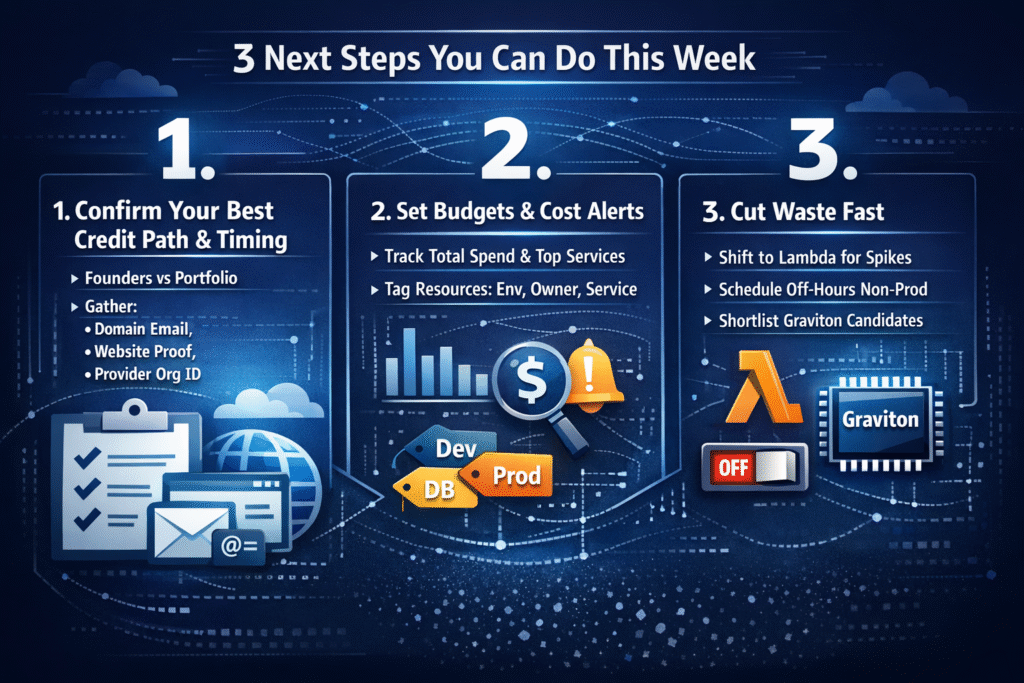
3 next steps you can do this week
- Confirm your best credit path and timing (Founders vs Portfolio), then gather your domain email, website proof, and provider Org ID (if applicable).
- Set Budgets plus Cost Explorer alerts for total spend and top services, then tag resources by
env,owner, andservice. - Cut obvious waste fast: move spiky endpoints to Lambda where it fits, schedule non-prod off-hours, and shortlist Graviton candidates for steady compute.
Quick comparison (for finance planning)
| What to get right | What it prevents | What “good” looks like |
|---|---|---|
| Tier and timing | Expired credits before scale | Apply right before a launch or ramp |
| Admin readiness | Rejections and delays | Domain email, live site, correct Org ID |
| FinOps defaults | The credit cliff | Budgets, alerts, tags, weekly review |
TLDR (50 words)
AWS Activate grants help startups fund AWS usage without dilution, but credits expire fast. Choose the right tier, apply with clean admin proof, and treat credits like a budget line. Set alerts, tag spend, use serverless and Graviton to stretch value. Add Spendbase for visibility and savings across cloud and SaaS.


Get discounts on your team’s favorite apps
Find deals for 10%, 30%, or even 70% off in our discount marketplace.
Check Discounts



