










How Cloudflare Can Cut Multi-Vendor Security Costs by 30%

Security spend often looks tidy on a spreadsheet, then turns messy in real life. If you buy WAF, DDoS protection, and Zero Trust from three vendors, you don’t pay only for licenses; you also incur costs related to managing your enterprise network. You also pay for support tiers, setup work, renewal cycles, training, and the hours your team burns tying it all together.
That hidden layer is where budgets swell. For many CTOs, CFOs, and founders, consolidating on Cloudflare can trim annual security spend by about 30% while making the stack easier to run.
The invoice is only part of the cost. Your team’s time is part of the bill too.
What Cloudflare does, and why it often replaces three separate tools
Cloudflare is a reverse proxy and security platform that sits in front of your web application, API, and even private network traffic. Instead of buying one vendor for a web application firewall, another for DDoS mitigation, and a third for zero trust access, you can often use Cloudflare to cover all three. If you want a broader primer on what Cloudflare is used for, that background helps frame the cost discussion around WAF attack scores.

What Cloudflare is used for in a modern security stack
When you use Cloudflare, traffic hits Cloudflare’s global network first. From there, Cloudflare can cache content, inspect requests, apply firewall rules, block bots, mitigate DDoS attacks, and enforce secure access policies for users and apps. That means one platform can handle security and performance services that many teams still buy as separate tools.
For example, Cloudflare WAF applies managed rules and custom rules to block common web exploits before they hit your app. Cloudflare’s DDoS protection absorbs attack traffic at the edge network. Cloudflare Access and Cloudflare Tunnel support zero trust security, so your team can reach internal tools without relying on a heavy VPN.
When Cloudflare makes sense for your team
Cloudflare fits best when you want fewer moving parts. That often means growing SaaS companies, e-commerce brands, and distributed teams that need both network security and speed. If your team wants one dashboard, one policy model, and one global network across the entire network, Cloudflare usually makes more sense than a pile of narrow tools.
See how much you can save on your stack
Pick your team’s tools!
Click to select one or more tools.


What’s your company size?
Just click to select.
What’s your business email?
We'll send you calculations right away
The email is flying to your inbox!
Beyond discounts, you may qualify for up to $100K in AWS credits.

How WAF, DDoS, and Zero Trust work together, and where the costs stack up
These controls protect different doors into the same house, aligning with a reference architecture for security. DDoS protection filters floods of bad traffic. A WAF inspects web requests for malicious payloads. Zero Trust checks who gets secure access to apps, admin panels, and private systems.
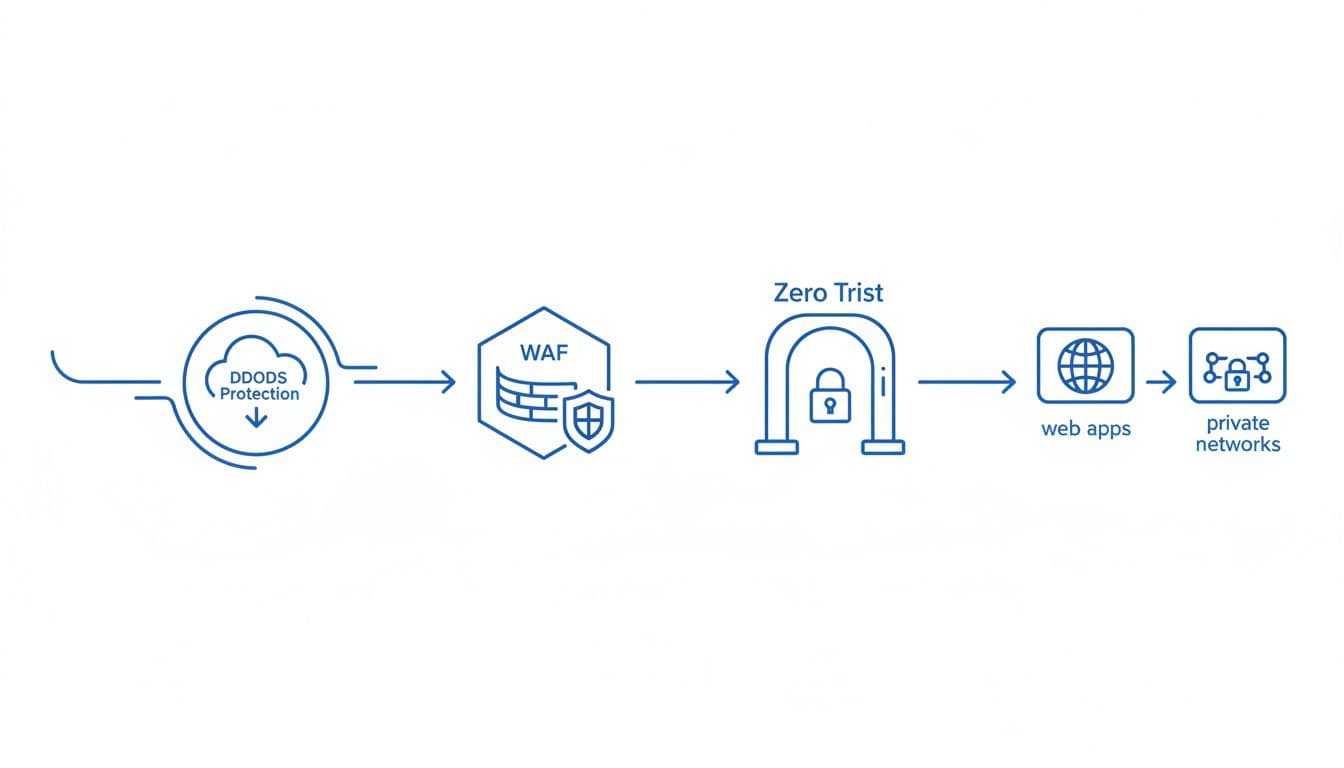
This is the flow you pay for, whether it sits under one contract or three.
WAF: the shield for web application traffic
A web application firewall screens HTTP and API requests before they reach your app. It uses managed rules, WAF rules, and custom logic to stop SQL injection, cross-site scripting, and abusive bots, enhancing the overall security model. When your WAF lives outside the rest of your stack, your team often spends more time tuning policies, syncing logs, and chasing false positives across vendors, which can lead to unauthorized access.
DDoS: why attack traffic can become an expensive problem
A DDoS attack tries to overwhelm your service with junk traffic. Cloudflare reported more than 129,000 attacks per day in 2025, and 89% lasted under 10 minutes, highlighting the importance of robust security measures in your data center. Short attacks still hurt. Recent estimates put downtime near $22,000 per minute for affected businesses. Separate DDoS vendors can also bill by traffic tier or mitigation level, which raises the risk of surprise costs during an incident.
Zero Trust: reducing access risk without adding more complexity
Zero Trust security means you verify each user and device before access, instead of trusting anyone already “inside” the network. In practice, that means access control, device checks, and narrow permissions. If you buy that as a separate zero trust network access product, you often add per-user fees, more admin work, and another dashboard your team has to learn.
What Cloudflare costs in 2026, and where the money usually goes
Cloudflare’s 2026 pricing is still easier to read than most enterprise security quotes. Public plans start with Free, Pro at $20 per month per domain when billed annually, Business at $200 per month per domain annually, and Enterprise with custom pricing. You can verify current Cloudflare plan pricing is competitive, especially for enterprise network solutions. before you model your own stack using the benefits of Cloudflare.
Core Cloudflare plans at a glance
This quick table shows where the main tiers fit.
| Plan | Starting price | Best fit | WAF and DDoS coverage | Support for Cloudflare services is available 24/7. |
|---|---|---|---|---|
| Free | $0 | Personal sites, staging, small apps | Basic firewall, standard unmetered DDoS protection | Community |
| Pro | $20/domain/month annually for Cloudflare services. | Small business, early SaaS, content sites | Cloudflare WAF, managed rules, bot controls, standard DDoS | Ticket support |
| Business | $200/domain/month annually | Revenue-critical sites, APIs, e-commerce | Advanced DDoS protection, more firewall rules, up to 100 custom WAF rules are part of the security model offered by Cloudflare. | Priority support |
| Enterprise | Custom | Large, regulated, or high-risk teams | Enterprise WAF, SLA-backed DDoS mitigation, deeper controls | 24/7 support for all Cloudflare services |
Annual billing on Pro and Business is about 20% lower than monthly list pricing, which matters if you protect multiple domains in the Cloudflare global network.
Add-ons and extra services that can raise the bill
Your base plan is only the start. Spend rises with load balancing, advanced certificates, smart routing, Workers, bot tools, API security, and higher support needs. Zero Trust pricing also tends to be per user, and larger teams often negotiate bundle discounts under Cloudflare One. In 2026, list pricing is stable, but your real spend still climbs with more domains, more traffic, and more security services.
How much can you save on Cloudflare with Spendbase
If you are budget-planning, don’t compare only list prices for Cloudflare security solutions. You can review the Up to 25% off Cloudflare discount for a quick cost benchmark. That helps you estimate whether a consolidated Cloudflare contract will beat your current mix of WAF, DDoS protection, VPN, and access tools.
Why consolidating WAF, DDoS, and Zero Trust on Cloudflare can save about 30% a year
The 30% figure is a planning benchmark, not a promise for every company. Still, it is realistic for teams that run overlapping vendors and pay for premium support on each one, as they may need to consider their network capacity.
The cost buckets you remove when you consolidate
First, you cut duplicate contracts, renewal work, and vendor meetings. Next, you reduce integration costs because logs, firewall policies, and access rules live in one place, enhancing your reference architecture. You also lower support overhead while implementing a zero trust security model. During an incident, your team doesn’t waste time proving whether the problem sits with the WAF vendor, the DDoS provider, or the Cloudflare network interconnect.
You save money in softer places too. Fewer dashboards mean less training. One policy model means fewer admin mistakes. Cloudflare’s network also lets you keep performance and security on the same path, so you are not paying one vendor to inspect traffic and another to speed it up.
A simple before-and-after cost picture
Here is an illustrative mid-market benchmark for annual spend on use cases involving Cloudflare security, particularly in network firewall implementations.
| Cost area | Multi-vendor stack | Cloudflare-first stack |
|---|---|---|
| WAF contract | $18,000 | Included in the Cloudflare services plan are performance and security services. |
| DDoS contract | $24,000 | Included in plan |
| Zero Trust or VPN replacement | $36,000 is a reasonable investment to strengthen your network firewall. | $24,000 |
| Premium support across vendors | $12,000 | $6,000 |
| Integration and admin time | $30,000 is the estimated expenditure to effectively implement a zero trust security model. | $12,000 |
| Total annual cost can be significantly reduced by leveraging security analytics. | $120,000 | $84,000 |
That picture lands at a total of $30,000 when factoring in the benefits of Cloudflare. 30% lower annual spend. Your numbers will vary, but the pattern is common.
If your team spends as much time managing security vendors as using them, consolidation usually pays back fast, especially against DDoS attacks with Magic Transit.
Why the savings are not only financial
One dashboard sharpens visibility into security analytics. One firewall and access policy model reduces drift. One global network means fewer gaps between application security and user access. As a result, your team responds faster and spends more time on product work instead of tool glue.
Free virtual cards for non-EU residents
Open in 1 working day, issue 100 virtual cards, and get up to 1.25% cashback.
Get a free account
How Cloudflare compares with other security stacks in 2026
Cloudflare is not the only path. AWS-native controls, Akamai, Imperva, and Zscaler all fit some teams. The question is how much work each stack creates for you, and how predictable the bill stays over a full year.
Cloudflare versus AWS, Akamai, and Imperva on total cost
A recent 2026 WAF provider comparison shows why Cloudflare often wins on total cost. Cloudflare starts at public plan prices, while AWS WAF costs often grow with rules and request volume. Akamai and Imperva usually move into custom enterprise quotes much earlier, often in the thousands per month. If you already live deep inside AWS, native tools may still fit. If you need a specialized edge case, Akamai or Imperva may be worth the premium.
The pros and cons of consolidating on Cloudflare
- You usually cut license overlap and vendor sprawl.
- You get one dashboard for WAF, DDoS mitigation, and zero trust access.
- Cloudflare Access and Cloudflare Tunnel can reduce VPN drag for remote teams.
- Add-ons can still push your bill up if you need advanced bot, API, or edge compute features.
- A niche point product may go deeper in one narrow area than the broader Cloudflare platform.
Real-world examples that show where consolidation pays off
- If you run a SaaS business with many web apps and APIs, Cloudflare can replace a stand-alone WAF and trim policy drift across environments.
- If you operate an e-commerce store, bundled DDoS mitigation protects revenue during peak traffic without metered attack bills.
- If your company is remote-first, a zero trust model through Cloudflare One can replace VPN-heavy access and reduce help desk load.

We can unlock discounts on 10,000+ tools you already use.
Conclusion
Multi-vendor security usually costs more than the line items suggest. The extra spend hides in support, handoffs, overlap, and the hours your team spends stitching tools together.
Cloudflare works well when you want WAF, DDoS, and zero trust on one platform with more predictable costs. If you want a practical next step, review your current contracts, map the hidden admin costs, and benchmark them against Cloudflare pricing before your next renewal.


Get discounts on your team’s favorite apps
Find deals for 10%, 30%, or even 70% off in our discount marketplace.
Check Discounts



