










Microsoft Azure Databricks in 2026: How It Works, What It Costs, and When It Fits

What Azure Databricks is, and why teams keep choosing it
Azure Databricks is a fully managed analytics platform on Azure. You use it to ingest data, run ETL, build a pipeline, train models, serve dashboards, and support data science work in one workspace. If your stack already leans on Microsoft Azure, it often feels less like adding another tool and more like extending what you already have.
The big idea is the lakehouse. Your raw files and polished tables can live in one open storage layer, then power BI, SQL, data engineering, and AI from the same base.
If you’re a founder or CTO watching both delivery speed and cloud spend, that matters, especially when new teams feel early pressure on budgets and start looking at options like free Azure credits for startups.
The simple version of the lakehouse model
Think of a lakehouse like one workshop with separate benches for different jobs. Your raw logs, app events, CSV files, and structured tables can sit in the same open lakehouse storage, often ADLS Gen2, while different teams use the same foundation in different ways.
Delta Lake is the part that makes that storage reliable. It adds transactions, schema checks, and time travel, so you can roll back to earlier table versions when a bad load lands. That’s why Azure Databricks combines the flexibility of data lakes with the consistency people expect from data warehouses.
Where Azure Databricks fits in a modern data stack

In most teams, Azure Databricks sits between storage, ingestion, BI, and apps. Data engineers build and run workflows. Data analysts query tables with SQL warehouses. Data scientists train models with Python, MLflow, and notebook-based experiments. App teams use processed data in products and AI solutions.
If you already use Azure Data Lake Storage, Power BI, Azure OpenAI, or Azure Active Directory, now Entra ID, the fit is natural.
On the other hand, tiny low-volume workloads may not need this much platform. A basic database plus scheduled scripts can still be enough.
See how much you can save on your stack
Pick your team’s tools!
Click to select one or more tools.


What’s your company size?
Just click to select.
What’s your business email?
We'll send you calculations right away
The email is flying to your inbox!
Beyond discounts, you may qualify for up to $100K in AWS credits.

How Azure Databricks works behind the scenes
Azure Databricks has three layers. The control plane manages the workspace, jobs, access control, and orchestration. The compute plane runs clusters, serverless compute resources, SQL warehouses, and job execution.
The data layer stores open data in services like ADLS Gen2 with Delta Lake tables on top.
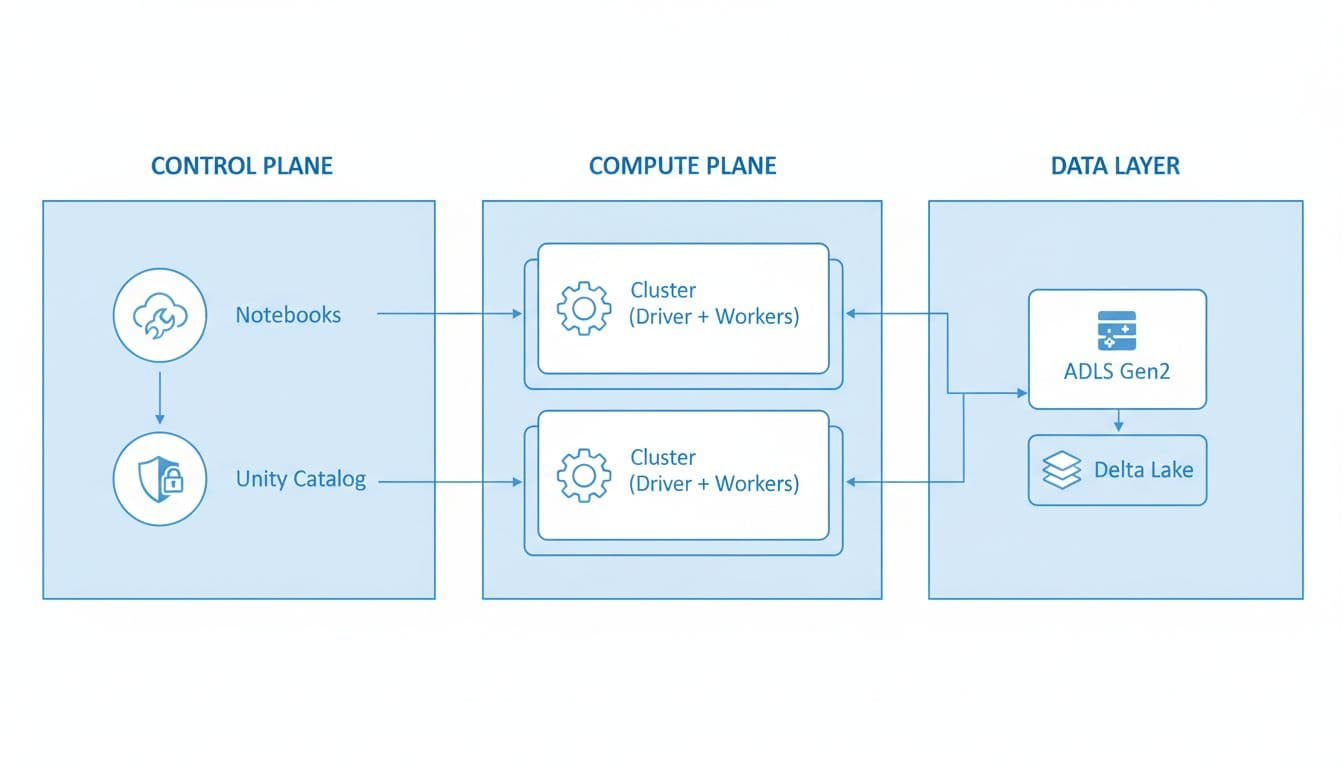
Autoscaling adjusts cluster size as your workload rises or falls. Serverless options cut setup work for many teams. Meanwhile, notebooks, jobs, and workflows give you a shared place to build data processing, analytics and AI, and machine learning tasks.
From notebook to pipeline, how your work runs
A common path is simple. You create a workspace in the Azure portal, connect storage, open a notebook, write Python or SQL, and run it on compute. Then you save clean tables, schedule jobs, and send results to Power BI dashboards or apps.
Because notebooks are collaborative, your engineers and analysts can work in the same space. That doesn’t replace software discipline, but it does speed up model development and early ETL work.
Why Azure integration changes the day-to-day experience
This is where the best of Databricks and Azure shows up. Identity flows through Azure Active Directory. Reporting connects well with Power BI. Ingestion often starts with Data Factory or related Azure data patterns. Private networking, Key Vault, and Azure security controls also reduce friction.
When people compare Azure Databricks and Databricks on AWS, the core Databricks platform looks familiar on both.
Still, Microsoft-heavy teams often prefer Azure because the joins between services are tighter, and recent comparisons point to Azure-tuned performance gains for some query patterns.
Key Azure Databricks features that matter in real work
The point isn’t having more buttons. The point is getting faster results with fewer moving parts.
The table below shows the major features and where they fit best.
| Feature | What it changes for you | Best use case |
|---|---|---|
| Unity Catalog | Central data governance, lineage, and permissions | Shared enterprise data and regulated access |
| Delta Lake | Reliable tables on open storage | ETL, BI, and data management on one base |
| Photon | Faster query and data processing engine | Heavy SQL, BI, and cost-sensitive analytics |
| Lakeflow | Managed ingestion and declarative pipelines | Repeated pipeline work and streaming data |
| MLflow | Experiment tracking and model lifecycle | Data science and machine learning teams |
| SQL Warehouses | Fast SQL query serving | Dashboards, BI, and analyst self-service |
| Databricks One | Simpler business user interface | Non-technical users who need governed data |
| Lakebase | Operational data patterns on the platform | Mixed analytics and AI workloads |
Governance, speed, and reliability in one platform
Unity Catalog gives you a clear data governance model, with lineage, permissions, and consistent data access rules.
Delta Lake keeps tables stable. Photon speeds up query execution and can reduce wasted compute on the same workload.
Databricks has also reported performance gains from Photon that can range from roughly 10x to 100x versus older Apache Spark patterns in some tasks, though your results depend on data shape and query style.
The practical win is simple: fewer broken tables, fewer permission surprises, and faster SQL on the same platform.
New 2026 updates that change what you can build
Recent 2026 updates show where Databricks is heading. Azure updates and product announcements point to a simpler business-user path through Databricks One, which launched in January 2026. Governed tags are now generally available, which helps teams organize open data with less guesswork.
Teams are also watching Lakebase, Lakeflow Connect’s free tier, Genie Code, Microsoft 365 and Excel integration, and recent SQL and OAuth improvements. At the pipeline level, Lakeflow Spark Declarative Pipelines, plus changes to declarative pipelines and Auto Loader behavior, matter if you run production ingestion at scale.
Free Azure credits for startups
Check my eligibility

What you gain, and what to watch for, across small, mid-size, and enterprise teams
Smaller teams often like Azure Databricks because it removes a lot of setup burden. You don’t spend days wiring cluster managers, security layers, and separate notebook services. Serverless options help, shared notebooks keep work moving, and SQL plus AI tools are close at hand.
A public example comes from an ADA retailer case study, where a global retailer used Databricks to cut operational costs and simplify data workflows.
Another healthcare modernization case shows how Azure and Databricks supported a unified platform for a revenue-cycle product.
Why larger teams value governance and scale
Enterprise teams care about scale, but they care even more about control. That means identity, audit logs, private endpoints or VNet injection, and support for mixed analytics platform needs across BI, data engineering, and AI use cases. Azure Databricks provides that structure without forcing every team into separate tools.
Compliance matters too. Azure and Databricks support common standards such as SOC 2, ISO 27001, HIPAA, PCI DSS, and FedRAMP in varying scopes. Still, you should verify the current service and region coverage in Microsoft documentation before you promise anything to security or legal.
Here’s the balanced view:
- Pros: fast setup, shared workspace, strong Microsoft integration, solid governance, open lakehouse storage, and room to grow from ETL to generative AI.
- Cons: pricing can surprise you, notebook-heavy work can get messy without standards, and it may be more platform than you need for a tiny app.
Free virtual cards for non-EU residents
Open in 1 working day, issue 100 virtual cards, and get up to 1.25% cashback.
Get a free account
How to get started with Azure Databricks without wasting time or budget
Your first setup should feel like building a short runway, not a new airport.
Start small, get a real use case running, then deploy wider.
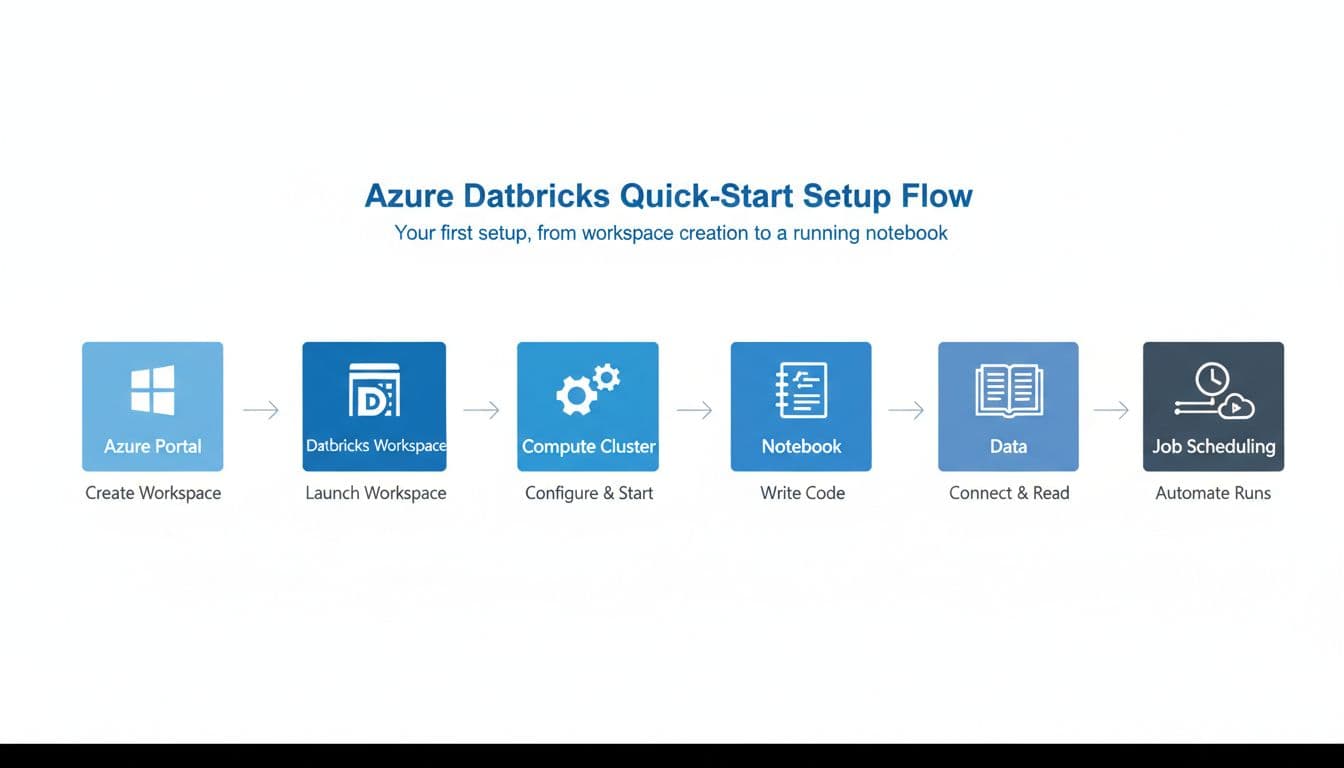
Your first setup, from workspace creation to a running notebook
In Azure Portal, pick a subscription, resource group, and region close to your data. Create the workspace, launch it, create compute, open a notebook, connect storage, and run a first query. For a small pilot, one clean source and one business question is enough.
A quick-start checklist helps keep the first hour focused:
| Step | What you decide | Good default |
|---|---|---|
| Workspace | Region and resource group | Same region as your Azure data |
| Compute | Job cluster or all-purpose | Start small, enable auto-stop |
| Storage | ADLS Gen2 connection | Separate raw and curated zones |
| Governance | Catalog and naming rules | Turn on Unity Catalog early |
| Output | SQL, dashboard, or app feed | Pick one clear business outcome |
What to decide before your first production workload
Make a few decisions early. Choose the right region, plan for Premium, and set cluster policies from day one. Also define naming standards, monitoring, and auto-stop settings before the team grows.
If you’re an early-stage company, cost planning matters as much as architecture.
A helpful reference is this guide to Azure credits for startups tiers, especially if you want to map pilot work to available Microsoft Azure credits.
Best practices that help you control cost, performance, and governance
The first pricing lesson is this: DBUs are only part of the bill. Azure Databricks pricing combines Databricks commit units, or DBUs, with the Azure virtual machine, storage, and networking below them. DBU consumption depends on the workload type, cluster shape, and features you turn on.
| Pricing point | What it means for you |
|---|---|
| Pay-as-you-go | Good for pilots and uneven usage |
| Premium tier | The main plan to evaluate in 2026 |
| Standard tier retirement | Scheduled for October 1, 2026, per the Databricks community announcement |
| Pre-purchase discounts | Can reach up to 37% for steady usage |
| Trial | 14-day option, though Azure infrastructure charges may still apply |
How to keep Azure Databricks pricing under control
Use job clusters for scheduled work and save all-purpose compute for active development. Turn on auto-stop. Watch both DBU usage and VM spend. Most waste comes from idle compute, over-sized clusters, and dev resources left running overnight.
For current list rates and pricing options, use Microsoft’s Azure Databricks pricing page. It’s the best place to sanity-check Azure Databricks pricing before you commit.
How to build for security and compliance from the start
Set up role-based access, private endpoints where needed, encryption, audit logs, and least-privilege access before your first shared workspace gets busy. Above all, use Unity Catalog early. It’s much easier to start with one governance model than to bolt one on later.
Common Azure Databricks mistakes, and how you can avoid them early
Teams often create expensive problems with small setup choices. The common ones are picking the wrong region, over-sizing clusters, skipping auto-stop, and mixing dev and prod in one loose workflow.
Many teams also track DBUs but forget the underlying virtual machine costs.
The other trap is governance delay. If you wait on Unity Catalog, use weak naming rules, hand out broad permissions, and ignore lineage, your workspace grows like a garage with no shelves. You can still walk through it, but finding anything takes too long.
If you’re a startup, Spendbase’s Azure credits offer focuses on two practical areas: help with Azure startup credits and support around reducing Azure costs.
The public offer is framed around eligibility checks, application help, and success-based pricing, which is useful if cloud budget pressure is already shaping your roadmap.
Conclusion
Azure Databricks fits best when you want one platform for data engineering, SQL, BI, and AI on Microsoft Azure. If your workloads are tiny or your stack lives elsewhere, a lighter path may serve you better.
Your next step is simple: run a small pilot, measure the full cost, and answer the practical questions next, cost, pricing tiers, Azure Databricks and Databricks on AWS, compliance scope, and free-trial rules.


Get discounts on your team’s favorite apps
Find deals for 10%, 30%, or even 70% off in our discount marketplace.
Check Discounts



